
Bedazzled532
Inspiring
May 20, 2022
Answered

Imitate multiple text frame

  • May 20, 2022
  • 2 replies
  • 1111 views

Hi

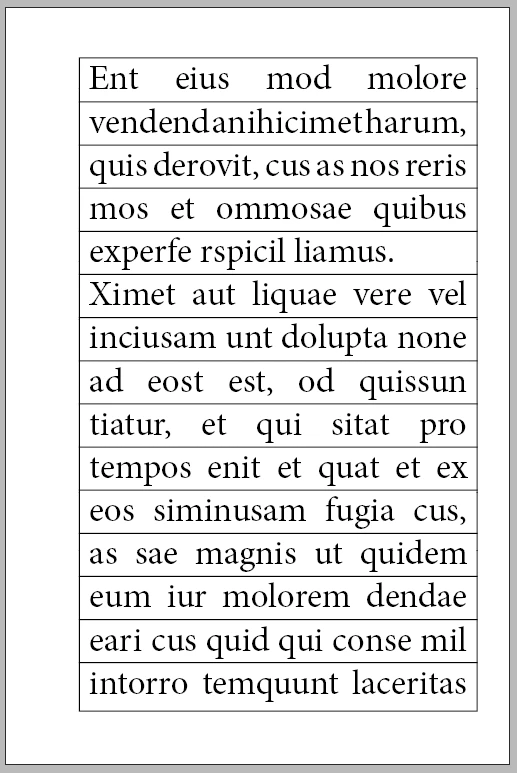
I need some help there. I have lots and lots of lines which I need to be in a box line structure. Earlier I have done the same thing using multiple text boxes and it worked fine, however, I would like to achieve the same thing using single text frame in one layer, and make a box and lines in another layer. I need to find a feasible way to do it. I have managed to do it but it requries lots of calculations. I get this kind of job very often in different page sizes, different fonts. I have attached a sample which I want. Thanks. 
Note: I have used baseline as Leading in the example. What you see in the example is single paragraph.

I do not want to use multiple text frames or tables.

Thanks
This topic has been closed for replies.
Correct answer James Gifford—NitroPress

I see what you mean. Need to experiment a little further. I'm off to try a combination of  text frames and hard graphics frame with the border...


How about this —

...simply putting the outline and lines on a parent page and letting the text flow in carefully adjusted frames? Probably with a baseline grid?


Paragraph borders might be another solution although that would be back to one-line-per-para.


2 replies

James Gifford—NitroPress
Legend
May 20, 2022

Not completely sure this will work but some quick experimentation showed a good result:

  1. Use Text Underline.
  2. Adjust characteristics (line weight and offset) along with spacing to get the boxed effect you're seeking.
  3. Use Justify to get full width underlines on most text lines.
  4. Add a full-margin tab to the last line of each paragraph to force it to continue to the box margin.


ETA: All but some margin and baseline tweaking. Should work unless RTL handles things very differently.


Community Expert
May 23, 2022

Hi James,

also thought like that, but I think we need a small inset left and right of the text.

And I wonder how we could do this when using underlines only.


Regards,
Uwe Laubender
( Adobe Community Professional )

James Gifford—NitroPress
Legend
May 23, 2022

I see what you mean. Need to experiment a little further. I'm off to try a combination of  text frames and hard graphics frame with the border...


How about this —

...simply putting the outline and lines on a parent page and letting the text flow in carefully adjusted frames? Probably with a baseline grid?


Paragraph borders might be another solution although that would be back to one-line-per-para.


Barb Binder
Community Expert
Community Expert
May 20, 2022

Would Edit > Step and Repeat work for you? You can adjust the amount on a given page.

~Barb

~Barb at Rocky Mountain Training
Bedazzled532
Inspiring
May 20, 2022
Thanks Barb,

I am using step and repeat but lots of adjustment required. If one setting
does not work then again I have to step and repeat with new values. Any
more ideas?
Thanks
Barb Binder
Community Expert
Community Expert
May 20, 2022

My first thought was to use a custom underline as per @James Gifford—NitroPress's reply, but you said you wanted the lines on different layers.


Those are the only two options I can think of but perhaps there is a scripting solution? That's not my area of expertise.


~Barb

~Barb at Rocky Mountain Training