
carolynseng
Participant
August 1, 2017
Answered

Import Excel spreadsheet into InDesign table

  • August 1, 2017
  • 2 replies
  • 11577 views

Hello,

I am having issues importing an Excel spreadsheet into an InDesign table.

The issue is that the InDesign table keeps being overwritten by the Excel spreadsheet - so my nicely designed table turns to chaos.

How do I import an Excel sheet into InDesign while still retaining the design in InDesign?

Thanks,

C
This topic has been closed for replies.
Correct answer Barb Binder

You are asking how to import an Excel spreadsheet into InDesign, and have InDesign control the formatting?

In that situation, I'd set up styles: a table style to control the look of the entire table, cell styles to control the look of the rows and columns, and paragraph styles to control the look of the text. You can nest all of these together so that simply applying the table style will also apply the cell and paragraph styles.

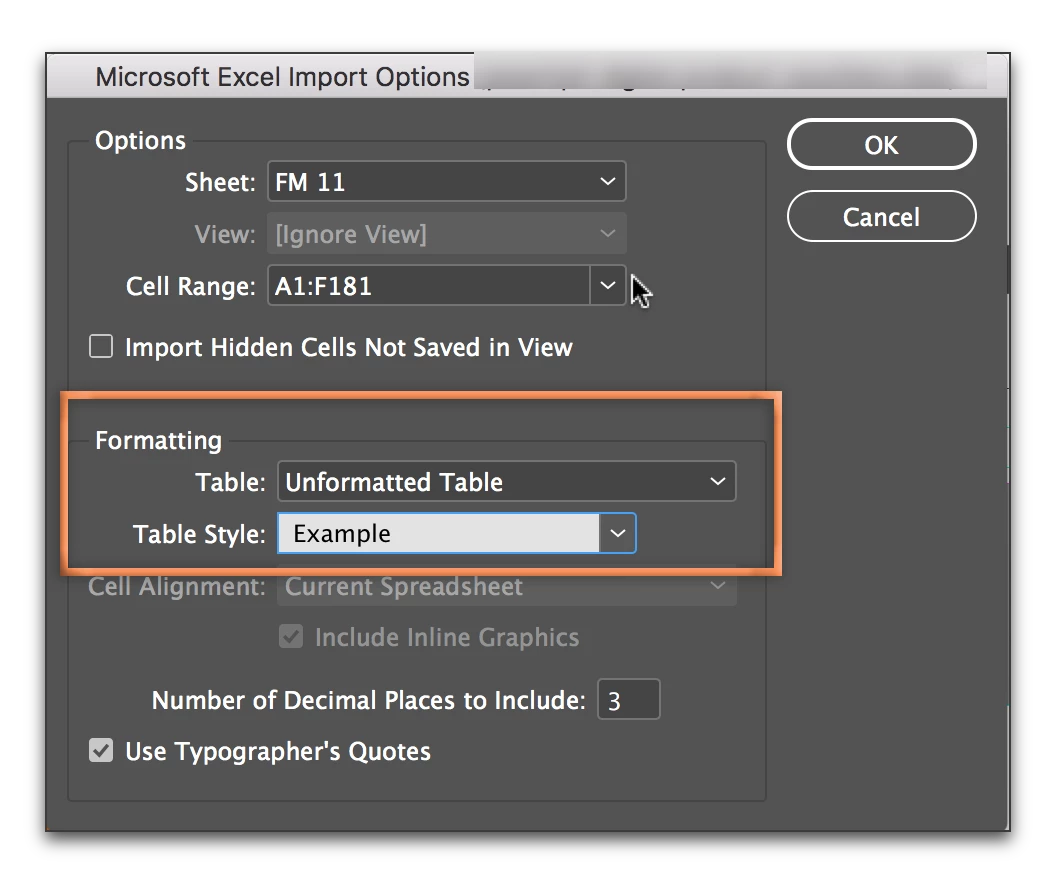
Once set up, you can assign the table style on import. Enable Import Options in File > Place, pick unformatted table and select the cell style.

2 replies

BobLevine
Community Expert
Community Expert
August 1, 2017

Perfectly normal if you imported an unformatted table.

You have two choices:

1. Do all the format in Excel and place the table as a formatted table.

2. Place table as unformatted and do all the styling in InDesign. Then create table/cell styles.

michaelv71857798
Participant
March 29, 2021

Bob,  I am having just the opposite issue, previously I was able to import all of the "styles" assigned in excel into my Indesign file.  Including background colors and font, this year using the same process I am losing the colors and fonts.  Any suggestions would be appreciated. 

BobLevine
Community Expert
Community Expert
March 29, 2021

This discussion is old and answered. Please create a new discussion with full details on Excel, InDesign and operating system you're using and show us a screen cap of your import options.


I'm going to lock this thread.

Barb Binder
Community Expert
Barb BinderCommunity ExpertCorrect answer
Community Expert
August 1, 2017

You are asking how to import an Excel spreadsheet into InDesign, and have InDesign control the formatting?

In that situation, I'd set up styles: a table style to control the look of the entire table, cell styles to control the look of the rows and columns, and paragraph styles to control the look of the text. You can nest all of these together so that simply applying the table style will also apply the cell and paragraph styles.

Once set up, you can assign the table style on import. Enable Import Options in File > Place, pick unformatted table and select the cell style.

~Barb at Rocky Mountain Training
carolynseng
Participant
August 1, 2017

This worked, thank you!

Barb Binder
Community Expert
Community Expert
August 1, 2017

You are very welcome. Glad I could help.

~Barb at Rocky Mountain Training