Participant
August 14, 2020
Answered

Import single cell values from Excel

  • August 14, 2020
  • 3 replies
  • 3260 views

Hi everyone, is it possible to import single cell values from Excel into a cell (existing table)?

Glad about any help!


Adobe InDesign CC 2020

This topic has been closed for replies.
Correct answer Colin Flashman

I agree with Diane, so long as the table has cell styles that are well formed, the incoming content from the table should come in based on the cell style formatting. Also, using the show import options feature, it is possible to control what cells you want to /not to import. For example:
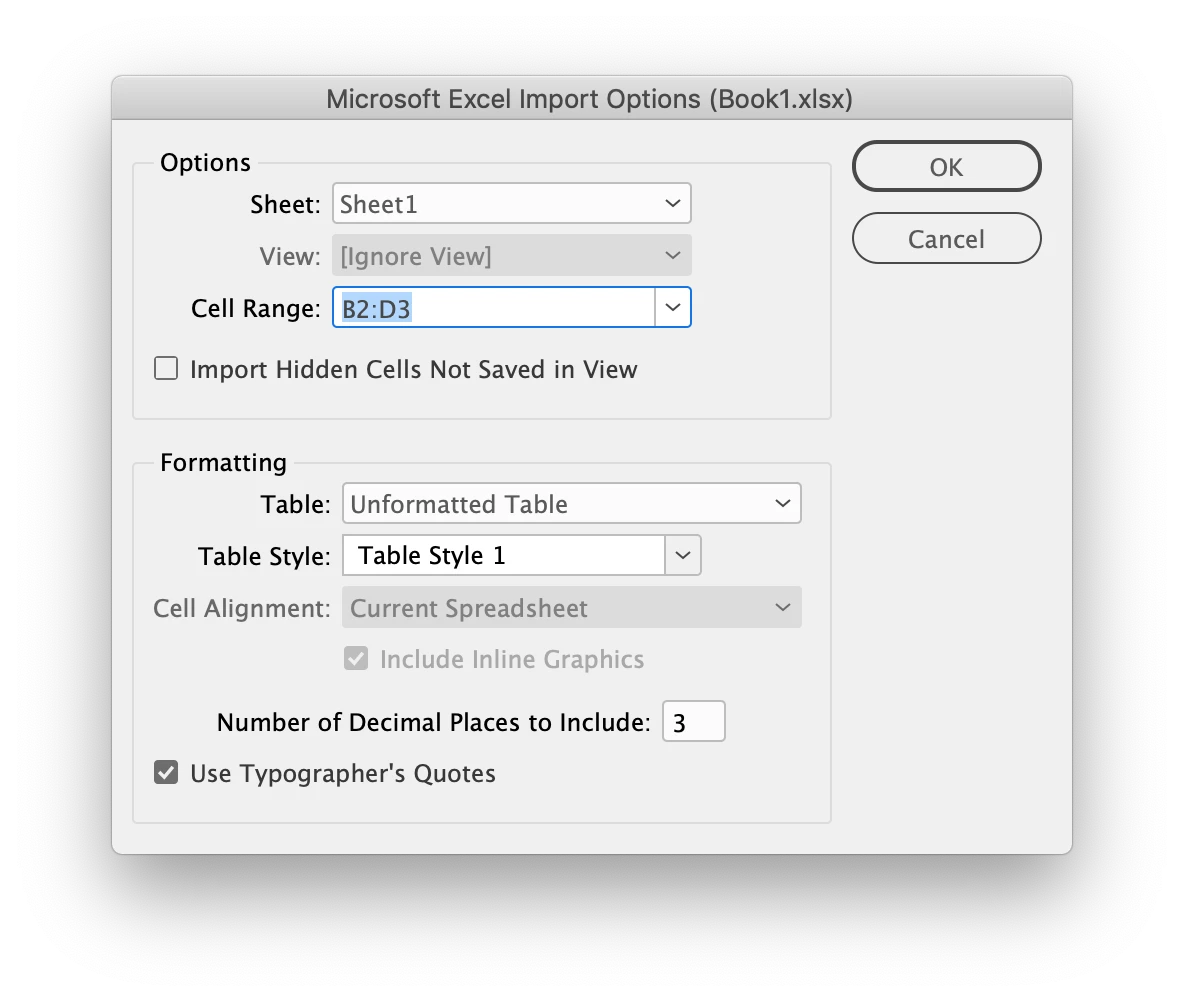
 

 In this example I've created a table style called table style 1 and have assigned cell styles to the body rows. When I use the show import options feature, I can also give it the cell range, I don't have to bring in the whole spreadsheet.

3 replies

Community Expert
August 25, 2020

Hi MASSON-RK21,

don't know exactly what your scenario is.


Do you have a table in InDesign that is not linked to an Excel file and you want to update the contents of one single cell through place and link of a table file from Excel?


This could be done if you place and link one cell of that Excel table aside from the other table in its own text frame and anchor the text frame to a text cell in your table. Every time you update the placed and linked Excel file the anchored one cell table can be updated through the Links panel.


But of course this is a very clunky, perhaps insane workflow.


Regards,
Uwe Laubender

( ACP )

Diane Burns
Inspiring
August 23, 2020

You can certainly copy/paste. But it seems to me you could also use import options for Excel (select file name, then hold down the Shift key while clicking the Place button); the import options dialog lets you restrict which cell or cells you want to import. 

You could set up the linking feature in Preferences (File Handling > Create Links When Importing Spreadsheet). As Steve mentions, you'll can lose formatting when the link is updated, but if you apply a Cell Style, this is easily corrected. If you have access to LinkedIn Learning/Lynda.com, I have a video on this topic. Here is the LinkedIn Learning video: https://www.linkedin.com/learning/indesign-tables/working-with-linked-word-and-excel-documents

Colin Flashman
Community Expert
Colin FlashmanCommunity ExpertCorrect answer
Community Expert
August 24, 2020

I agree with Diane, so long as the table has cell styles that are well formed, the incoming content from the table should come in based on the cell style formatting. Also, using the show import options feature, it is possible to control what cells you want to /not to import. For example:


 In this example I've created a table style called table style 1 and have assigned cell styles to the body rows. When I use the show import options feature, I can also give it the cell range, I don't have to bring in the whole spreadsheet.

If the answer wasn't in my post, perhaps it might be on my blog at colecandoo!
Steve Werner
Community Expert
Community Expert
August 14, 2020

There's no Import command. But if you select the content of the destination table cell, select the content of the Excel cell and copy and paste.

Participant
August 14, 2020

Copying and pasting would be one possibility, but I would like to have control over the values if something changes in the source file.

Steve Werner
Community Expert
Community Expert
August 14, 2020

Linking between InDesign and Excel doesn't work well. Any formatting applied in InDesign gets lost when you update.


I'm told that a good alternative is WordsFlow from Em Software. "

  • What if you could place Word and Excel documents with live links in InDesign, and proceed with production, while your authors and editors continued working on the original documents?"


http://emsoftware.com/products/wordsflow/