pageup41032374
Participating Frequently
June 23, 2021
Answered

Import SVG, crashing indesign

  • June 23, 2021
  • 6 replies
  • 1879 views

I'm using the latest versin of Indesign 16.2.1 and when i import an svg, indesign do not respond and crash. It's normal ?

 
This topic has been closed for replies.
Correct answer Laubender

I also see a freezing InDesign 2021 version 16.2.1 when trying to place your SVG file.

Had to kill the running app with the Task Manager on my Windows 10 machine.


Well, it could be that the necessary fonts could not be accessed with InDesign and Illustrator.


PhotoShop 2021 for example is able to render the SVG, but is showing missing fonts either as "no text at all" or as substituted:

Same SVG file opened in Firefox browser on Windows 10:
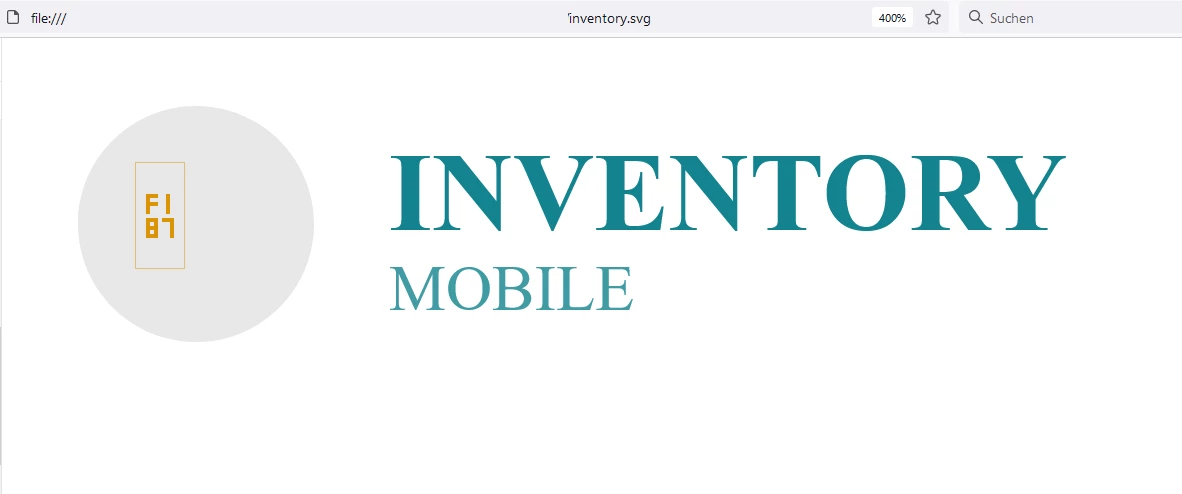
 

To resolve the issue:

Are you able to export from XD with the text converted to SVG shapes?


Regards,
Uwe Laubender

( ACP )

6 replies

Community Expert
July 5, 2021

Hi pageup41032374,


had a chance to test placing your SVG file to a page in InDesign 16.3. That worked without a crash.

Of course, InDesign's Preflight function is detecting missing fonts or Type > Find fonts… is seeing the missing fonts as well. That is as expected.


But here comes a warning:

If you try to open the document where your inventory.svg is placed with a previous version of InDesign 2021 like 16.2.1, InDesign will crash on trying to open the document. Indesign 16.2.1 will also crash if the placed inventory.svg was exported to IDMS or stored as asset with an InDesign library file or CC Libraries with InDesign 16.3 and you try to place the IDMS file or the assets from the libraries with Indesign 16.2.1.


The same happens if you export the 16.3 document with the placed inventory.svg to IDML and try to open the IDML file in InDesign 2021 version 16.2.1 or InDesign 2020.


FWIW: If you try this with InDesign CC 2019, InDesign will not crash, because InDesign CC 2019 does not support the placement of SVG files.


Regards,
Uwe Laubender

( ACP )

Community Expert
June 30, 2021

Glad converting text to SVG shapes is working for you!


In the meanwhile I reported a bug at InDesign Prerelease.

You should perhaps do this as well at InDesign UserVoice and post the link to that report so that others can up-vote for fixing the issue.


We could now discuss how a possible fix could work.

Should InDesign, Illustrator and PhotoShop simply give a warning message that some fonts cannot be accessed?

Should InDesign list missing web fonts after placing the SVG in menu Type > Find Fonts…?

What would it take to open the SVG in a standard browser and convert the text to SVG shapes from there?


Regards,
Uwe Laubender

( ACP )

LaubenderCommunity ExpertCorrect answer
Community Expert
June 25, 2021

I also see a freezing InDesign 2021 version 16.2.1 when trying to place your SVG file.

Had to kill the running app with the Task Manager on my Windows 10 machine.


Well, it could be that the necessary fonts could not be accessed with InDesign and Illustrator.


PhotoShop 2021 for example is able to render the SVG, but is showing missing fonts either as "no text at all" or as substituted:

Same SVG file opened in Firefox browser on Windows 10:


To resolve the issue:

Are you able to export from XD with the text converted to SVG shapes?


Regards,
Uwe Laubender

( ACP )

pageup41032374
Participating Frequently
June 28, 2021

I converted to SVG shapes as you recommended and yes, it's working !

Thank you very much for your solution.

Community Expert
June 24, 2021

Or you should report the issue on the XD Forum, if a faulty SVG is written by XD:

https://community.adobe.com/t5/adobe-xd/bd-p/xd?page=1&sort=latest_replies&filter=all


Regards,
Uwe Laubender

( ACP )

Community Expert
June 24, 2021

Will a browser show the SVG ?


Hm. Could you post the SVG file so that we can do a test or look into its XML code?

Do not attach the SVG. Best put it on Dropbox or a similar service where you have the control to remove it anytime from sight and post the download link.


You should do a bug report at InDesign UserVoice and also on Illustrator UserVoice.

https://indesign.uservoice.com/forums/601180-adobe-indesign-bugs

https://illustrator.uservoice.com/forums/601447-illustrator-desktop-bugs


Thanks,
Uwe Laubender

( ACP )

pageup41032374
Participating Frequently
June 25, 2021

Yes, a browser (chrome, firefox, edge) show the SVG

Please find the SVG here : https://transfert.pageup-lab.fr/index.php/s/x0Iwba3rdt1vNAT


Thanks for your answers 🙂


Community Expert
June 23, 2021

Is it only a specific SVG file or is it that all SVG files crashing InDesign while placing?


Regards,
Uwe Laubender

( ACP )

pageup41032374
Participating Frequently
June 24, 2021

It's an SVG exported of Adobe XD (File export > SVG).

The problem is the same when I'm placing the SVG in illustrator. Illustrator crash.