Inspiring
August 8, 2019
Answered

importing text into Indesign - its backwards

  • August 8, 2019
  • 3 replies
  • 2601 views

Heya - I was supplied a word doc from google docs.

However a lot of the text is coming up backwards - or sometimes just the apostrophes are coming up backwards and spaces in the wrong places.

Once I put it into the paragraph style - then clear the overides its fixed - but its a bit time consuming.

Does anyone know the reason - or a better solution.

    This topic has been closed for replies.
    Correct answer Bevi Chagnon - PubCom.com

    As @ said, you're bringing in Google Doc's manual formatting code along with the text. You need to strip it out, which is what "Clear Overrides" does.

    But our studio has found that "clear overrides" doesn't always scrub the text clean enough and leaves some strange hidden coding in the text that causes problems for our automated publishing workflows and exports to accessible tagged PDF.

    So we prefer to do a thorough scrubbing of the crud so that it doesn't cause any problems during production. Especially important with Google Docs, which leaves a lot of residual code crud in the file.

    If you use File / Place / Show Import Options to bring the content into your layout, you can strip out the formatting during the place procedure. Set the import options to these settings, which strips out all formatting (both manual overrides and styles) from the incoming file:

    1. In Google Docs, save the file as Word.docx file format.
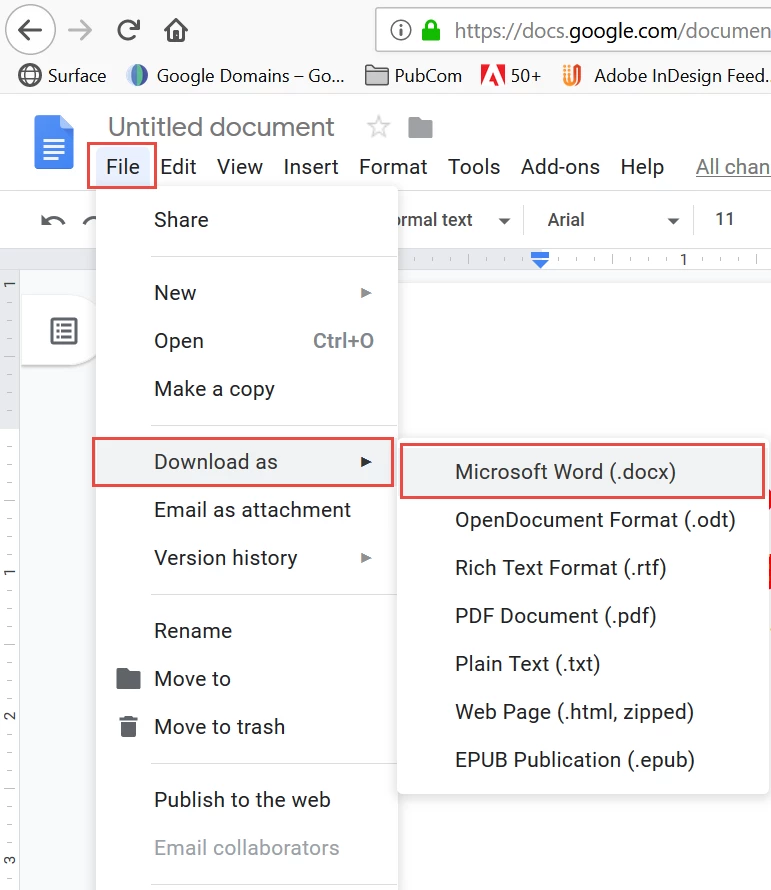
    2. In InDesign, use File / Place / Show Import Options which gives you control as to how much formatting (if any at all) is imported from Word.docx files.
    3. Select these options to strip the document clean:
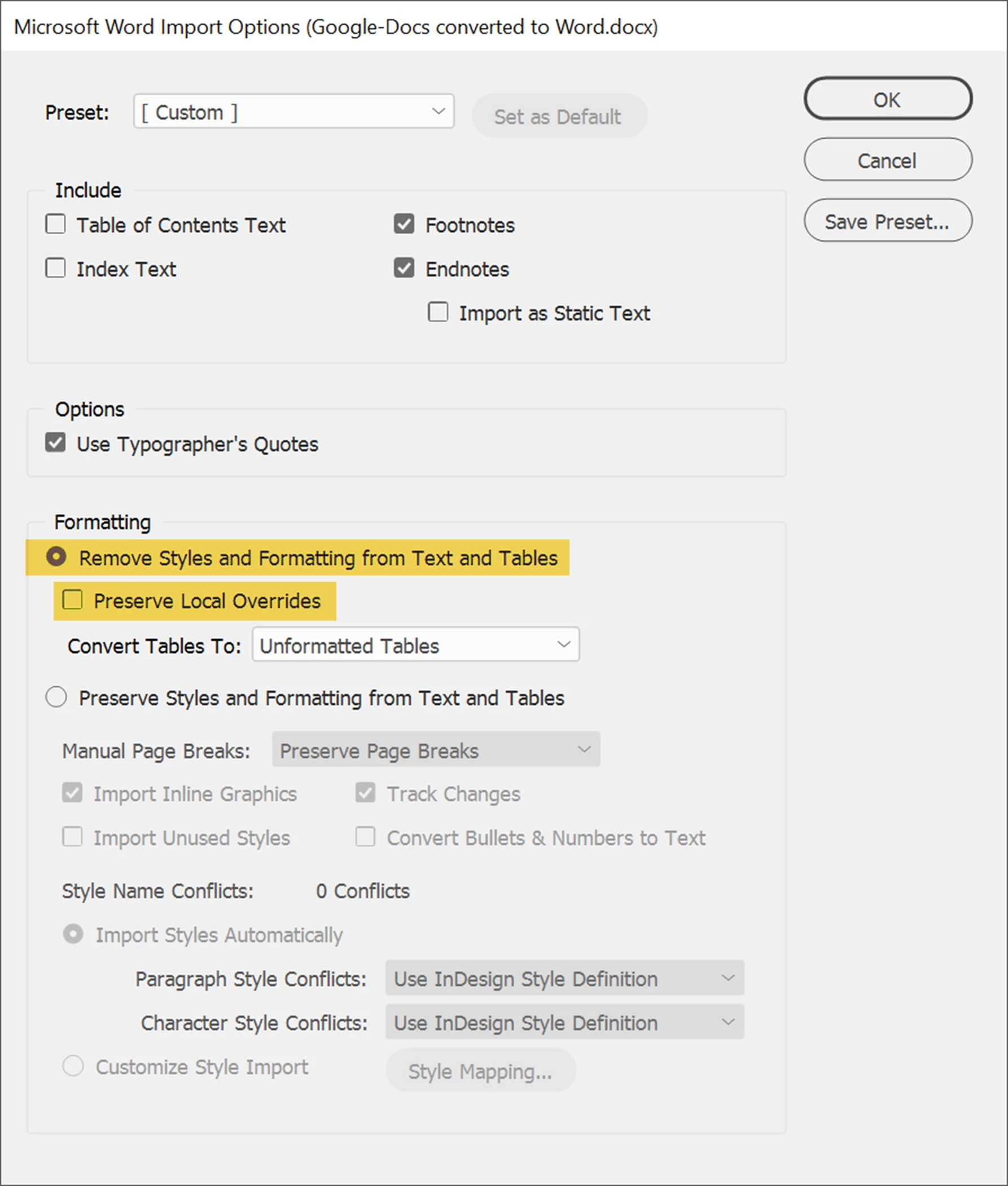
      Check "Remove Styles and Formatting from Text and Tables."
      UNcheck "Preserve Local Overrides."
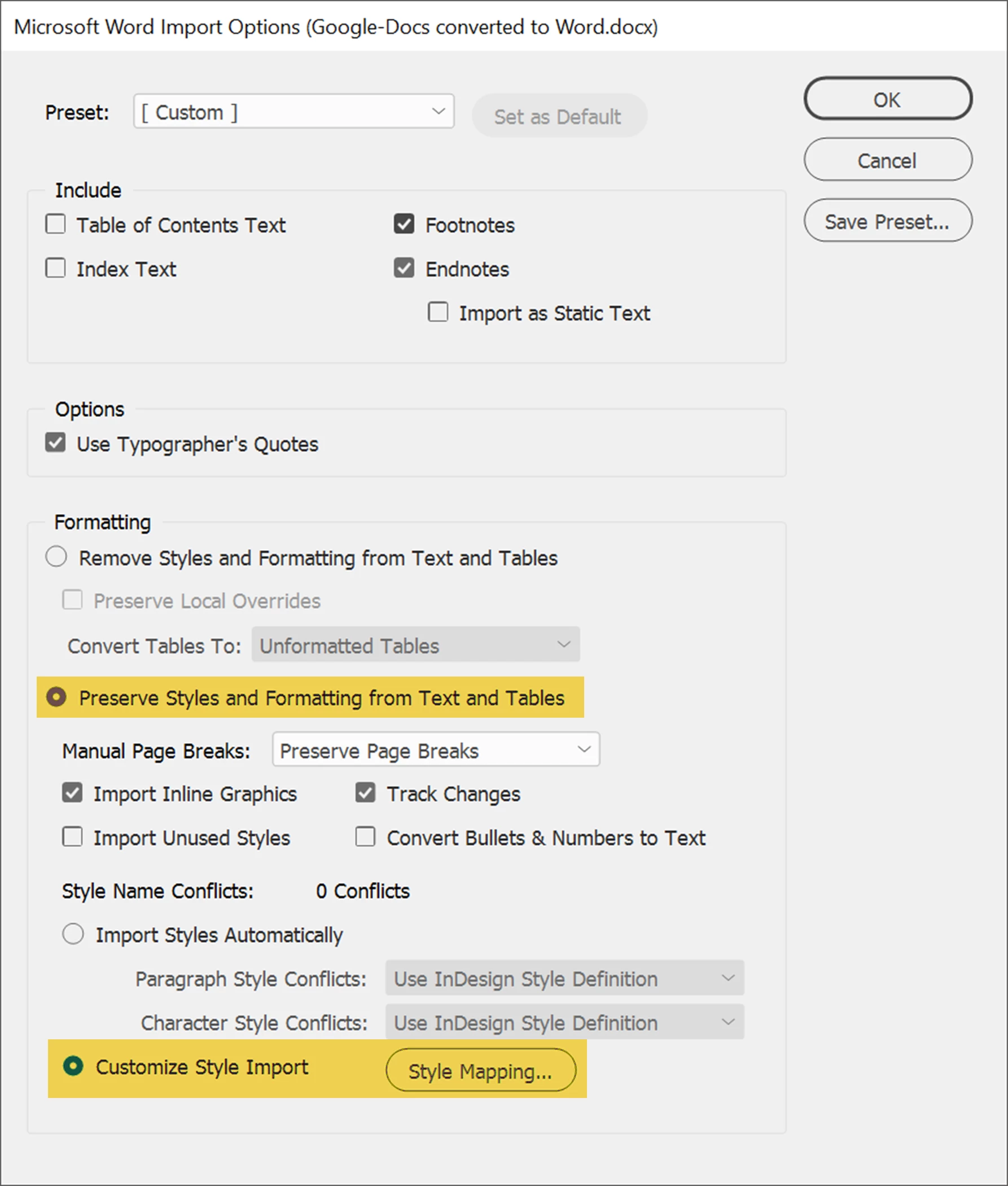
    4. If the original Google Doc used formatting styles which were transferred into the Word.docx version, those styles can be "mapped" to your InDesign styles with these import settings:
    5. You can save either set of settings as a present to use with future documents.

    3 replies

    Bevi Chagnon - PubCom.com
    Legend
    August 8, 2019

    As @ said, you're bringing in Google Doc's manual formatting code along with the text. You need to strip it out, which is what "Clear Overrides" does.

    But our studio has found that "clear overrides" doesn't always scrub the text clean enough and leaves some strange hidden coding in the text that causes problems for our automated publishing workflows and exports to accessible tagged PDF.

    So we prefer to do a thorough scrubbing of the crud so that it doesn't cause any problems during production. Especially important with Google Docs, which leaves a lot of residual code crud in the file.

    If you use File / Place / Show Import Options to bring the content into your layout, you can strip out the formatting during the place procedure. Set the import options to these settings, which strips out all formatting (both manual overrides and styles) from the incoming file:

    1. In Google Docs, save the file as Word.docx file format.
    2. In InDesign, use File / Place / Show Import Options which gives you control as to how much formatting (if any at all) is imported from Word.docx files.
    3. Select these options to strip the document clean:

      Check "Remove Styles and Formatting from Text and Tables."
      UNcheck "Preserve Local Overrides."
    4. If the original Google Doc used formatting styles which were transferred into the Word.docx version, those styles can be "mapped" to your InDesign styles with these import settings:
    5. You can save either set of settings as a present to use with future documents.
    |    Bevi Chagnon   |  Designer, Trainer, & Technologist for Accessible Documents ||    PubCom |    Classes & Books for Accessible InDesign, PDFs & MS Office |
    Legend
    August 8, 2019

    Solution: save the DOC as text file or RTF, then copy into ID.

    John Mensinger
    Community Expert
    Community Expert
    August 8, 2019

    melaniescooby  wrote

    Once I put it into the paragraph style - then clear the overides its fixed - but its a bit time consuming.

    That suggests to me that underlying style code is coming along with the text. You could try copy/paste rather than Placing the document, and either:

    • Set Preferences > Clipboard Handling > Paste: to Text Only
    • Paste to a plain text editor first, the re-copy and paste in InDesign