

Participating Frequently
May 12, 2026 7:02 PM UTC
Answered

Importing Word doc and weird number render
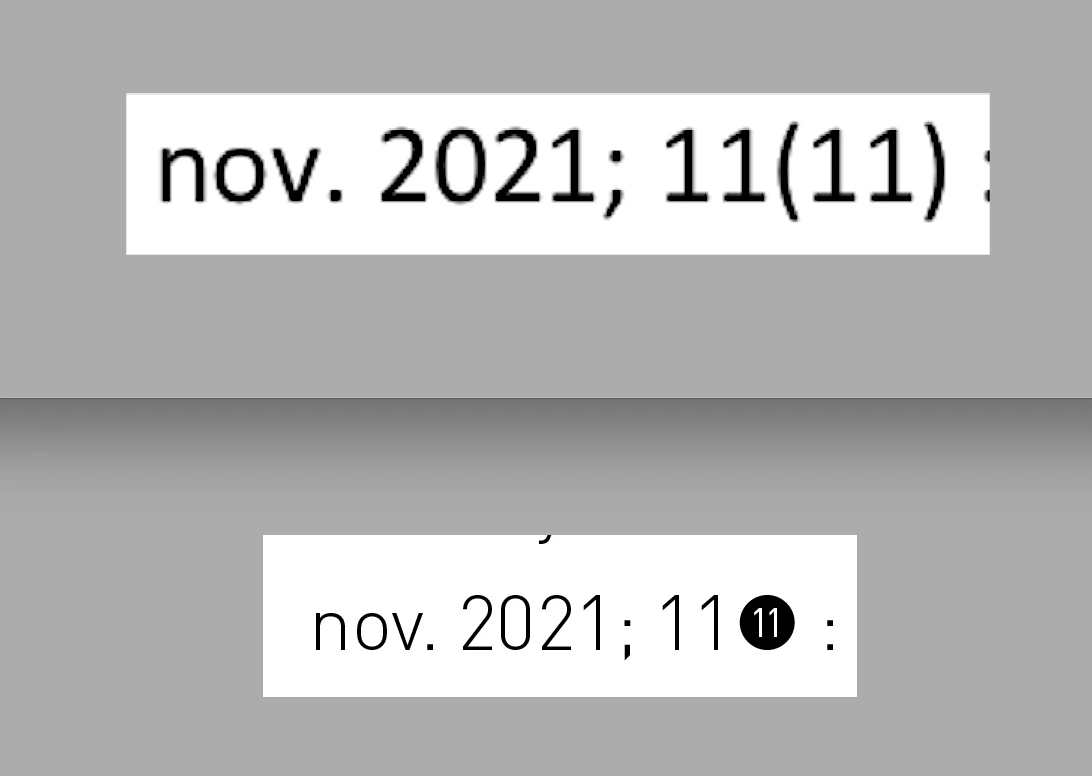
Above image is the Word document, below is what imports into Indesign.
Font is DIN. Why does it import like this and how do I change it back to the original format?

    Joel Cherney
    Joel CherneyCorrect answer
    Community Expert
    May 12, 2026 10:27 PM UTC

    @Dave Creamer of IDEAS You can turn off this behavior in DIN by turning off Contextual Alternates. This particular version of DIN has some Unicode glyphs for e.g. U+2461 CIRCLED DIGIT TWO or U+24EB NEGATIVE CIRCLED DIGIT ELEVEN. It also has the facility to create a circled digit for any value of twenty or less (which will auto-substitute NEGATIVE CIRCLED DIGIT ELEVEN whenever it finds (11), if Contextual Alternates is turned on). 

    ​@default2o4km1iirzlj, you can find the Contextual Alternates setting in the flyout menu of the Character panel, under “OpenType”.

    6 replies

    Dave Creamer of IDEAS
    Community Expert
    Community Expert
    May 12, 2026 7:34 PM UTC

    I cannot duplicate the problem. 

    Does it happen on new files or just an existing one?

    If the problem occurs with just the text shown, can you upload your Word and InDesign documents (without any other content). 

    Translate
    David Creamer: Community Expert (ACI and ACE 1995-2023)
    Participating Frequently
    May 12, 2026 8:50 PM UTC

    New files.

    Here are the test files.
    When I use a different font this issue is not there. The font I’m using is DIN from the Adobe Fonts cloud library.


    Translate
    Dave Creamer of IDEAS
    Community Expert
    Community Expert
    May 12, 2026 10:15 PM UTC

    It’s the font. You are using the FF DIN Paneuropean. 

    Try the DIN 2014 or the URW version. 


    If you type (11) in the Sample Text area, you will see the black circle. 

    If you use your arrow keys to move through the letters, you will note that the black circle is make of of three parts: (, 11, and ). The font automatically converts it. 


    Translate
    David Creamer: Community Expert (ACI and ACE 1995-2023)