
Tunnelman
Participant
March 7, 2019
Answered

Improved Hello World script error?

  • March 7, 2019
  • 1 reply
  • 2119 views

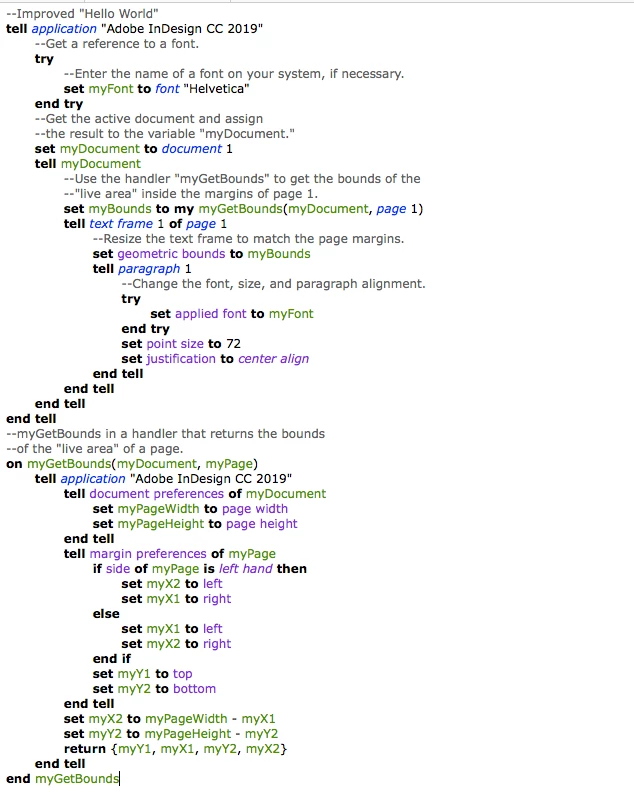
Hey all, was asked by my job to learn AppleScript for some automation and I've been butting my head against the wall with the tutorial Improved Hello World script.  I'm having difficulty identifying what exactly is incorrect in both the script I wrote following the tutorial as well as the script provided by Adobe as they both return the same error.  Any help would be appreciated.  The error is as follows:

Error Number: -10006

Error String: Adobe InDesign CC 019 got an error: Can't set geometric bounds of text frame 1 of page 1 of document id 1 to {0.5, 0.5, 10.5, 8.0}.

Here's the script:
This topic has been closed for replies.
Correct answer Manan Joshi

It looks that you are working on the open document, and try to set the geometric bounds of the textframe on the first page. Can you check if the page indeed has a textframe on it.

-Manan

1 reply

Manan JoshiCommunity ExpertCorrect answer
Community Expert
March 8, 2019

It looks that you are working on the open document, and try to set the geometric bounds of the textframe on the first page. Can you check if the page indeed has a textframe on it.

-Manan

-Manan
Tunnelman
TunnelmanAuthor
Participant
March 8, 2019

Lord help me, Manan.  Sure enough even the documentation mentions to make sure you've run the original sample HelloWorld script to make it work.  It works fine if you've run that first, and just makes that size larger.  Given the name "Improved" instead of "Improve" I thought it would be making a new text box even though looking at it again clearly there's not even content set for it.  I have since been attempting to tweak the improved script to also create a text box with those properties.  I have successfully gotten it to create the text frame to the right size and print text in it, but I can't get the set point size and set justification to work properly.  Do I have something in the wrong place?  I've tried moving a few things. 

Specifically the error reads as follows: Can't set point size of text frame 1 of page 1 of document id 23 to 72

Community Expert
March 9, 2019

Hi,

I don't know Applescript at all, but playing around with the code that you gave, i have a working version. Setting the property of parentStory would work. Try something like the following


  set contents of myTextFrame to "You did it"

  set myStory to parent story of myTextFrame

  tell myStory

       set applied font to myFont

       set point size to 72

       set justification to center align

  end tell

Hope this helps

-Manan

-Manan