
Matt Wallace
Participant
September 14, 2017
Answered

In Book Panel: Chapters show number of pages, not the page number within the book. Help?

  • September 14, 2017
  • 2 replies
  • 431 views

I've been fighting the Book Page Numbering in trying to get a Table of Contents to work across 35+ chapters. 

Reading every reference I can find on the forums and general internet searches. Nothing is seems to match what I'm seeing.

I'm on CC2017 InDesign... Windows 10.

I have yet to see an example that doesn't show the pages number incrementing in the Book Panel out to the right of each chapter. In my case, I've never seen anything other than the number of pages in each chapter shown to the right of the Chapter (Document) within the Book.

The screen capture below shows the current number of pages in each document/chapter. In ALL examples I see, it would be Chapter 01 would be 1-4, Chapter 02 would be 5-8, Chapter 03 would be 9-11, etc.
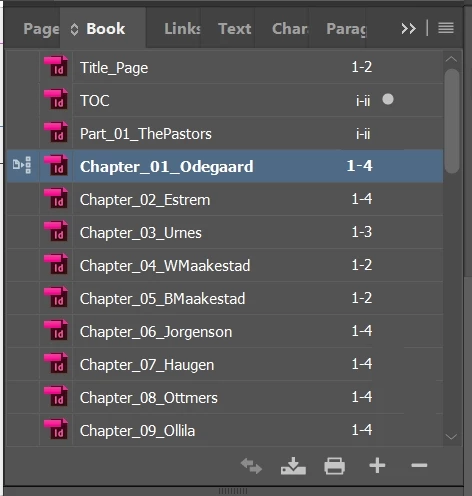
I've checked and re-checked "Numbering & Section Options" and synchronization and everything I can find over and over... and can't get it to change.

We are running into some deadline issues, and it's starting to look a little bleak. After pushing to move everything to InDesign, it's even more dicey as each minute clicks by.

If someone could help me systematically double-check things, it would be helpful.

-JMW

Correct answer WashingCatz

OMG x 1000! Page numbering in book files attached to INDD preferences?!

I work on the always current vsn of INDD on my Windows work computer daily, have done for 18 years or more. Never a problem with book files. I only recently purchased a home copy of InDesign 2025 for my Mac to work on a 500 page history book, and thought I had the application set up nailed. But when I built -- and rebuilt -- and rebuilt my book and individual document files over and over again, I had the same problem as O.P. back in 2017. 

How did I never know the overarching setup of INDD governs how book files are handled?! 

This simple fix cured the problem of two days of headscratching. Thank you!

2 replies

Matt Wallace
Participant
September 14, 2017

Found it! After 4 days, something triggered from a semi-related post and it was....

PREFERENCES > GENERAL > Page Numbers....

I'm not sure how it got set to ABSOLUTE NUMBER, but when I set it to SECTION NUMBERING, it started working.

DONE!

WashingCatzCorrect answer
Participant
August 8, 2025

OMG x 1000! Page numbering in book files attached to INDD preferences?!

I work on the always current vsn of INDD on my Windows work computer daily, have done for 18 years or more. Never a problem with book files. I only recently purchased a home copy of InDesign 2025 for my Mac to work on a 500 page history book, and thought I had the application set up nailed. But when I built -- and rebuilt -- and rebuilt my book and individual document files over and over again, I had the same problem as O.P. back in 2017. 

How did I never know the overarching setup of INDD governs how book files are handled?! 

This simple fix cured the problem of two days of headscratching. Thank you!

amaarora
Inspiring
September 14, 2017

Hi,

Can you open the Book panel flyout menu and choose Book page numbering options.

Then enable the "Continue from previous document" option.

Update the page numbering.

-Aman

Matt Wallace
Participant
September 14, 2017

Thank you so much for replying. I hope my answer/conclusion will help others in the future.

JMW