

karthikS
Inspiring
August 30, 2016
Answered

In textFrame Last Row appliedCellStyle

  • August 30, 2016
  • 2 replies
  • 976 views

Dear Friends,

I need your help;

How to appliedCellStyle(row) for continued tables first text frame end of the row?. I have place the code is below, but not working.

Please suggest friends! what can i do?

var myTable = app.activeDocument.stories.everyItem().tables[0].rows.everyItem();

var myCell = myTable.cells.everyItem().getElements(); 

for(var n=0;n<myCell.length-1;n++){ 

var cell1 = myCell.texts[0].insertionPoints[0].parentTextFrames[0].id; 

var cell2 = myCell.texts[0].insertionPoints[0].parentTextFrames[0].parentPage; 

var cell3 = myCell.texts[0].insertionPoints[0].parentTextFrames[0].parentPage.documentOffset;

cell3.appliedCellStyle = "TBL_row";

I have attached screenshot also:

InPut:
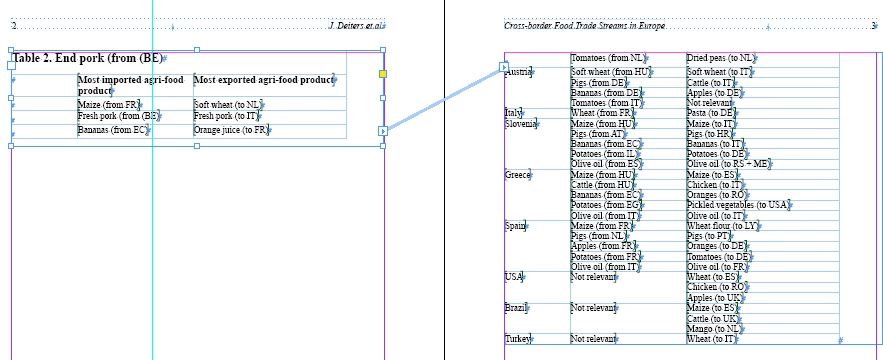
OutPut:

I need to help friends.

Thanks in Advance

Ks

This topic has been closed for replies.
Correct answer Kai Rübsamen

Hi Guys,

I wrote something similiar a while ago:

main();

function main() {

  var curDoc = app.documents[0];

  var allTables = curDoc.stories.everyItem().tables.everyItem().getElements();

  var nTables = allTables.length;

  var testID = 0;

  for (var t = 0; t < nTables; t++) {

    var curTable = allTables;

    var allRows = curTable.rows;

    var nRows   = allRows.length;


    for (var r = 0; r < nRows; r++) {

      var curRow = allRows;

      var iP = curRow.cells[0].insertionPoints[0];

      var parTFrameID = iP.parentTextFrames[0].id;

      if (testID != 0 && testID != parTFrameID) {

        var c = allRows[r-1].cells.everyItem();

        c.bottomEdgeStrokeWeight = curTable.bottomBorderStrokeWeight;

      }

      testID = parTFrameID;

    }

  }

}

@Loic: I’m interested in your code, but didn’t understand everything. It would be great, if you can explain some parts:

1. What is the benefit of the global object ns ?

2. Why is there a need for 'delete' and assigning a value of 'null'?

3. Normally I wrote 'function main()' > you wrote ns.main = function()  >> why? I think, Marc did it the same way. Since Marcs coding is really hard for me to read, I try to understand, why you guys do it in this way …

4. Why app.properties.activeDocument instead of app.activeDocument ?

Thanks

Kai

2 replies

Loic.Aigon
Legend
August 30, 2016

Hi Kai,

I think, Marc did it the same way…

Well, clearly Marc is a great source of inspiration to me, no misteries

1. What is the benefit of the global object ns ?

2. Why is there a need for 'delete' and assigning a value of 'null'?

It's just a current attempt of dealing with memory management. It's not needed here but I try to take good habits. Pointing to a "namespace" object may allow deleting this object thus releasing it for the garbage collector.

Marcs coding is really hard for me to read…

Marc has his own great logic. I won't say I understand all of it but I try to get inspired as much as possible.

4. Why app.properties.activeDocument instead of app.activeDocument ?

It allows reducing the need of code. Actually I took this from Marc and I never told him how smart that is, so Marc if you are around, this line is brilliant.

app.properties.activeDocument will return undefined. It avoids dealing with if(app.documents.length… avoiding a scope on the fly.

HTH

Loic

Kai Rübsamen
Participating Frequently
August 30, 2016

Thanks for your reply. Any comments on point no. 3??

Kai

karthikS
karthikSAuthor
Inspiring
August 30, 2016

Hi Loci,

Thanks to your first reply!

I have try to your script, but i got one error for "Object is invalid"? I have attached screenshot below:

Please suggest friends! what can i do?

Thanks in Advance

KS

Loic.Aigon
Legend
August 30, 2016

You may try to loop through rows and see if the parent text frame id is consistent with the id of the first container. Otherwise it means it has changed:

var ns = {};

ns.fixTable = function( t ) {

  var rows = t.rows,

  tf=t.cells[0].texts[0].parentTextFrames[0],

  tfId = tf.id,

  i = 0, n = rows.length,

  row;

  for ( i = 0; i< n; i++ ) {

  row = rows;

  if ( rows[i+1].isValid && rows[i+1].cells[0].insertionPoints[0].parentTextFrames[0].id != tf.id ) {

  row.cells.everyItem().appliedCellStyle = "BLUE";

  break;

  }

  }

}

ns.main = function() {

  var doc = app.properties.activeDocument,

  sts, st, t, cellText;

  if (!doc ) return;

  sts = app.activeDocument.stories.everyItem().getElements(); 

  while ( st = sts.pop() ) {

  t = st.tables[0];

  cellText = t.cells[0].insertionPoints[0];

  cellText.parentTextFrames.length

  && cellText.parentTextFrames[0].isValid

  && ns.fixTable( t );

  }

};

ns.main();

delete ns;

ns = null;

HTH

Loic

www.ozalto.com

Kai Rübsamen
Kai RübsamenCorrect answer
Participating Frequently
August 30, 2016

Hi Guys,

I wrote something similiar a while ago:

main();

function main() {

  var curDoc = app.documents[0];

  var allTables = curDoc.stories.everyItem().tables.everyItem().getElements();

  var nTables = allTables.length;

  var testID = 0;

  for (var t = 0; t < nTables; t++) {

    var curTable = allTables;

    var allRows = curTable.rows;

    var nRows   = allRows.length;


    for (var r = 0; r < nRows; r++) {

      var curRow = allRows;

      var iP = curRow.cells[0].insertionPoints[0];

      var parTFrameID = iP.parentTextFrames[0].id;

      if (testID != 0 && testID != parTFrameID) {

        var c = allRows[r-1].cells.everyItem();

        c.bottomEdgeStrokeWeight = curTable.bottomBorderStrokeWeight;

      }

      testID = parTFrameID;

    }

  }

}

@Loic: I’m interested in your code, but didn’t understand everything. It would be great, if you can explain some parts:

1. What is the benefit of the global object ns ?

2. Why is there a need for 'delete' and assigning a value of 'null'?

3. Normally I wrote 'function main()' > you wrote ns.main = function()  >> why? I think, Marc did it the same way. Since Marcs coding is really hard for me to read, I try to understand, why you guys do it in this way …

4. Why app.properties.activeDocument instead of app.activeDocument ?

Thanks

Kai