
Known Participant
November 25, 2022
Answered

Include Idml in the package script

  • November 25, 2022
  • 1 reply
  • 1054 views
Hi Everyone,
I took this reference order from the DOM (v18.0.0.312) for packaging script. But it doesn't work as expected, throws the below mentioned error. If I re-ordered 'versionComments' to before the 'includeIdml', script creates the package with no error but the idml file is not created. But I need the 'Idml' file included in the package.
 
try{var myPackageOk = myDoc.packageForPrint(
to = myOutFolder,
copyingFonts = true,
copyingLinkedGraphics = true,
copyingProfiles = false,
updatingGraphics = true,
includingHiddenLayers = true,
ignorePreflightErrors = true,
creatingReport = true,
includeIdml = true,
includePdf = false,
pdfStyle = undefined,
useDocumentHyphenationExceptionsOnly = false,
versionComments = undefined,
forceSave = false)}catch(e){alert(e)}
 
Please suggest anything to resolve the issue or am I doing anything wrong. I am testing this code in the indesign version 17.4.
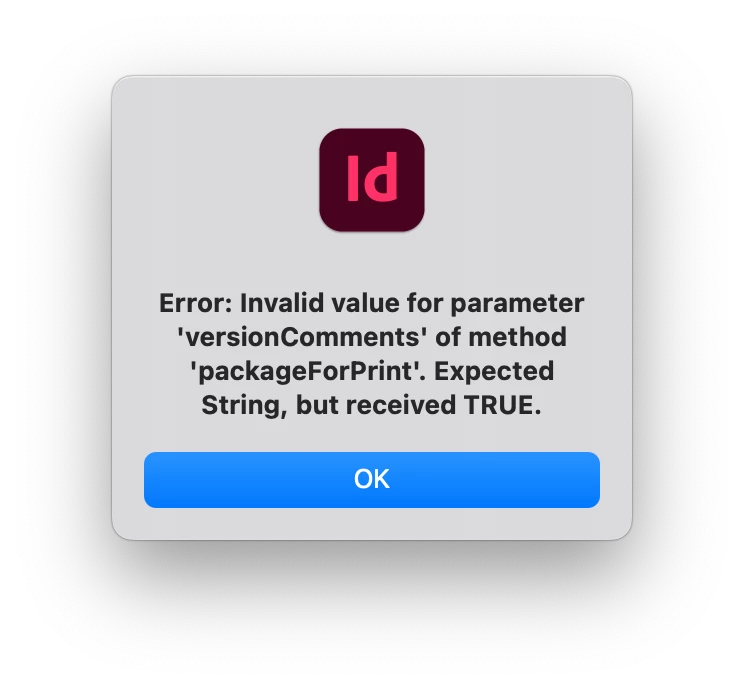


This topic has been closed for replies.
Correct answer Manan Joshi

Yup! My bad!

Hi @Manan Joshi  @Kasyan Servetsky ,


Here is the modified script,


var myInDesignVersion = Number(String(app.version).split(".")[0]);
try{myParentFolder = Folder.selectDialog("Select the folder containing the indesign files in FILES MODIFIED ", "");}catch(e){exit(0)}
var xmlinfolder = myParentFolder;

try{mySentFolder = Folder.selectDialog("Select the folder to place the files in FILE SENT", "");}catch(e){exit(0)}

myAppFolder = myParentFolder;
myAppFolder1 = myAppFolder;
myAppFolderName = Folder(myAppFolder1).name;
var appArrays = [];

var myApps = Folder(myAppFolder1).getFiles("*.indd");
i = myApps.length;
while (i--) {
appArrays.push(myApps[i]);
}
if (appArrays.length > 0) {
for (a = 0; a < appArrays.length; a++) {
app.scriptPreferences.userInteractionLevel = UserInteractionLevels.NEVER_INTERACT;
try{myDoc = app.open(appArrays[a]);}catch(e){alert("Application is new version! Check and run it suitable version.");exit(0)}
if (app.activeDocument.modified==true){
var myDocNameF = app.activeDocument.name;
myDoc=app.activeDocument.save(new File("/HDD1/Users/Shared/"+app.activeDocument.name));
}
var myDocNameF = app.activeDocument.name;
proFiles.push(myDocNameF);
app.scriptPreferences.userInteractionLevel = UserInteractionLevels.INTERACT_WITH_ALL;
var mySentFolder2 = myDocNameF.split(".indd").join("");
app.scriptPreferences.userInteractionLevel = UserInteractionLevels.NEVER_INTERACT;
try{
var myDoc = app.activeDocument;
var myOutFolder = new Folder("~/Desktop");
var myPackageOk = myDoc.packageForPrint(myOutFolder,
true, // copyingFonts
true, // copyingLinkedGraphics
false, // copyingProfiles
true, // updatingGraphics
true, // includingHiddenLayers
true, // ignorePreflightErrors
true, // creatingReport
true, // includeIdml
false, // includePdf
undefined, // pdfStyle
false, // useDocumentHyphenationExceptionsOnly
undefined, // versionComments
false // forceSave
);
}catch(e){alert(e)}
myDoc.close(SaveOptions.no)
}
}

I don't see what was so difficult in this, the error itself clearly mentions what's the problem. The following line

proFiles.push(myDocNameF);
tries to push in proFiles but that isn't defined anywhere so the error. Commenting out this code successfully executes the code for me. Although the code logic would need work, as nothing is saved in the folder that we choose but is saved on the desktop, but that is a logic issue and you can easily handle it. There is much scope to improve the code quality, work on it.
-Manan

1 reply

Kasyan Servetsky
Legend
November 25, 2022

Try this:

try{
	var myDoc = app.activeDocument;
	var myOutFolder = new Folder("~/Desktop");
	
	var myPackageOk = myDoc.packageForPrint(myOutFolder,
			true, // copyingFonts
			true, // copyingLinkedGraphics
			false, // copyingProfiles
			true, // updatingGraphics
			true, // includingHiddenLayers
			true, // ignorePreflightErrors
			true, // creatingReport
			true, // includeIdml
			false, // includePdf
			undefined, // pdfStyle
			false, // useDocumentHyphenationExceptionsOnly
			undefined, // versionComments
			false // forceSave
		);
}
catch(e){
	alert(e);
}
SingaaramAuthor
Known Participant
November 25, 2022

Hi @Kasyan Servetsky ,


Thanks for responding and it is working perfectly for the active document. But if it is applied in the loop for the multiple applications i get the error above mentioned.


Is anything wrong with myDoc variable in the batch? or something else.


Please help.

@Kasyan Servetsky And thanks for your contribution to the fellow people. It is very helpful to learn alot as a beginner like me. 


Thanks,

Singaaram

Kasyan Servetsky
Legend
November 25, 2022

I don't understand what you mean by 'multiple applications' and 'myDoc variable in the batch'.

If you want to batch process (package) multiple documents, try this script adjusting it to your requirements.