Participant
September 19, 2024
Question

InCopy Not Receiving Updates After Gutter Change in InDesign

  • September 19, 2024
  • 2 replies
  • 545 views

Hello,

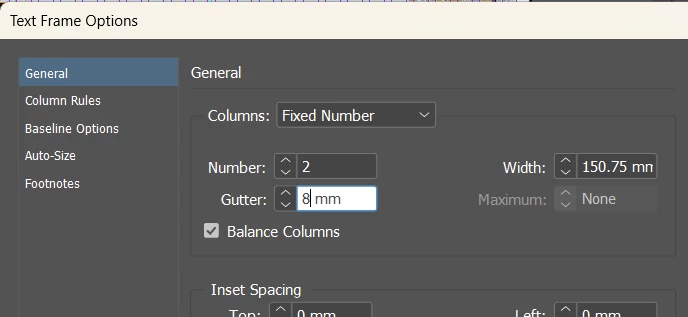
After updating the 'Test Frame Options - Gutter' in InDesign and saving the changes, InCopy fails to receive the update automatically. Additionally, InCopy does not provide a notification for us to manually synchronize the changes. We have checked the InDesign and InCopy version is align and updated.

How can this issue occur, and what steps can we take to resolve it? Many Thanks


<Title renamed by MOD>


This topic has been closed for replies.

2 replies

BobLevine
Community Expert
Community Expert
September 19, 2024

How are you working? Local server? Cloud service (Dropbox, OneDrive, etc)? Was the InDesign file saved? If you open InCopy after the InDesign file is saved do you get alerted? How about the opposite direction? When you update a story in InCopy does InDesign display an alert?

Participant
September 20, 2024

Hi!  Thank you for your reply!

Yes we use local server. Open InCopy after the InDesign file is saved no alerted, also tested open both InCopy and InDesign, then update Indesign and save, InCopy got no alert ⚠. Update in InCopy can reflect to InDesign, but the gutter change InDesign aren't reflected in InCopy automatically.


BobLevine
Community Expert
Community Expert
September 20, 2024

Are you using an assignment (ICMA) or opening the INDD file? If you're using an assignment, try opening the INDD file directly in InCopy.

Abhishek Rao
Community Manager
Community Manager
September 19, 2024

Hi @Shana38737641oxoe,


Thank you for reaching out and sharing the details. I understand how frustrating it can be when updates in InDesign aren't reflected in InCopy automatically, especially when you're working with layout adjustments like the gutter change.


To help resolve this issue, could you please confirm the version of InDesign and InCopy you're currently using along with the operating system details? Sometimes compatibility or version misalignment can cause such issues, even though you mentioned the versions are updated.

A few steps that you can try:

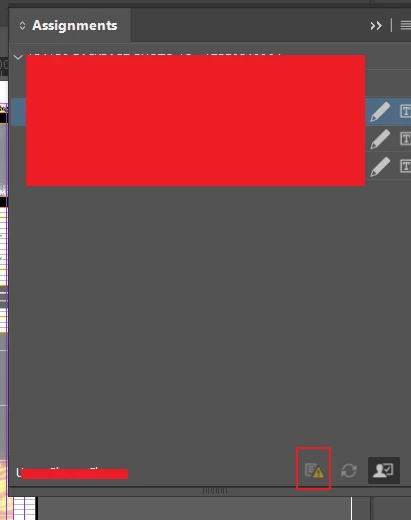
  1. Manually Update Assignments: In InDesign, go to the Assignments panel and click on the yellow triangle icon (as seen in the screenshot). This should prompt InCopy to update with the changes made to the document.
  2. Check the Assignment Links: Ensure that the assignments are correctly linked and that no network issues are preventing InCopy from receiving updates.
  3. Save the InDesign File Again: Sometimes, resaving the InDesign document and then reopening it in InCopy can trigger the update.
  4. Check the Preferences: Verify that the preferences in InCopy are set to notify for updates. Go to InCopy Preferences > File Handling and ensure "Check for Updates" is enabled.

Please try these steps and let me know how it goes. If the issue persists, feel free to share more details, and we’ll continue to investigate this together.


Thank you, 
Abhishek Rao

Participant
September 20, 2024

Hi!

Thank you for the reply!

For the version of InDesign and InCopy I am currently using along is 17.4.1. We have checked the preference both are set to notify and update. However, we tried in different device on this issue, after InDesign update gutter, the yellow triangle icon did not light up in InCopy so we could not manually update assignment. Is there any other thing causing this happen? 

Thank you!