Known Participant
May 17, 2023
Question

Indented bullet list AND aligned tab spacing

  • May 17, 2023
  • 2 replies
  • 731 views

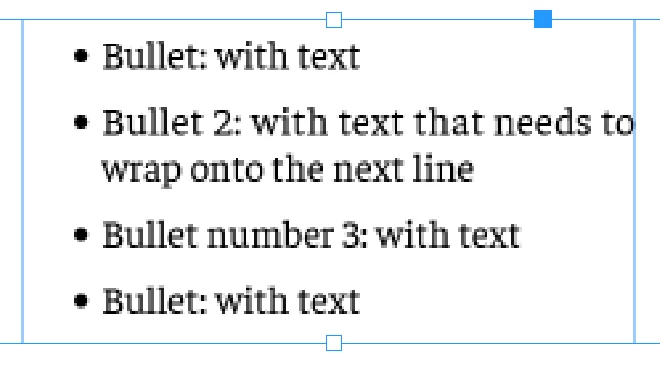
I have a bullet list like the below


It's indented from the body text but I would like everything after the : to be aligned too. I can't seem to get the tab align for everything after the : to work (so everything after the : starts at the blue line) WITH the indent for the entire list.(so the list remains indents by the same amount - pink box)
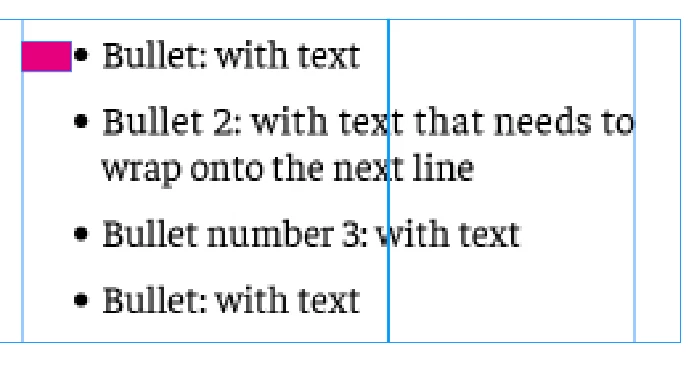
Any ideas?


This topic has been closed for replies.

2 replies

Barb Binder
Community Expert
Community Expert
May 17, 2023

Visually (because that's how I think): left indent, and a negative first line indent with the same value. Two left-align tabs: one for the text after the bullet and one even with the left indent.


~Barb

~Barb at Rocky Mountain Training
James Gifford—NitroPress
Legend
May 17, 2023

A second tab at the point where you want the inner alignment should work. This is, I believe, one of the cases where a tab must be defined at the first indent as well. (A tab is usually 'assumed' at the first line indent point and works normally, but not in this case.)

IsoneryumAuthor
Known Participant
May 17, 2023

Ah, like a tab before the bullet point you mean? How would I do that?

The current style looks like this

And the list is indented, and everything after the : is lined up, but the longer text for the bullet that goes onto a 2nd line, the text on the 2nd line (starting with wrap in the example) is still lining up with the first word of the bullet point (Bullet in the example). Whereas I'd like it to line up with the tab position of the rest of the bullets, so on the blue line in the example. 

I can get it almost lined up with another tab before the word "wrap" but it's not perfect and doesn't seem the right way to do it 😕😕 

Thank you!

Peter Spier
Community Expert
Community Expert
May 17, 2023

I think what James is saying is set the left indent to the blue line, add a first line negative indent that is equal to that amount, use a tab in the bullet definition to set the distance between the bullet and the beginning text, then type a (left aligned) tab after the :. The position of that tab should be defined as the same as the blue line in the style definition.