Susan Flamingo
Known Participant
September 9, 2024
Answered

Indenting Background Color in Block Quotes: How to Control Shading Without New Text Frame

  • September 9, 2024
  • 2 replies
  • 405 views

Hi, Dear Friends!

I want to make a paragraph into a "block quote," i.e., inside a frame with a different colored background. That much even a dummy like me can handle. But the shading color of the paragraph stretches the entire text frame width, which I don't want. I want it indented from both right and left. The paragraph indent has no effect on the shading, and it fills up the entire width as above; how can we indent the border with the shade without making a new, separate text frame? (In MS Word, we did this using a table, but am sure ID can handle it without that. )

Thank you, and have a good day!
Susan Flamingo


<Title renamed by MOD>

This topic has been closed for replies.
Correct answer rob day

But the shading color of the paragraph stretches the entire text frame width, which I don't want.


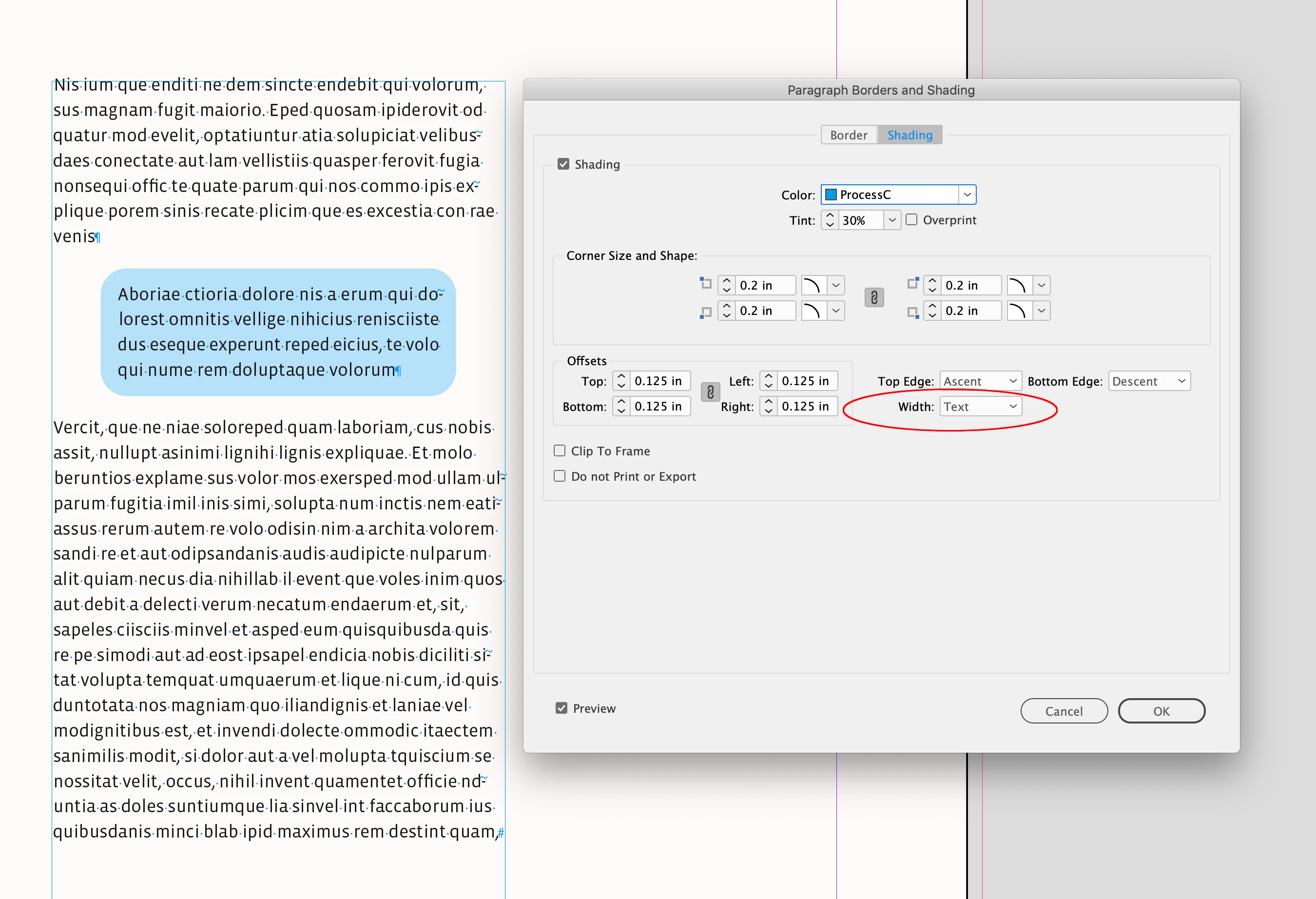
Hi @Susan Flamingo , Also there is the Width parameter, which for indented text will set the left and right shading to the text rather than the text frame:


2 replies

rob day
Community Expert
rob dayCommunity ExpertCorrect answer
Community Expert
September 9, 2024

But the shading color of the paragraph stretches the entire text frame width, which I don't want.


Hi @Susan Flamingo , Also there is the Width parameter, which for indented text will set the left and right shading to the text rather than the text frame:


Scott Falkner
Community Expert
Community Expert
September 9, 2024

There are a few ways to get what you are after. You can use Paragraph Shading or use a separate text frame. If you use a text frame you probably want to add a text wrap to it. This has the added benefit of not having to be exactly between paragraphs.


See screen shots below and examine attached INDD file.


Pull quote as a run-in paragraph using paragraph shading:


Pull quote as a separate text frame with text wrap: