
Answered
Indesign 17.4 slow performance when editing text Windows 11
For some time now, I'm having to disable pictures display (make them all greyed out) in order to speed up text editing? I have no idea what's happening.

For some time now, I'm having to disable pictures display (make them all greyed out) in order to speed up text editing? I have no idea what's happening.
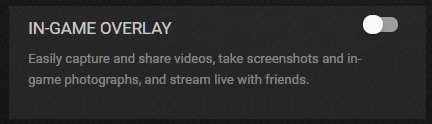
Just tried "Updating" my NVIDIA GFX1070 video card GeForce "Experience" and deselecting "Game Overlay" which kept coming up every time I tried to use specific shortcuts in Photoshop, like Ctrl + Alt + P, to open up the Select and mask feature. In Photoshop, the "Overlay" appeared over my Desktop window but it did not interfere with any Photoshop commands. It was just annoying to see it constantly "popup" in response to some keyboard shortcut.
Like I said, I just tried "disabling" the Game overlay feature and it seems to work? Or solve the problem of InDesign slow text editing "lagging"? I'll be keeping an eye out...
Here's a screen capture of the "offending" NVIDIA setting :
Already have an account? Login
No account yet? Create an account
Enter your E-mail address. We'll send you an e-mail with instructions to reset your password.


 AdChoices