Inspiring
November 4, 2022
Answered

Indesign 18.0 - Image Quality in PDF

  • November 4, 2022
  • 3 replies
  • 1010 views

Hi, I am using Indesign 18.0


The image format is .jpg. When I export it in PDF, the images are blurry. I use the snipping tool and Greenshot to capture images. I do not have Illustrator, Photoshop, or SnagIt.

Please could anyone suggest a better option and the image format that I should use so that the images are clear enough in the PDF? 
 

This topic has been closed for replies.
Correct answer Eugene Tyson

Export Settings. I have added the screenshot above. Please could you check and let me know if I should make any changes for better quality images. I have replaced  jpg to png


Your settings will not matter for a screenshot. Screenshots are low resolution. 


Either reset the text, find a vector version of what you're looking for, or reduce the size of the image. 


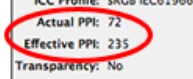
If you reduce the size of the image - go to Window>Links and with the image selected have a look at the Effective Resolution.

If it's 215 or above it should be fine for printing. 


3 replies

Legend
November 4, 2022

Yes, do not save as JPEG, use PNG. JPEG is designed for photographs only (the P stands for Photographic) and it will damage text and screen shots. 


Once you are using PNG, focus on your export settings. You haven't told us what they are, so we can't suggest better settings.

Lija SNAuthor
Inspiring
November 4, 2022

Thanks @Test Screen Name , @BobLevine . 

Export Settings: General

Compression

Output

Advanced

Marks & Bleeds


Lija SNAuthor
Inspiring
November 7, 2022

Please could anyone check the Export Settings and let me know. please

BobLevine
Community Expert
Community Expert
November 4, 2022

Screenshots are screenshots. Save them as PNG and leave them alone. You'll never get great quality out of them especially since you don't have any tools. If you do a lot of work with screenshots, I highly recommend Snagit, though.

Community Expert
November 4, 2022

It should be in vector.

Sounds like you're making a screen grab - also called a screenshot - which would  be low resoltuion.


You can type that text. I think the font is called 'Pastoral Black'.


Where did you get the screenshot?

Maybe we can help get a better version for you. 


Lija SNAuthor
Inspiring
November 4, 2022

Hi,  I am preparing a user manual for a web application. I took screenshots from that app using the snipping tool and Greenshot and saved them in .jpg format.  Now when I export it in PDF, these images are blurry. 

I do not have Illustrator, Photoshop, or SnagIt. Please could you suggest a better option and the image format that I should use so that the images are clear enough in the PDF? 


"You can type that text. I think the font is called 'Pastoral Black'." I am unable to understand this, actually.