
Answered
InDesign 2017 adjusting leading in table
I have a document with a table that I have continually updated for a client for years. I just upgraded to ID 2017 and when I went to make a small change to the text in one of the table cells, the text was pushed down below the baseline causing it to be out of alignment with the text in the cells directly to the left and right in the same row. This also caused the table row to increase in height. I confirmed that "align to baseline grid" is turned off so that does not appear to be the cause of the problem. I have attached a screen shot from the document. You can see that "109**" is pushed down below the baseline and the row is now taller than the other rows. Any help would be appreciated.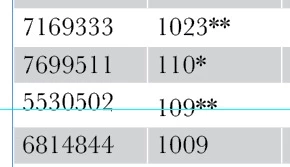
 AdChoices