They dont work in ID at all but I can use them in other programs such as word.
Your fonts listed in your screen capture are outdated and incorrect.
RE: Outdated
Microsoft is removing all older versions of TrueType (TT) and PostScript (T1) fonts when new editions of Windows 10 are installed.
The entire computer industry converted to OpenType/Unicode fonts in 2000 (19 years ago) and Microsoft is finally ditching the old technologies completely. (Sad, but we're all required to use this century's technologies!)
As Mike Witherell mentioned above, replace those outdated fonts with OpenType versions. See below for details.
RE: Incorrect
Looking at your screen capture above, I noticed your Minion Pro fonts have odd names that include the weight number (47 Light Condensed, 57 Condensed).

Minion Pro is an Adobe font available for free through your Creative Cloud subscription. And it doesn't contain those fonts anywhere in the entire 65 font family. See the font family at Minion | Adobe Fonts
Solution:
Get the correct fonts installed with the following tasks:
- Download OpenType (OTF) versions of the PostScript (T1) fonts:
- Helvetica Neue is available from Monotype at https://www.monotype.com/ In fact, they just updated Helvetica Neue to Helvetica Now and you might go with that version. Helvetica is not free from any vendor.
- Swap out Times Roman (TT) for the OpenType version of Times New Roman that came with your Windows operating system.
- Keep Calibri: it's fine as is.
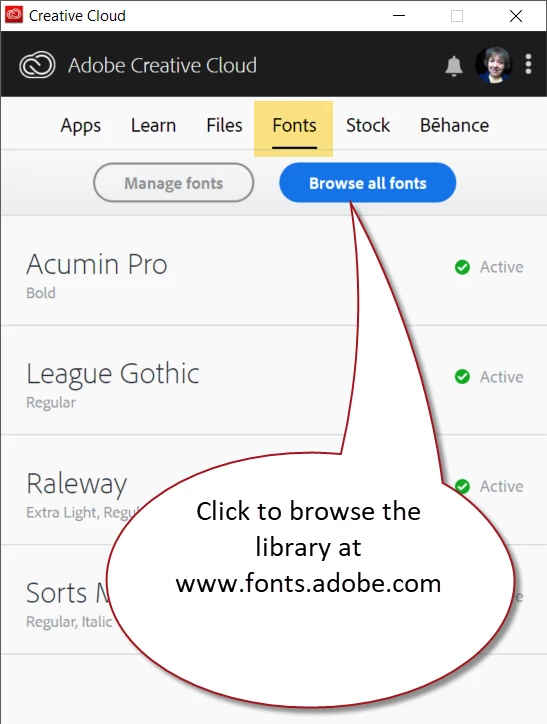
- Get legitimate copies of the Minion Pro family from your Creative Cloud app (see screen capture below) or directly from Search results for minion+pro | Adobe Fonts These will be free with your Creative Cloud subscription.
- Swap the Minion Pro 47 Light Condense with something else. There is no "light" version of Minion!
- Swap the Minion Pro 57 Condensed with Minion Pro Condensed.
| Bevi Chagnon | Designer, Trainer, & Technologist for Accessible Documents || PubCom | Classes & Books for Accessible InDesign, PDFs & MS Office |





 AdChoices