
alexs65702213
Known Participant
November 20, 2018
Answered

indesign 2019 standard ligatures issue

  • November 20, 2018
  • 1 reply
  • 1489 views

Hey y'all,

Just updated to the 2019 version of InDesign CC and I'm noticing that my standard ligatures are refusing to type out. This seems to be the case with all fonts, and as far as I can see this is an issue unique to 2019...any thoughts or fixes? Bug?

- Alex
    This topic has been closed for replies.
    Correct answer Laubender

    Hi Alex,

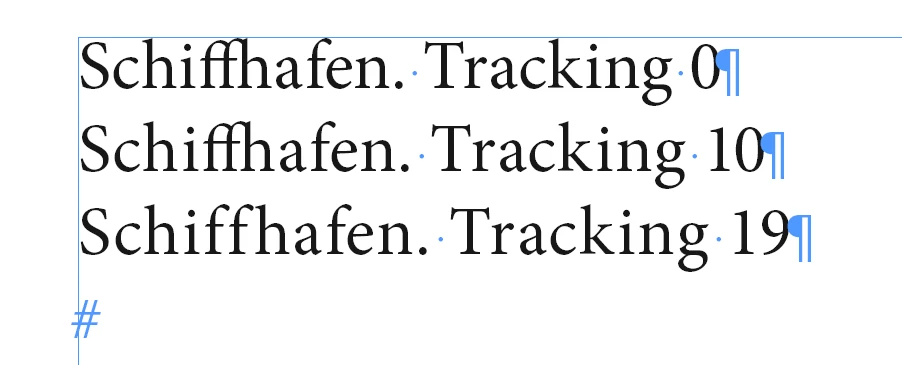
    is tracking applied to the text?

    Regards,
    Uwe

    1 reply

    Jongware
    Community Expert
    Community Expert
    November 20, 2018

    What are your standard ligatures -- "fi", "fl", or anything more exotic?

    Is "LIgatures" enabled? It used to be, by default, but maybe it got changed by Adobe or just in your own defaults.

    alexs65702213
    Known Participant
    November 20, 2018

    So far I've tried the "fi", "fl" "ffl" ligatures, nothing more exotic, although the problem appears to be with all ligatures.

    Ligatures is enabled in the option dropdown in the character menu, is there anywhere else I should be looking?

    Even when adding ligature glyphs directly from the glyphs panel they appear as separate characters. Using the same typeface in Illustrator they type correctly with no issue, I've tried a handful of typefaces including Adobe defaults like Minion.

    Thanks

    Bill Silbert
    Community Expert
    Community Expert
    November 20, 2018

    Try updating to the latest bug-fix version (14.0.1) and see if you still have a problem.