
inkling23
Participant
Jul 9, 2020 6:47 PM UTC
Answered

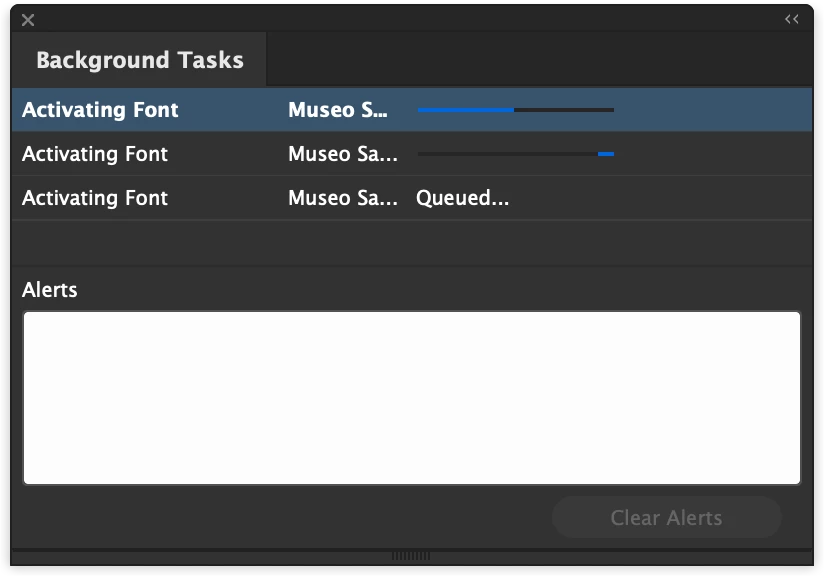
InDesign 2020 (15.1.1) stuck while "activating font" on macOS Catalina


CC reports a font could not be activated due to a conflict, yet the "Activating Font" task is stuck until I quit InDesign. When I try to export a PDF, it is stuck behind these never-ending tasks in the queue, thus preventing me from exporting it. Bug?

(MacOS Catalina 10.15.4, Indesign 15.1.1)


{Renamed by MOD}


paulb6672322
paulb6672322Correct answer
Participant
Jan 28, 2021 5:14 PM UTC

I was also stuck in an endless loop of "activating font" - in this case default Minion Pro.


My workaround:

Ctrl + Alt + Delete > End Task

Update Creative Cloud

Update InDesign to 16.0.1


Solved! 

55 replies

Participant
Jan 9, 2025 2:59 AM UTC

It's 2025 and this is "still" happening. This doesn't happen in the other Adobe apps. It's definitely an InDesign bug that 'still' isn't fixed.

Translate
Participant
Apr 10, 2024 2:34 AM UTC

I thought I was screwed, and had a deadline in just a few hours but by some miracle, my risk to force quit ID payed off and on re-opening it was back to normal. A risky fix however, luckily my files were preserved. 

Translate
Participant
Dec 13, 2023 3:17 PM UTC

This is still happening in 2023... come on Adobe, can you remove this function or fix the bug!? 

Translate
Participant
Oct 13, 2023 2:28 PM UTC

Hello everyone still having this problem.  

Remove the auto-activate fonts option under file handing in preferences. 

Translate
Participating Frequently
Sep 26, 2023 5:26 PM UTC

Why is this bug STILL THERE IN 2023.. three years later? This is a rhetorical question, because I have a long list of bugs, some going back 20 years.. NEVER FIXED. What a company!

Translate
Participant
Sep 25, 2023 11:49 PM UTC

Indesign is the biggest POS


Translate
Participant
Aug 15, 2023 1:33 PM UTC

I have the same problem with my work computer. All versions are updated. I deactivated and activated the fonts, as well as disabled the preferences. Nothing works. 

However, I don't have this problem with my personal computer. Extremely annoying and time-consuming. 

Translate
Participant
Jul 26, 2023 7:38 PM UTC

All I did was delete the task, save the InDesign file, then close the file, close InDesign/reboot indesign, and done!

Translate
elanport
Participant
Jan 25, 2023 5:21 PM UTC

I found a simpler solution, just go to adobe fonts website, deactivate the font and reactivate it, that worked for me. (InDesign 2023 18.1)

Translate
Participant
Dec 19, 2022 6:49 PM UTC

Strangely enough, I think you and I are having trouble with the same font.. I quit Indesign, updated to the latest version (v18.1) and the issue was resolved. Though, I wonder if there is some problem related to the font pack, too. 

Translate