

inkling23
Participant
Jul 9, 2020 6:47 PM UTC
Answered

InDesign 2020 (15.1.1) stuck while "activating font" on macOS Catalina


CC reports a font could not be activated due to a conflict, yet the "Activating Font" task is stuck until I quit InDesign. When I try to export a PDF, it is stuck behind these never-ending tasks in the queue, thus preventing me from exporting it. Bug?

(MacOS Catalina 10.15.4, Indesign 15.1.1)
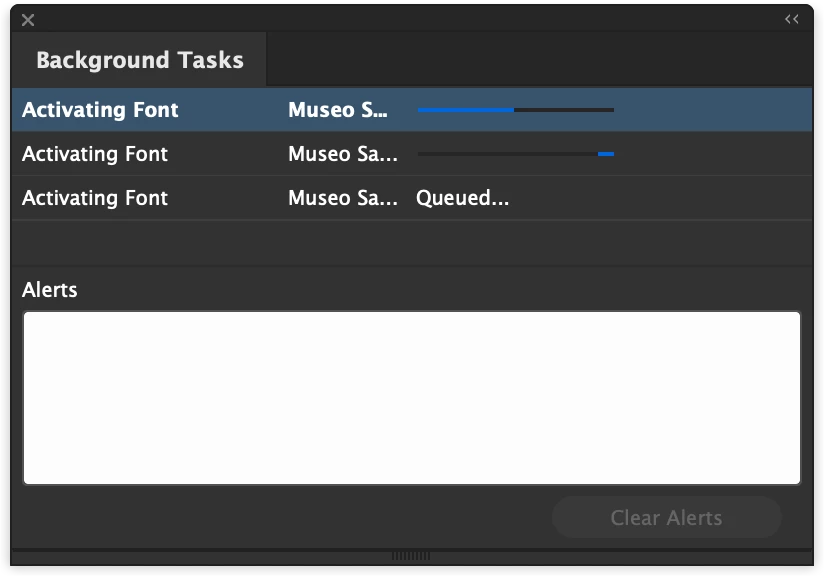


{Renamed by MOD}


paulb6672322
paulb6672322Correct answer
Participant
Jan 28, 2021 5:14 PM UTC

I was also stuck in an endless loop of "activating font" - in this case default Minion Pro.


My workaround:

Ctrl + Alt + Delete > End Task

Update Creative Cloud

Update InDesign to 16.0.1


Solved! 

55 replies

sadie_lofi
Participant
Jul 29, 2020 3:03 PM UTC

I am also having this issue woth 15.1.1. Tried the help link steps with no avail. Must be a google font syncing issue. Went back to v15.1 from 15.1.1 and works fine. 

Translate
Sheena Kaul
Legend
Jul 20, 2020 9:44 AM UTC

Hi there,


I'm hoping that the issue is resolved for you. 

If the above-mentioned solution or suggestion helped, please mark it correct.

If not, do let us know so that we can assist you further.


Regards,

Sheena

Translate
Srishti_Bali
Legend
Jul 11, 2020 7:28 AM UTC

Hi there,


Sorry to hear about this trouble. Looks like there is some issues with Font syncing. Please try steps share on this help article (https://helpx.adobe.com/in/fonts/kb/troubleshoot-font-activation.html) and let us know how it goes.


Regards,

Srishti

Translate
Participant
Oct 20, 2020 6:06 PM UTC

Thank you this helps! 


My issue was the fonts were already somewhere in my computer. I hunted them down, deleted them, dis-activated from Creative cloud, and then reactivated my font family, and Voila! 

Translate