
Participant
November 5, 2019
Answered

InDesign 2020 cant save file and gives error "already open"

  • November 5, 2019
  • 20 replies
  • 11791 views

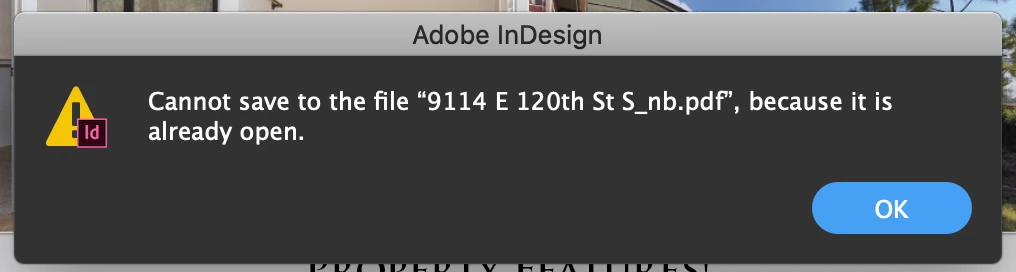
When I finished a document in InDesign save it as a .pdf and try to opene it in Adobe Acrobat, the first time will open de document, the second time around I have to completely close both apps in order to get the document open again. it say's and I quote "Cannot save to the file ""name.pdf"", because it is already open".  does any body have a solution for it?

Thank you!


{Renamed by MOD}

Correct answer Laubender

Hi sml_design,

the bug fix is out now: Version 15.0.1.209 should be ready for install from your Adobe Creative Cloud Desktop App.


Fixed issues in InDesign
InDesign 2020 (version 15.0.1)

https://helpx.adobe.com/indesign/kb/fixed-issues.html


Regards,
Uwe Laubender

( ACP )


20 replies

Srishti Bali
Community Manager
Community Manager
November 8, 2019

Thanks for confirming, Peter. This issue has already been reported to the Product team and they are working on it. Please upvote this issue here https://indesign.uservoice.com/forums/601180-adobe-indesign-bugs/suggestions/38963116-indesign-2020-won-t-overwrite-pdf and stay tuned for updates. Thanks in advance for your Patience!


Regards,

Srishti

moniquem7227096
Participant
November 8, 2019

Hi,

I installed the new version of InDesign 2020 but now I cant't save my file to PDF. I get an warning: 'Can't save to PDF' Big problem, the printer needs the file asap! I didn't have this problem in version 2019. I cannot go back because the program won't open the file because it was opened in a newer version...


What to do??

Rene-007
Participating Frequently
November 8, 2019

In the mean time, Clossing both programs and then turning it back on will re-export the pdf file without re-naming it.

That's what I've been doing while the Adobe Team find the solution to Re-Exporting PDF file.

Srishti Bali
Community Manager
Community Manager
November 8, 2019

Hi,


Thanks for reaching out and highlighting this. We have found that issue occurs only when the files are saved on Windows Server from MAC machines. Could you please confirm where your files and PDF are saved? Try saving them on Desktop and check if you get the same error.


Regards,

Srishti

Participant
November 8, 2019

Srishti,

I am confirming that when I try to overwrite a PDF to a Windows based server that it cannot overwrite the file because it says it's already open. When I overwrite it to my desktop it works perfectly (no overwrite error). I am running Mac OS 10.13.6

Community Expert
November 7, 2019

Hi Kristen,

what is your operating system version?


Regards,
Uwe Laubender

( ACP )

Inspiring
November 7, 2019

My coworkers and I have the same issue. It seems like it only kicks in if the Indesign file is already saved as a 2020 format (2019 files not saved out yet seem to work fine). We're all on MacOS 10.14.6 or lower (not 10.15), and we're connected to a Windows file server.

Inspiring
November 7, 2019

I am only having the problem when trying to save files to our NAS, files saved locally to the desktop do not have the same issue. Running Indesign 2020 and Catalina 10.15.1.

Participant
November 7, 2019

I'm having the same issue. I have to trash my old PDF in order to save a new one.

Participating Frequently
November 6, 2019

Same issue here on macOS 10.14.6

Community Expert
November 5, 2019

Hi Renee-007,

best do a bug report at https://indesign.uservoice.com/


Thanks,
Uwe Laubender

( ACP )

Rene-007
Participating Frequently
November 6, 2019

Thank you for your help, the Adobe team recognize the bug as: "InDesign won't overwrite pdf document" and it is already looking into it.
Thank you Again Laubender!

Srishti Bali
Community Manager
Community Manager
November 7, 2019

Hi Rene,


Thanks for sharing this information. I have sent you a DM for more details, please check.


Regards,

Srishti

Community Expert
November 5, 2019

Hi together,

hm, that must be a Mac OS X issue. Perhaps especially with Catalina?


Just tested on my German version of InDesign 2020 15.0.0.155 on Windows 10 and had no issue.

I could always overwrite my exported PDF with the same name. Unless of course the PDF was opened with e.g. Acrobat Pro DC, but that's normal business.


Regards,
Uwe Laubender

( ACP )

Participant
November 5, 2019

I am having the same issue with InDesign 2020. I cannot overwrite a pdf and get the same error message as the original poster.

I don't have the issue using InDesign 2019, so I've gone back to that for now.

I am using MacOs 10.14.2

Rene-007
Participating Frequently
November 5, 2019

Thanks for your sincere response, i will hait till the adobe team puts hands into matter.

Participant
November 5, 2019

I am also having the same issue. I cannot export a pdf with the same name and overwrite it. It will tell me the file is already open. (which it isn't) My only workaround is to save the pdf as a different name.

Willi Adelberger
Community Expert
Community Expert
November 5, 2019

You should not save as PDF, you have to export as PDF. You try to save your document as PDF, even if it is an INDD.

Rene-007
Participating Frequently
November 5, 2019

Of course I did that. "I exported". I did not save my IND as pdf, I exported and saved a pdf doc, but can't export it more than once without shutting my Indesign Program and turning it back on, to re-export my pdf doc again. other wise I recieved the warnig I posted in my previous post.

Steve Werner
Community Expert
Community Expert
November 5, 2019

I can't reproduce that problem with InDesign 2020 on my Mac running macOS 10.14.6.  


Please tell us what operating system (exactly) you're running.