Zachary0526
Inspiring
November 23, 2020
Answered

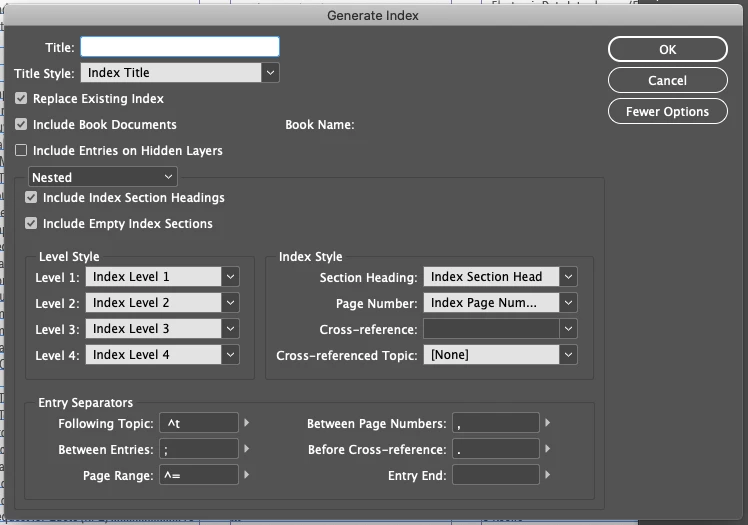
InDesign 2021 v16.0 - Generate Index: "Include Book Documents" gray (unable to check box)

  • November 23, 2020
  • 1 reply
  • 1174 views

Updated to ID 2021 v16.0. Created .indb (book). Added multiple documents. Last document contains page for index. Wanting to add index that includes references throughout all documents in book. When generating index, the checkbox and "Include Book Documents" is grayed out so I am unable to check it so my current index isn't including any of the references from any of the other documents in my book. Anyone know of a fix? Screenshot attached.

This topic has been closed for replies.
Correct answer Zachary0526

Very happy to report that Adobe's Chat Support tech helped me solve this. They had me reset my Preferences by quiting InDesign and then holding Shift+Command+Control+Option IMMEDIATELY after starting InDesign. Note that at first I only opened one of the documents in my book and found that the problem still existed. Then, after opening the book that the document was in and turning on Overprint View, I was able to Generate an Index using "Include Book Documents" exactly as I'd hoped to do BEFORE I posted this.
1 reply

Zachary0526
Zachary0526AuthorCorrect answer
Inspiring
November 23, 2020

Very happy to report that Adobe's Chat Support tech helped me solve this. They had me reset my Preferences by quiting InDesign and then holding Shift+Command+Control+Option IMMEDIATELY after starting InDesign. Note that at first I only opened one of the documents in my book and found that the problem still existed. Then, after opening the book that the document was in and turning on Overprint View, I was able to Generate an Index using "Include Book Documents" exactly as I'd hoped to do BEFORE I posted this.