
Participating Frequently
February 20, 2025
Answered

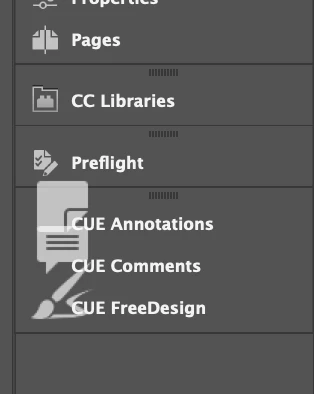
InDesign 2023: Big icon in docked panel

  • February 20, 2025
  • 1 reply
  • 172 views

Hi, 
Has anyone seen this? It happened when I dragged the panel into the dock. Now, it's stuck like this. It's perfectly useable, but just a bit annoying. It appears like this no matter which workspace I use. The panel is a specialised one from a company I work with, but it has been fine up until now. I'm on a Mac with InDesign 2023 (client required). 
Thanks in advance, 
Karen
 

Correct answer leo.r

try these troubleshooting steps, especially cache cleaning, they often solve unusual UI issues:

https://www.rockymountaintraining.com/adobe-indesign-rebuilding-preferences-cache/


just make sure not to uninstall InDesign 2023, you won't be able top install it again.

1 reply

leo.r
Community Expert
leo.rCommunity ExpertCorrect answer
Community Expert
February 20, 2025

try these troubleshooting steps, especially cache cleaning, they often solve unusual UI issues:

https://www.rockymountaintraining.com/adobe-indesign-rebuilding-preferences-cache/


just make sure not to uninstall InDesign 2023, you won't be able top install it again.

Participating Frequently
February 20, 2025

Thanks, Leo. That worked perfectly.