
Participant
December 22, 2024
Question

InDesign 2025 (20.0.1) - High CPU when idle and while working (Windows 11)

  • December 22, 2024
  • 2 replies
  • 1975 views

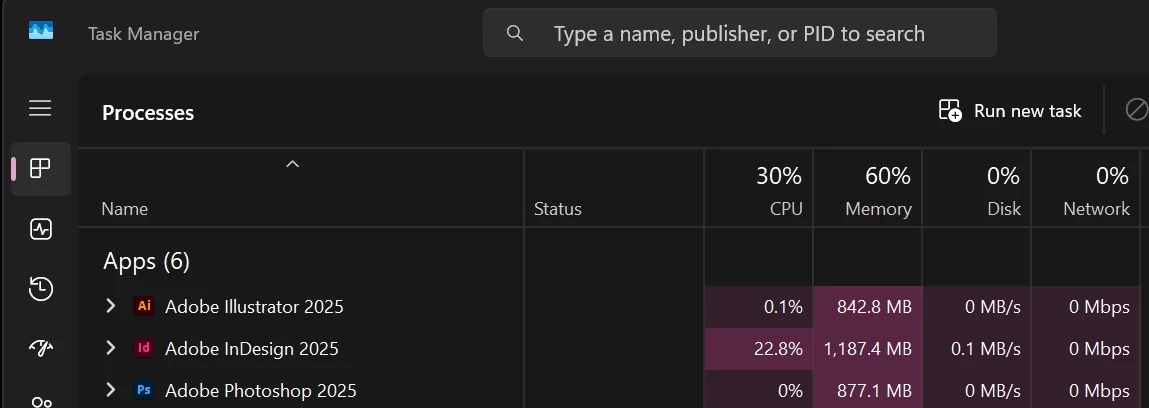
This is my first time using InDesign 2025 (20.0.1). After the initial launch, I noticed the CPU usage stays at 20% or higher all the time, regardless of whether it's idle, minimized, or in use. This issue doesn't occur with Illustrator 2025 (29.1) or Photoshop 2025 (26.2). Why is this happening?


My laptop is Lenovo Legion i7 Pro, i9-13900HX, RTX-4080, 32GB RAM, running Windows 11 Home Version 24H2.
 

2 replies

Robert at ID-Tasker
Legend
December 22, 2024

@makfotopro


It's pretty normal - after you install InDesign for the first time.


You need to let it idle for about 2 hours - so it can "settle down". 


Participant
November 16, 2025

And this works?

J E L
Community Expert
Community Expert
December 22, 2024

Hi @makfotopro, here are a few things you can try. Are you syncing your apps with Creative Cloud library? If not, open the Library panel from within InDesign with no documents open and then see if the CPU usage returns to low.


Next, check if this folder exists and if not, create it. AppData\Local\Adobe\Creative Cloud Libraries. Another thing to try is disabling automatic updates on the Creative Cloud Desktop app. If you still can't get it down, you can uninstall and reinstall, try the Creative Cloud Cleaner tool, or revert to an earlier version if you were stable there. Let us know how it goes!