
Participating Frequently
November 25, 2024
Answered

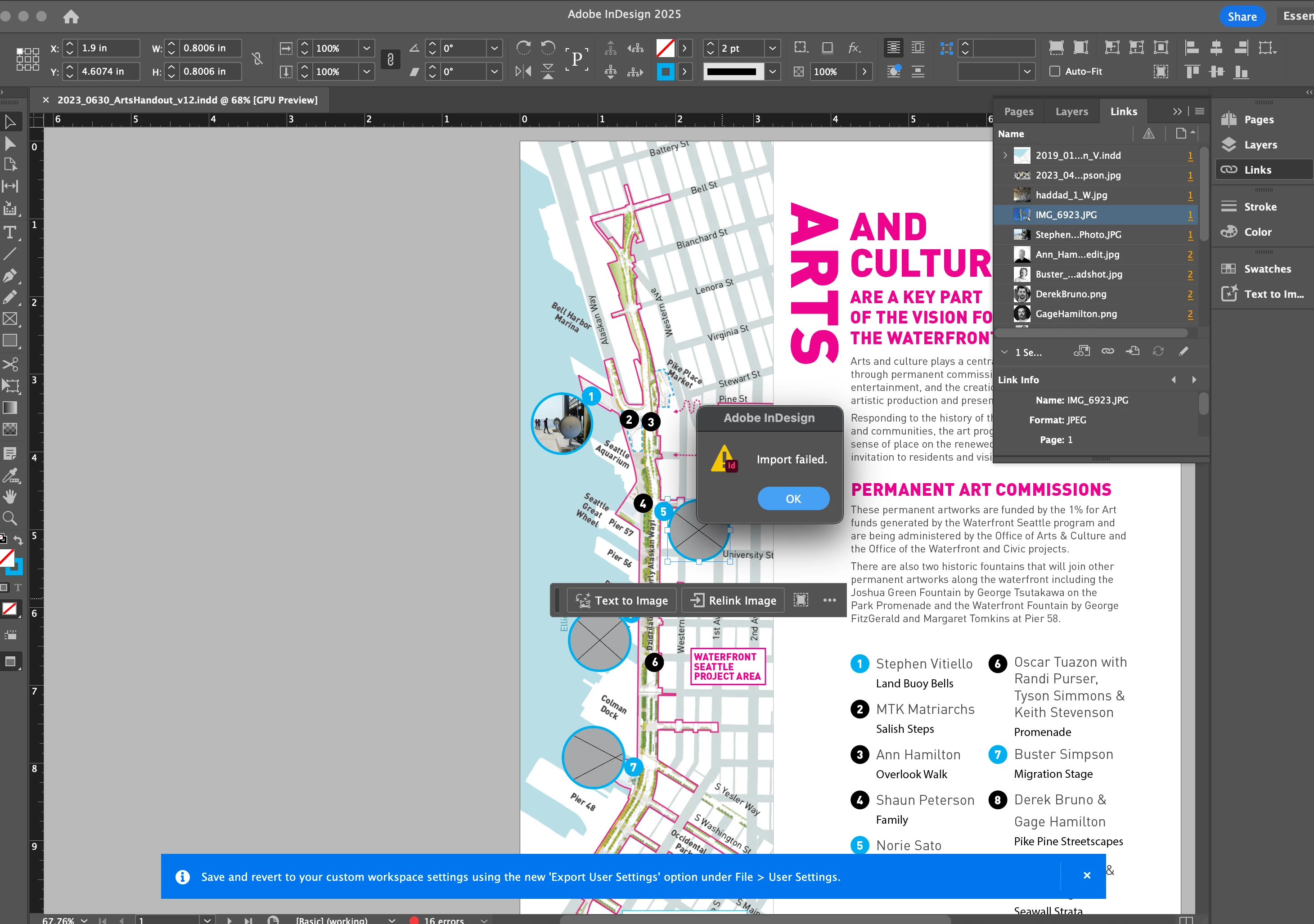
Indesign 2025 links display as grey boxes and I am not able to edit or relink them

  • November 25, 2024
  • 1 reply
  • 1076 views

I have been struggling with working on all files created by a previous version of Indd. All the links appear to be working when in the links pannel. When I try to manually relink the files I get this pop up and am not able to edit, change or link any new files.


Some things I have done and tried that have not resolved the issue:

  • Installed macOS Sequoia
  • Uninstall and reinstall Indd
  • Restarted computer
  • Saved file in another location
  • Saved the file as IDML
  • Tried packaging the file but it would not package the file since the links could not be found


I could really use some help troubleshooting!
 

This topic has been closed for replies.
Correct answer Eugene Tyson

Same issue with both indd 2025 and 2024 and I did the uninstall and reinstall/ restart process as well which did not work


Reinstalling rarely fixes everything - you can do a complete reinstall using the
Creative Cloud Cleaner Tool https://helpx.adobe.com/creative-cloud/kb/cc-cleaner-tool-installation-problems.html


Since it's happening in 2024 and 2025 could be a deeper problem

----------------

Can you share a sample file and image so we can test it? 


Can you like the files in a blank document? Completely new?


If you can - you might try as a test to use the Pages Panel and Move your pages to the new document.

You'll need both your documents open and in the problematic files choose Move Pages and then select your new document as the destination.


See if that works.

1 reply

Willi Adelberger
Community Expert
Community Expert
November 25, 2024

What file type do you want to import?

Participating Frequently
November 25, 2024

There are .jpg, .png and .pdf placed in this file which is pretty standard and they were working before the 2025 update.