
Inspiring
October 30, 2025
Answered

InDesign 2026 doesn't open on Mac

  • October 30, 2025
  • 3 replies
  • 503 views

I get this error when trying to open the new InDesign 2026 version:

"Adobe InDesign 2026.app" is damaged and can't be opened. You should move it to the Trash.
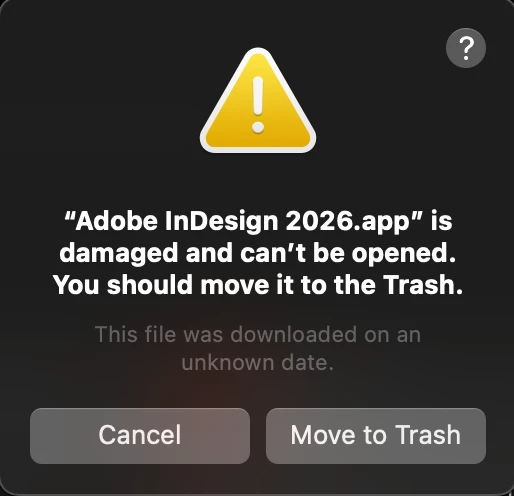
I've tried installing it twice with the same result. I put the InDesign 2025 back and it opens fine.

Correct answer leo.r

That's Apple's pseudo-security inventions acting up again.


Go to System Settings > Security & Privacy, scroll to the bottom: do you see a switch to allow InDesign 2026 to run?


If not, then what's your macOS version?


P.S. Plus everything @Barb Binder said (we were typing at the same time).

3 replies

Abhishek Rao
Community Manager
Community Manager
October 30, 2025

Hi @mhd6,


Thanks for sharing the details and the screenshot. Please try the suggestions shared by the experts. Once you've tried the steps, please let me know if the issue gets resolved or if it persists, so I can take it forward.


Looking forward to your update.
Abhishek

leo.r
Community Expert
leo.rCommunity ExpertCorrect answer
Community Expert
October 30, 2025

That's Apple's pseudo-security inventions acting up again.


Go to System Settings > Security & Privacy, scroll to the bottom: do you see a switch to allow InDesign 2026 to run?


If not, then what's your macOS version?


P.S. Plus everything @Barb Binder said (we were typing at the same time).

mhd6Author
Inspiring
November 3, 2025

This appears to be the issue. Thanks. 

My Mac is running Sequoia 15.7.1

leo.r
Community Expert
Community Expert
November 3, 2025
quote

This appears to be the issue. Thanks. 

My Mac is running Sequoia 15.7.1


By @mhd6


Ok good to know it helped.


Obviously, normally this shouldn't happen, and InDesign should open without this error. This error is displayed if the software isn't "notarized" by Apple. In which case the user can allow the app to run by enabling the switch in System Settings you used. InDesign, however, definitely IS notarized. So I don't know why you got this error. Most likely the problem lies with macOS, not InDesign.

Barb Binder
Community Expert
Community Expert
October 30, 2025

You might try fully uninstalling it using the Adobe CC Cleaner tool (https://helpx.adobe.com/creative-cloud/apps/troubleshoot/diagnostics-repair-tools/run-creative-cloud-cleaner-tool.html). Uninstalling from the desktop app is not a full uninstall.


It's also worth noting that's not a great idea to move important work to a brand new version. It's fun to download the new version to play with it, but you really want to continue working on a stable version until at least the .1 release is available. 

~Barb 

~Barb at Rocky Mountain Training