
Participating Frequently
November 4, 2025
Question

InDesign 2026: Drop Shadows graphical glitch

  • November 4, 2025
  • 12 replies
  • 1142 views

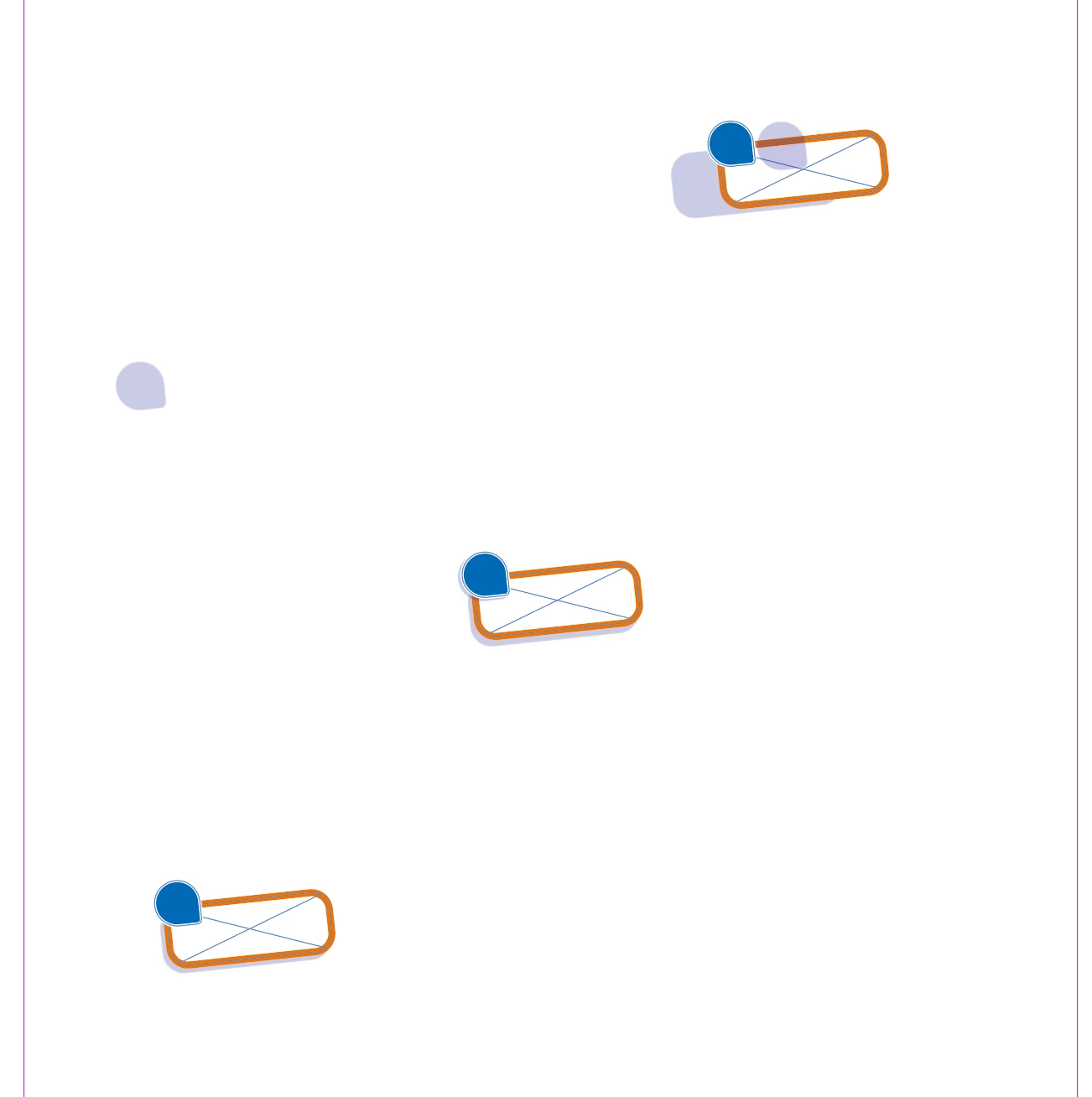
After the most recent update I had to create a document using assets from older indesign files that previously never gave any issues. Now the dropshadows from multiple (different objects) move all over the place (away from the object as if theres a fixed lightsource) when I move these objects. When I turn off the dropshadow of the object, move the object and then turn the shadow back on it will have the shadow in it's correct position. When I move the object around multiple times it will start glitching the entire page until I move my cursor over it again. When I change the path of the object the displaced shadow will snap back into it's correct position, making me think this is a graphical display issue. 


In the example below you can see how the dropshadows moved. (left one moved up when moving the object down and to the left. Right one stayed closer to it's original position but offset, middle is the original position before copying and moving). 


i'm working on a Macbook Pro m2MAx Sequoia Version 15.6.


12 replies

Participant
February 16, 2026

I also have this ugly problem since more than 2 months - no solution after the last updates. Every day it makes me crazy and I've tried everything to find a workaround. What I´m doing now is: select the object with the shadow, cut it (command-X) and undo. Then the shadow is correct again. Not a solution, but a workaround. I hope there will be soon an update that solves the problem.

Participating Frequently
February 11, 2026

This appears to be two different problems: the on-screen graphical glitch (which I have seen, but am no longer exeriencing), and the export-to-PNG problem, which is still a hugely disruptive bug for me. Like the examples above from ​@jas0ntho and ​@dalef48115216, it appears to only be in the Y-axis for me. I have found that reducing the Y offset of the shadow in the effects panel by about 15 pixels or so (getting into negative numbers, if necessary) mostly compensates for the issue when exporting.

Steph34573869dt94
Participant
February 9, 2026

For anyone still experiencing this glitch, I just noticed it for the first time, but a workaround seems to be to make a copy of the object with the drop shadow.

For me it only happened with certain objects that had been freshly added to the document (copied from another document in my case), but duplicates within the document showed normal behaviour.

Participant
February 6, 2026

I commented about getting this 3 months ago and still no fix. Also now when i export PNG files from indesign it glitches and moves the drop shadow. I can’t export PNG at ALL from indesign now which has really screwed up my workflow. I’m attaching a screen shot of what it looks like in the file VS when exported to PNG. 


Participant
February 11, 2026

I to am still having the same problem when exporting it into a PNG. It’s find on the actual document though. I have tried all the tips in this thread, like grouping and then chaning the % down then up, but nothing helps. I just do see how Adobe have allowed the glitch to occur for so long, it’s rediculous. It’s not just me either, all the designers in my department are experiencing it as well.  


Participant
February 5, 2026

Have this bug, probably form 2 or 3 months already. 2 or 3 indesign updates have passed, but this thing still persists.


Known Participant
February 5, 2026

So what? The problem still exists in InDesign 21.2 on Mac.

Thomas Gregorc
Participant
January 29, 2026

So, what's the status now? The bug report is two months old and the error still exists! My tests haven't been able to confirm rotation as the cause. It doesn't matter what text or object is positioned, how, or where; the drop shadow is always shifted when exporting to PNG. This is extremely annoying and it's high time it was fixed.

Participant
January 28, 2026

This is still a HUGE issue, why hasn’t this been fixed already? 


Abhishek Rao
Community Manager
Community Manager
November 10, 2025

Hi everyone,


Thanks for sharing all your observations and examples. I've noted the details from each of your reports, and I'm currently checking this behavior with the product team. I'll update this thread as soon as I have more information or next steps from them.


Appreciate your patience in the meantime.

Abhishek

Abhishek Rao
Community Manager
Community Manager
November 11, 2025

Hi everyone,


Thanks again for all the details, screenshots, and files you've shared regarding this behavior. I wanted to let you know that a bug has been logged for this issue, and the product team is actively working on a fix.

I'll share an update here as soon as more information becomes available or the fix is implemented.


Appreciate your patience and collaboration while the team works on resolving this.

Abhishek

Participant
November 13, 2025

In the meantime, what do you recommend as a workaround? 

Participant
November 10, 2025

I'm working on Windows 10 Pro and I have the same problem since my update to InDesign 2026 (v21.0). I never had this issue before. Turning GPU Preview on or off doesn't help here. However, it seems to me that the problem only occurs when the object is rotated. Obejcts without any rotation (i.e. 0°) behave like they should. But any degree of rotation leads to the problem.

Participating Frequently
November 10, 2025

@Fotofant Well spotted! Can confirm that rotation breaks the shadow, doesn't matter if it's grouped or not