


InDesign 2026: Tab stop at 3p0 doesn't move text to 3p0 — what am I missing?
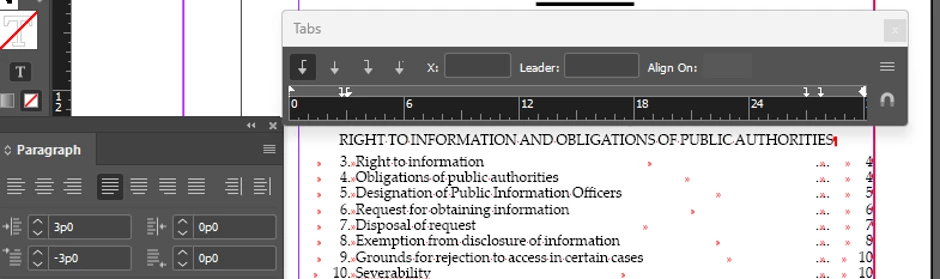
File A
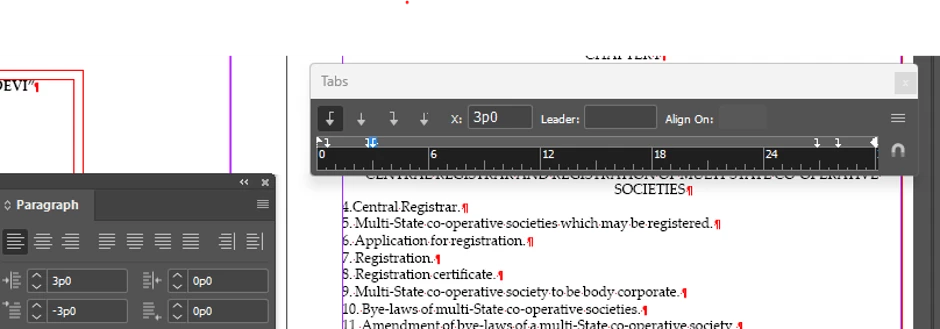
File B
Hi everyone,
I'm trying to reproduce the paragraph/tab formatting from one InDesign document in another.
I've attached two screenshots:
- File A = the correctly formatted document
- File B = the document I'm trying to format
In File A, the section entries are formatted so that:
- the section number (e.g. 3.) is positioned at approximately 2p9
- the section title (e.g. Right to information) begins at approximately 3p0
- the Tabs panel shows tab stops at 2p9 and 3p0
- the Paragraph panel shows Left Indent = 3p0 and First Line Indent = -3p0
In File B, I have set the Paragraph panel to the same values:
- Left Indent = 3p0
- First Line Indent = -3p0
File B also appears to have tab stops at 2p9 and 3p0.
However, I cannot reproduce the behaviour of File A.
For example, in File B I have:
4. Central Registrar.
If I place the cursor after 4. and press Tab, the tab character is inserted, but the text after the tab does not jump to the 3p0 tab stop.
The same happens when I try inserting a tab before the section number.
Interestingly, when I click the tab markers in the Tabs panel, InDesign shows the X position and the temporary vertical guide at the correct position. So the tab stops appear to exist, but the actual text does not move to them as expected.
I've attached screenshots showing the Tabs panel and Paragraph panel for both files.
What am I misunderstanding about the tab stops/indents here? Why doesn't pressing Tab move the text to the 3p0 tab stop even though that tab stop is present?
I'm using InDesign 2026.
Thank you!

 AdChoices