



R.+Touret
Participant
August 5, 2026
Question

[InDesign 21.5] “Remove All AI-Generated Alt Text” Fails to Detect and Remove Existing AI-Generated Alt Text

  • August 5, 2026
  • 3 replies
  • 10 views

(05/08/2026, version 21.5, updated yesterday) Glad for the option to delete all AI generated alt-text... if only it would work properly. The remove all button doesn’t recognize the generated alt-text and pretends there is nothing to delete. 

This document has 208 pages and there is several pictures on each of them. Having AI generated descriptions on our images erodes the trust our clients have in our products, and I had to find roundabout techniques to delete them directly in the exported PDF because as a professional, I can not afford the time to delete them all by hand, one by one in InDesign. Thus, neither me or my colleagues have touched the descriptions : they are as they were generated (without our consent) when this feature was pushed without notice. So the feature should recognize them as AI generated text to be deleted, and just does not. 

I keep being dissatisfied with how this whole situation have been handled since it’s been reported month ago. 
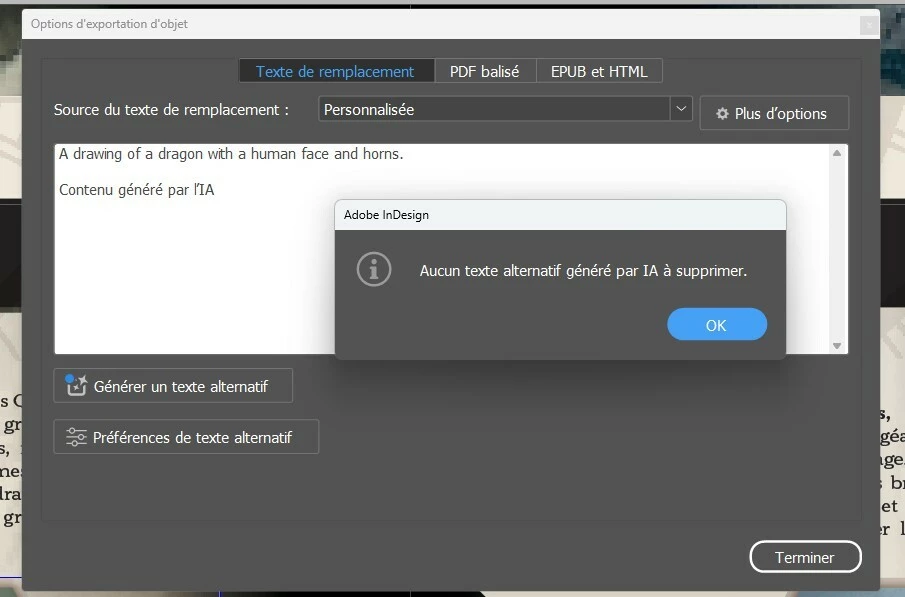
 

Dialog box says “No AI-generative alt-tex to delete" , when there’s clearly a “generated by AI” labelled text just behind, on the very image I used to access these options.


    3 replies

    Dave Creamer of IDEAS
    Community Expert
    Community Expert
    August 12, 2026

    It worked on my quick test (only two images). I am using 21.5.1. 

    If it still doesn’t work after the update, my other question would be “was the text edited at all”? (Probably not, but it would be my next question...)

    David Creamer: Community Expert (ACI and ACE 1995-2023)
    Abhishek Rao
    Community Manager
    Community Manager
    August 12, 2026

    Hi ​@R.+Touret,


    Thanks for reporting this, and I’m sorry for the trouble this has caused, especially with such a large document.

    Could you please update to the latest InDesign 21.5.1 through the Creative Cloud desktop app and test the Remove All AI-Generated Alt Text option again? I tested the workflow on 21.5.1, and it worked as expected on my end.

    Additionally, once you're on 21.5.1, please open the affected document and save it as a new INDD file with a different name, then test the Remove All option in that newly saved file. Please let us know whether the AI-generated Alt Text is detected and removed correctly there.


    Looking forward to your update.

    Thanks,
    Abhishek

    leo.r
    Community Expert
    Community Expert
    August 5, 2026

    > because as a professional, I can not afford the time to delete them all by hand,
    > one by one in InDesign


    Well. There are scripts that can do this in InDesign in one click. Hopefully you won’t need them anymore, but keep it in mind.

    In general, whenever it seems that InDesign requires you to do something “all by hand, one by one”, it’s almost always a sign that it can be automated.

    Regardless, this Generative AI thing caused great frustration and huge amounts of wasted time for countless users.
