
Participant
September 9, 2020
Answered

InDesign

  • September 9, 2020
  • 2 replies
  • 1597 views

I have an InDesign file from the 2018 and it is a label I want to print. I just check that a few elements on this label are saved in LAB color pallets. So when I try to change them to CMYK they not as bright as my client would like to have. When I convert a whole document to CMYK it looks also different. It is any option to save it to print and keep bright LAB colors? Thanks for the help in advanced.


Regards

Piotr
This topic has been closed for replies.
Correct answer rob day

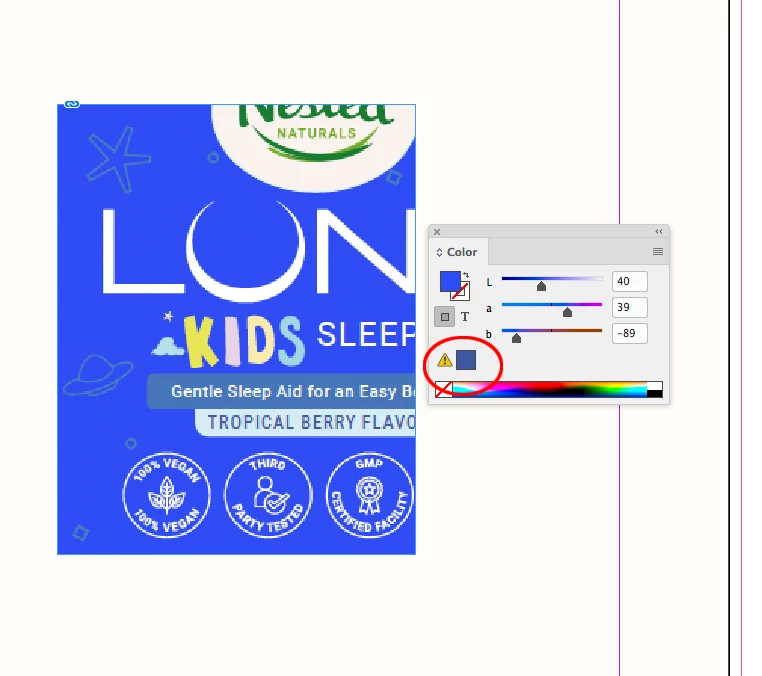
The blue in your sample is well outside of the typical CMYK color gamut, so it isn’t possible to match that color with process inks.


The Color panel displays a yellow warning triangle next to the closest printable color when a color is not inside of the document’s assigned CMYK space.


2 replies

rob day
Community Expert
Community Expert
September 9, 2020

There’s really not a Pantone Solid spot color that matches either. Photoshop’s Color Picker will show the closest Pantone color to a chosen Lab color:


Brad @ Roaring Mouse
Community Expert
Community Expert
September 9, 2020

Indeed. I was just suggesting what he could offer the client to get a brighter blue in print.

rob day
Community Expert
Community Expert
September 9, 2020

I think it is worth noting that both CMYK and RGB have gamut limits. Usually gamut discussions are about RGB colors that can’t be printed, but on a typical sRGB monitor, there are also CMYK colors that can’t be displayed—mostly in the blue/cyan/green range. That makes color managing the saturated blue part of the spectrum very difficult—impossible on a standard RGB display. In the end if the client is fussy about color they need to see a printed contract proof.

rob day
Community Expert
rob dayCommunity ExpertCorrect answer
Community Expert
September 9, 2020

The blue in your sample is well outside of the typical CMYK color gamut, so it isn’t possible to match that color with process inks.


The Color panel displays a yellow warning triangle next to the closest printable color when a color is not inside of the document’s assigned CMYK space.


Piotr5C7FAuthor
Participant
September 9, 2020

Thanks for the answer, so it is impossible to have the same color in CMYK pallet? So the solution is to make this label with CMYK color, will not be the same but printable? Is that correct? 

Randy Hagan
Community Expert
Community Expert
September 9, 2020

Likely, yes.


But rather than be surprised by the end result, I'd suggest going to your local Staples/Office Depot/FedEx Office and run a color copy from a PDF created with your file.


I recommend that because it's generally the most indifferent color reproduction you're going to get from that file. Not only will most any printer do a better four-color job, but it'll inexpensively identify any problem areas/colors you may want to correct for small stakes off a $2-5 color copy rather than hundreds or thousands of dollars at the end of a large print run.


Good luck,


Randy