mem33773068
Participating Frequently
March 30, 2023
Question

Indesign Actual ppi

  • March 30, 2023
  • 3 replies
  • 298 views

i am currently creating a high school yearbook.


I have it entirely finished when my printer returend proof saying that many of the photos the PPI is 72 (or at least below 300. to be clear not all of the images are this way.... but most of the student head shots. when I check the images i get this:
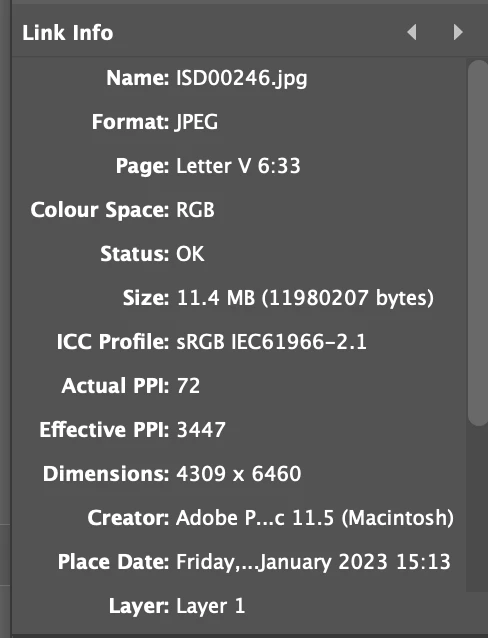
 

I do not have the time to place every picture in photoshop to fix this. The images are linked. The photos are large files but showing up as 72.


any ways of fixing this?


This topic has been closed for replies.

3 replies

Peter Spier
Community Expert
Community Expert
March 30, 2023

One other thing...

Have you made any sample prints yourself from the files you are delivering? If they don't look bad there's little reason to think your proofs will be bad.

rob day
Community Expert
Community Expert
March 30, 2023

Hi @mem33773068 , Are you providing an InDesign Package or an Exported PDF? If you are providing an ID file, the output resolution of the link in your capture is 3447ppi, not 72ppi. When you place an image InDesign scales the resolution with the image—the 72ppi image has been scaled to 2%, which increases the output res to 3447 (Effective Resolution)


As Peter notes, you can downsample on a PDF Export, so if you are providing a PDF, check the resolution in the exported PDF.

Peter Spier
Community Expert
Community Expert
March 30, 2023

The number that matters is the effective ppi, which in this case is far more than necessary.

Are you supplying the printer with a PDF? If so, check your export settings to be sure the image downsampling isn't set to 72 ppi (should be set to 300 for most work). If the settings are OK (and check all the images to be sure thay all have effective resolutions of at least 150), ask the printer where they see this problem. Normally I would say you need to find a better printer, but yearbooks are often the province of specialty shops and you don't get a choice.

All of that said, if all of the images are as large as your example, it's possible that the downsampling is causing quality degradation as standard downsampling to 300 ppi on export is throwing away 90% of the image data.