
Participant
June 11, 2024
Answered

InDesign adds a white border when trying to export with bleed

  • June 11, 2024
  • 3 replies
  • 3252 views

Hello! I am having the hardest time trying to figure out this problem. I've done every possible thing I can think to do, but I am a total novice to InDesign so I could totally be missing something obvious.

Im working on a catalog for the company I work for. It looks perfect on InDesign but when I try and export as a PDF, it creates a white border around every page of the document.

I've attached pictures of my document set up. I was advised to use .25 in bleed and slug. I have tried it with only .25in bleed and no slug. 

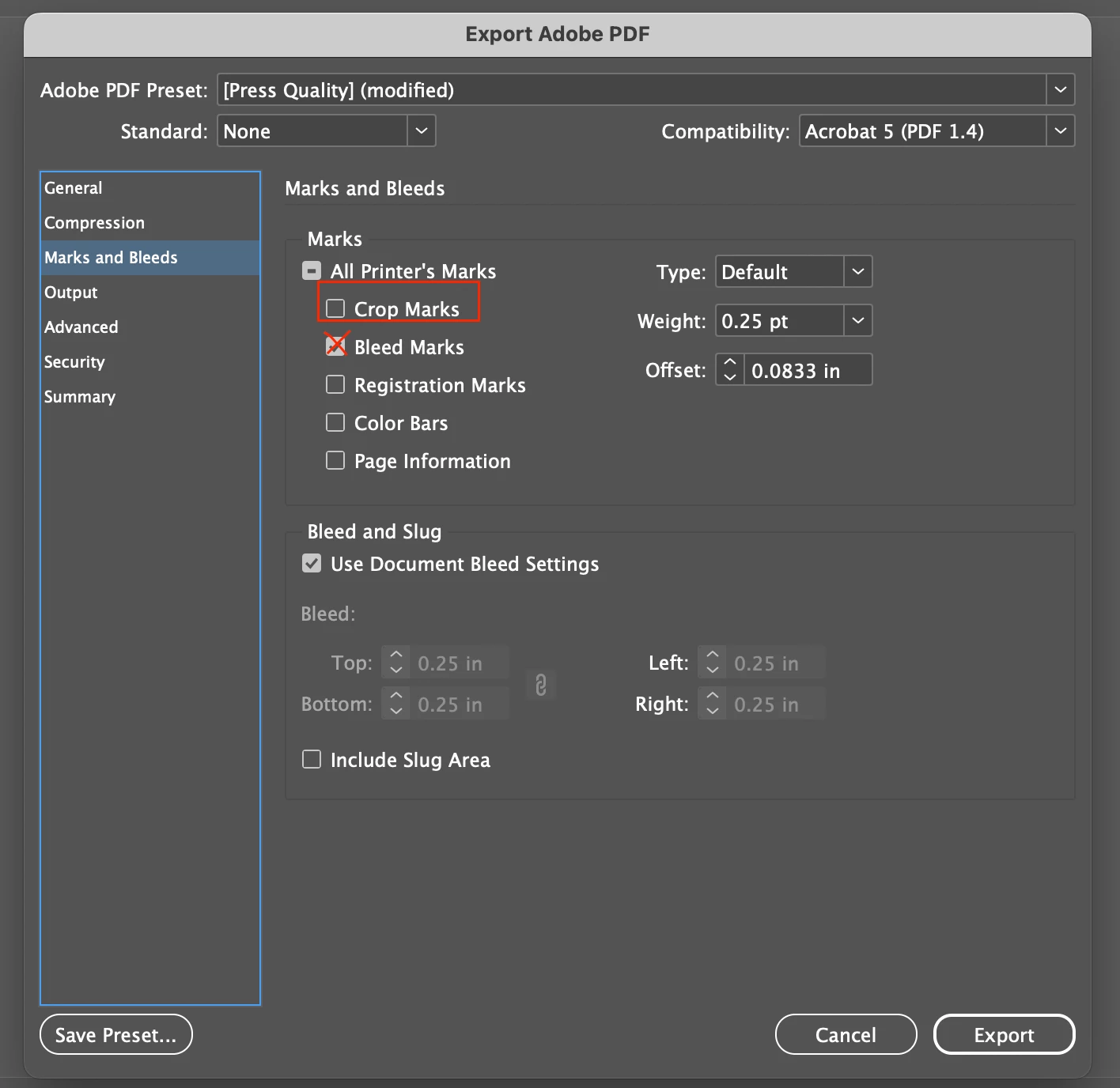
I also attached pictures of the "general" screen when exporting and the "marks and bleed" page when exporting. I have tried selecting and unselecting all options. 

Separate but completely related issue: I decided okay well I will just 0 out all bleed/slugs so that i can at least export this catalog as a PDF to upload to the company's site (I exported it perfectly fine before I ever even touched the bleed, just as a test before it was finished and there was no white border) - and now after ive messed with bleed, even with 0 bleed on the document set up or the export page, there is STILL a white border. What am I doing wrong???
This topic has been closed for replies.
Correct answer jmlevy

Don't tick “bleed marks” on your export seetings but “crop marks”.

3 replies

jmlevy
Community Expert
jmlevyCommunity ExpertCorrect answer
Community Expert
June 11, 2024

Don't tick “bleed marks” on your export seetings but “crop marks”.

Participant
June 11, 2024

I will try this!!! Thank you! 

Frans v.d. Geest
Community Expert
Community Expert
June 11, 2024

You seem to misunderstand what bleed is: elements need to extend in that area. There is no white border, that is the page size with bleed and will be cut in binding.

You need to educate yourself a bit further on this matter 😉

Participant
June 11, 2024

I only know enough on the matter to be dangerous and think I've made myself delerious going back and fourth over this, trying to get it done in a timely manner lol. I have the contents extended all the way to the bleed line in the document so I really had no idea why I thought I had a problem. Okay - so there really is no issue then and I'm just making myself crazy?? 

James Gifford—NitroPress
Legend
June 11, 2024

Really basic question... but are you aware that  you must extend content (background tint, images, graphic elements, etc.) into the bleed area?


Bleed does not automatically fill from the adjacent content, and a white bleed is... of zero use.

Participant
June 11, 2024

I did learn that in all my trial and errors. It needs to be extended to the blue outline, correct? My content was not extended so I assumed after I extended it that that would solve my problem. I believe I have done that now but am still getting the white border. 

James Gifford—NitroPress
Legend
June 11, 2024

I can't quite tell what's what on your layout, but on my system, bleed is indicated with a red border that should be visible (in Normal display mode) even over the extended content. Here's the corner of a page with bleed:

I've circled the corner of the bleed line; the black one is the page edge; the magenta one is the layout margin.


Empty bleed does no good; the idea is to extend the background elements so that when printed and trimmed, they go right to the page edge. You have to put something there as well as define the bleed.