

jomajupro
Participant
March 6, 2026
Resuelto

InDesign Adds Extra Blank Lines When Paragraph Leading Matches Baseline Grid

  • March 6, 2026
  • 2 respuestas
  • 64 visualizaciones

I am modifying a template I purchased and trying to get the paragraph styles and baseline grid to work together nicely. At the moment, when I set the paragraph style leading equal to the baseline grid (best practice, correct?) InDesign adds extra line breaks at the head of the paragraph. Example:
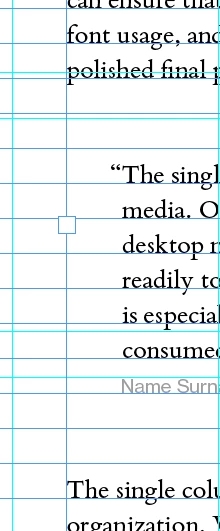
Two blank lines between paragraphs

This is all in one text frame. There are two blank lines between the first paragraph and the block quote, and between the block quote and following paragraph. The baseline grid is 14pt. The leading for the paragraphs is 14pt. When I reduce the paragraph leading to 13pt, it goes back to one blank line between the paragraphs, which is what I want.

Paragraph styles do not include any spacing before or after paragraphs that I can see. Am I missing something? Why is the grid/line spacing behaving this way?

EDIT: Apologies, never mind, I found it. There was in fact space added after the paragraph in two of the styles that I hadn’t seen yet. I didn’t realize that there were multiple paragraph styles being used.

    Mejor respuesta de jomajupro

    Thanks for the suggestion, Dave. I ended up finding the problem shortly after I posted the question. There was a separate paragraph style (with a nearly identical name--that’s why I missed it) that did include space after the paragraph. Once I found that style was being applied, I changed the paragraph style and everything worked as expected.

    2 respuestas

    Abhishek Rao
    Community Manager
    Community Manager
    March 12, 2026

    Hi ​@jomajupro,


    I hope the expert’s suggestion helped resolve the issue.

    If the problem is now resolved, please let us know so we can mark the thread accordingly. If you’re still noticing the extra spacing, feel free to share an update along with any additional observations, and I’ll be happy to look into it further.


    Looking forward to your update.

    Abhishek

    Dave Creamer of IDEAS
    Community Expert
    Community Expert
    March 6, 2026

    Try changing your Type preferences and check “Apply Leading to Entire Paragraphs”. See if that affects the alignment. 

    David Creamer: Community Expert (ACI and ACE 1995-2023)
    jomajupro
    jomajuproAutorRespuesta
    Participant
    March 12, 2026

    Thanks for the suggestion, Dave. I ended up finding the problem shortly after I posted the question. There was a separate paragraph style (with a nearly identical name--that’s why I missed it) that did include space after the paragraph. Once I found that style was being applied, I changed the paragraph style and everything worked as expected.