Inspiring
June 15, 2020
Answered

indesign adds white margins to exported selected areas to jpg

  • June 15, 2020
  • 5 replies
  • 1456 views

it export a group to jpg and in adds white margains on top and bottom.

if i deselect the texts the problem stop.

screencast: https://www.youtube.com/watch?v=TFbltN9Vxaw

how can i change it?

thanks!
This topic has been closed for replies.
Correct answer Laubender

Hi daezeq,

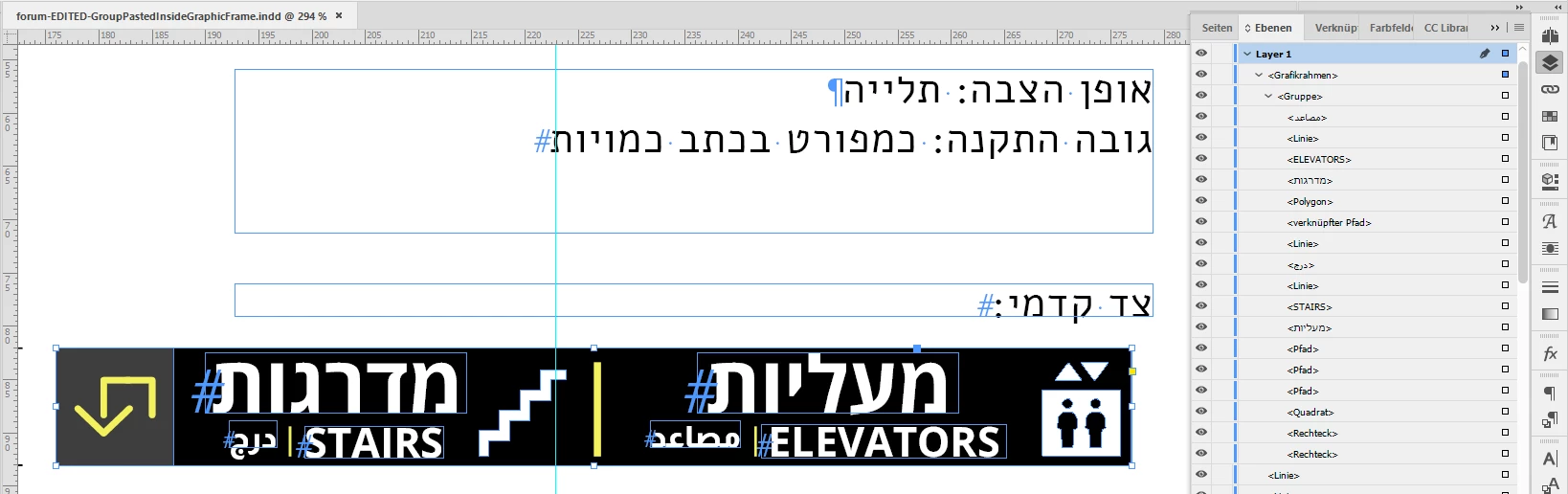
no. I mean a graphic frame like that:


The graphic frame is selected ( <Grafikrahmen> in my German InDesign ).

Inside the graphic frame is a group ( <Gruppe> ). And that group contains all the items you want to export.

See menu command Paste Inside to get contents of the clipboard inside a selected frame.


Details here: https://helpx.adobe.com/indesign/using/frames-objects.html


Regards,
Uwe Laubender

( ACP )

5 replies

Community Expert
June 16, 2020

Just draw out a rectangle with both tools and you know the difference.


Ahem. No, forgive me my bantering, it's not that easy:

As default rectangles that are drawn from the Rectangle Tool have a stroke definition of 1 Pt and color [Black].

Why? They follow a default object style.


The Rectangle Frame Tool does not do this.

You can be sure that if you draw out a frame with Rectangle Frame Tool there is no stroke and no fill.

Regardless the default object style that is defined in the Object Styles panel.


Two things you have to check, though:

[1] Is there any text wrap predefined when no object is selected.

If this is the case any new frame will have text wrap applied.

[2] The same principle applies to graphic frame fitting options.


Regards,
Uwe Laubender

( ACP )

danezeqAuthor
Inspiring
June 16, 2020

Thanks again Uwe

danezeqAuthor
Inspiring
June 16, 2020

I find it annoying to edit the contect inside graphic frame.

When i need to edit the content i cut the contect out side thew graphic frame, then ungroup it, editing, group again, and then pace into the graphic frame again.

since there is no isolation mode in indesign, is there any better way to edit it?

Community Expert
June 15, 2020

Hi danezeq,

see the InDesign document where I did Paste Inside the group of elements to that graphic frame:

https://www.dropbox.com/s/t8f0m1ptl4q82yb/forum-EDITED-GroupPastedInsideGraphicFrame.indd?dl=1


I used the "Rectangle Frame tool" to do that graphic frame:

https://helpx.adobe.com/indesign/using/drawing-line-or-shape-tools.html


Regards,
Uwe Laubender

( ACP )

danezeqAuthor
Inspiring
June 15, 2020

Thanks! Awesome!

BTW why do you use ""Rectangle Frame tool" and not "Rectangle tool" is there any difference?

LaubenderCommunity ExpertCorrect answer
Community Expert
June 15, 2020

Hi daezeq,

no. I mean a graphic frame like that:


The graphic frame is selected ( <Grafikrahmen> in my German InDesign ).

Inside the graphic frame is a group ( <Gruppe> ). And that group contains all the items you want to export.

See menu command Paste Inside to get contents of the clipboard inside a selected frame.


Details here: https://helpx.adobe.com/indesign/using/frames-objects.html


Regards,
Uwe Laubender

( ACP )

Community Expert
June 15, 2020

Hi danezeq,

thank you for the files!


I can offer two workarounds:


[1] Convert text to outlines before exporting to JPEG.

Undo that after you exported.


[2] Group the items you want to export.

Create a new graphic frame the size and position of your selection.

Cut the group and paste it inside the new frame.

Select the new frame and export to JPEG.


FWIW: I would report the issue as bug:

https://indesign.uservoice.com/


Regards,
Uwe Laubender

( ACP )


danezeqAuthor
Inspiring
June 15, 2020

By "Create a new graphic frame" You mean - Create a new spreadsheet?

Community Expert
June 15, 2020

Hi danezeq,

without looking into your InDesign document this is hard to tell.

Can you provide a sample document you attached with the forum's attach functionality?

Or save a sample to Dropbox or a similar service and post the download link.


Hm. Did you try to ungroup the group of objects before you do that export?


Thanks,
Uwe Laubender

( ACP )

danezeqAuthor
Inspiring
June 15, 2020

Yes i tried to ungroup it.

here is the file:


telavivinf.com/temp/forum Folder.rar