Known Participant
September 11, 2017
Answered

Indesign & All color profiles/No color profiles at export

  • September 11, 2017
  • 2 replies
  • 6108 views

Hello,

I'm struggling with this setting when exporting my document to PDF for printing.

I removed all the "profiles" settings (Edit - Assign profiles - discard). For the text, my blacks are C=0 M=0 Y=0 K=100.

The images have been saved in Photoshop as CMYK (Fogra 27).

When I export the document to PDF and set it up as "include all profiles", in Acrobat my blacks are now C=73 M=70 Y=62 K=78...

When I export and don't include profiles, the blacks are ok (C=0 M=0 Y=0 K=100), but the images looks colourless and missing shades.

The printer said they usually use "Fogra 27". But then they also said that they usually don't include profiles when exporting to PDF...

How to have the proper images looks how I made them and still have the proper blacks?

If I can't find any solution, I'm thinking about exporting without the profiles and the replacing the images directly into the PDF with Acrobat.

Any advices? Thanks in advance.
    This topic has been closed for replies.
    Correct answer rob day

    Well. It seems that all my black text shows as 0 0 0 1 with or without profiles.

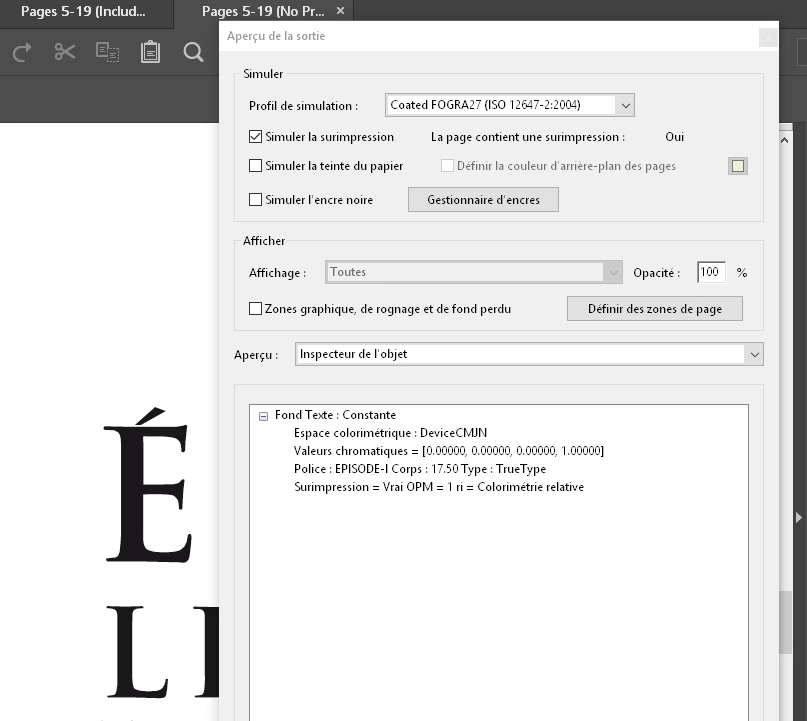
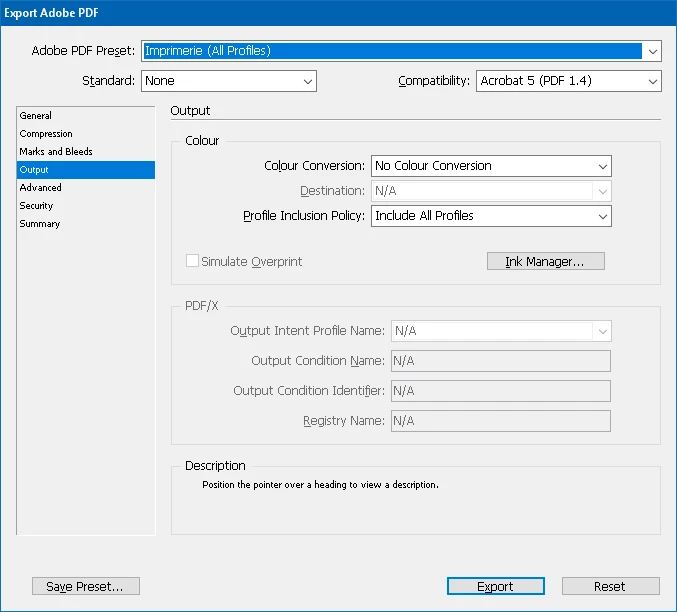
    With all profiles embedded in the export it says Fogra27:

    With no profiles it says "device cmyk":

    The printer said they "usually use Fogra 27". I assume they won't convert anything. They said that's my job to send them the proper document, they won't touch it.

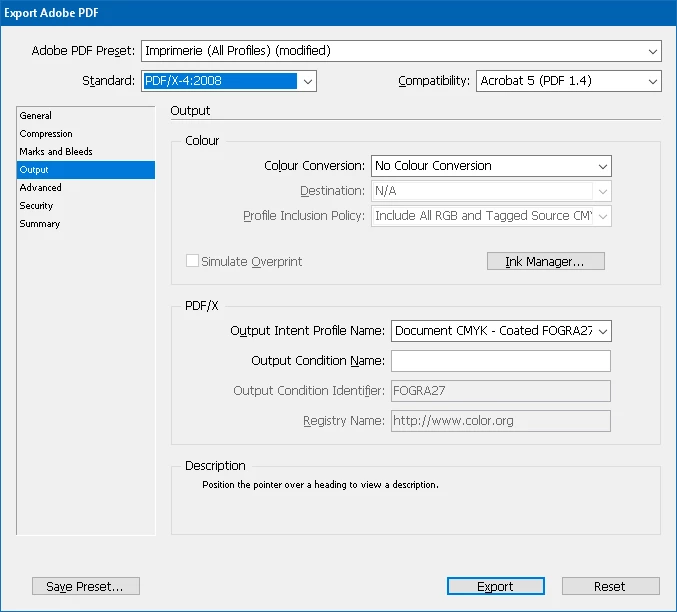
    Here are the output settings for these screenshots:

    Now, if I add "Pdf/x-4:2008" in the "standard" drop down menu, would that change anything? Would that be better?

    One other thing is that when I tested yesterday the 2 versions on another computer with the free version of Acrobat (there was no color picker, just with my eyes), I could see a huge difference in the colors and blacks.


    Well. It seems that all my black text shows as 0 0 0 1 with or without profiles.

    That's right, in both cases there was no conversion when you exported, so the numbers are unchanged. In your first example the black object you are sampling has an embedded profile because you chose Include All Profiles.

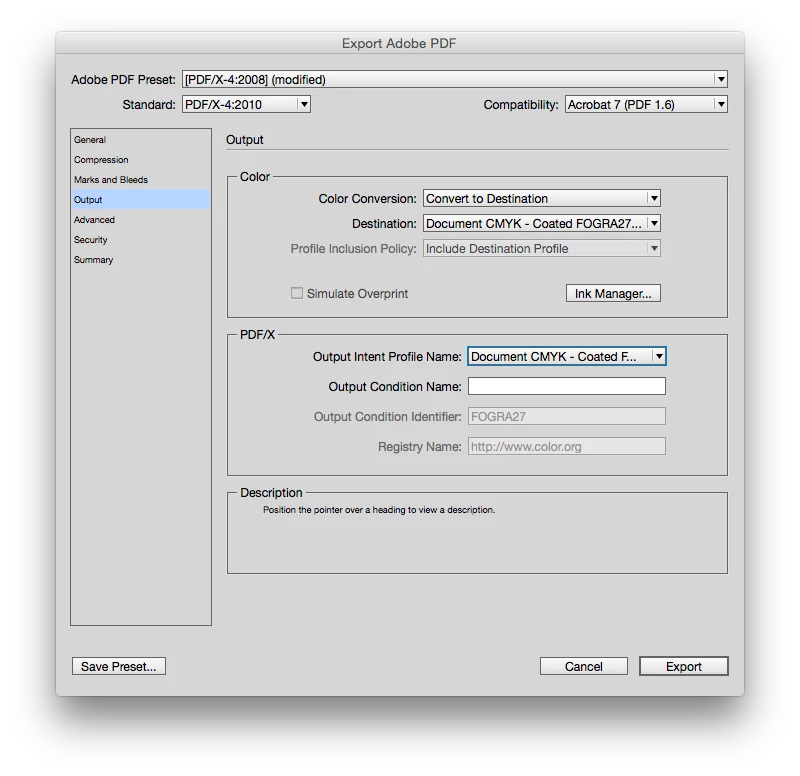
    You should use the latest PDF/X-4 preset. If your printer is requesting that all of the color be CMYK, make this adjustment to the default PDF/X-4 preset, where the destination is set to Document CMYK Coated FOGRA27.

    This will convert any process color (RGB, CMYK with a conflicting profile, or Lab) to FOGRA27 CMYK and everything will export as DeviceCMYK (no embedded profile). In this case the printer would have to actively force a color conversion to something other than FOGRA27 for you to get 4-color blacks. When you export to PDF/X-4, by default the PDF will open in AcrobatPro with the Simulation profile set to the Output Intent.

    2 replies

    rob day
    Community Expert
    Community Expert
    September 11, 2017

    I removed all the "profiles" settings (Edit - Assign profiles - discard). For the text, my blacks are C=0 M=0 Y=0 K=100.

    The images have been saved in Photoshop as CMYK (Fogra 27).

    Also, discarding profiles doesn't mean the document isn't being color managed—you can still get 4-color blacks with that strategy. Documents without profile assignments fall back to using whatever profiles happen to be currently set as Working spaces in Color Settings for color management. So if you were to discard profiles and leave the Color Settings' CMYK Working space as the default SWOP, then export with Fogra 27 as the destination, you would get 4-color blacks. For CMYK color it is important not to mix profiles—choose a single CMYK profile for all CMYK objects, and export using one of the PDF/X presets.

    AwaremanAuthor
    Known Participant
    September 11, 2017

    Hello. Thank you.

    What I did was testing it with the Acrobat tool.

    With the similation profile set as "fogra 27" is says 100% blacks. But when I turn it to the default swop profile, it is quadrichromy.

    I sent the file to the printer and she said it was quadrichromy.

    I tried to assign the profile fogra27 then export using the pdfx/4 setting. Same result.


    I'm lost, I don't know what to do. Color management seems so complicated and I'm new with this...

    rob day
    Community Expert
    Community Expert
    September 11, 2017

    With the similation profile set as "fogra 27" is says 100% blacks. But when I turn it to the default swop profile, it is quadrichromy.

    That would be expected because Acrobat is showing a simulation of what will happen if your printer converts from the Fogra 27 output intent to US Coated SWOP—the CMYK-to-CMYK conversion would produce 4-color blacks. But your printer is going to output to the intended Fogra 27 right?

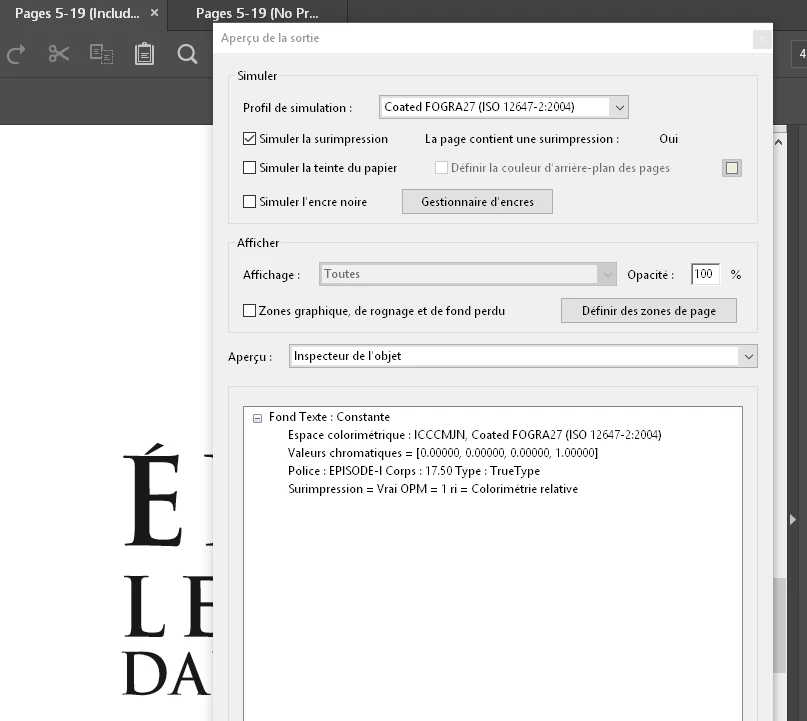
    Set the Preview drop down to Object Inspector and it will show the actual color with no simulation when you click on an object. Here I've exported to PDF/X-4 and it shows the black fill's actual color.

    Also note that the ColorSpace is listed as DeviceCMYK, which means there's no profile embedded with the black fill. The PDF/X presets include an output intent, but any object that is document CMYK exports without a profile (DeviceCMYK). You would only get 4-color blacks if you printer purposefully converted your Fogra 27 document to some other CMYK space like US Coated SWOP.

    You might confirm that the printer will output to Fogra 27 and try resubmitting using a PDF/X preset.

    rob day
    Community Expert
    Community Expert
    September 11, 2017

    Make sure your document's assigned profile is also Fogra 27. For existing documents you have to assign the profile via Edit>Assign Profiles...  (not the Color Settings' Working CMYK space). If your document has the default US Coated SWOP profile assigned and you export with Fogra 27 set as the destination, you will get 4-color blacks. Black only blacks that get converted to 4-color always indicate that there is a profile conflict somewhere in the workflow.

    With all of your images and the ID document assigned the same Fogra 27 profile, you can use either the PDF/X-4 or PDF/X-1a presets with the destination set as Document CMYK and the CMYK values and preview will export unchanged.