Participant
April 18, 2025
Question

InDesign automatically adjusting kerning on quotation marks

  • April 18, 2025
  • 1 reply
  • 147 views

Is there a reason/setting that InDesign automatically changes the kerning on ending quotation marks? Sometimes it happens and sometimes it does not, but it ends up putting the quotation marks directly over the ending punctuation. 
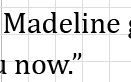
 When I set it to zero, it looks a lot less squished.
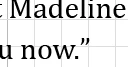
Is there a way to get it to not do this?


1 reply

Scott Falkner
Community Expert
Community Expert
April 18, 2025

The parenthesis indicates the kerning value is from the font’s metrics: it was designed that way.


If you don't want that kerning you will have to manually change it or change the kerning to either a specific value or Optical. You can create a character style with only Optical kerning applied, then use a GREP Style to apply it to every .” and ,”.


Here I created an Optical kerning character style and used GREP to apply it to 

(\.|\,)”