
InDesign Book (.INDB) exporting to PDF spreads
Hi there,
I've been trying to export a PDF magazine as spreads from an INDB file (InDesign Book including multiple INDD files).
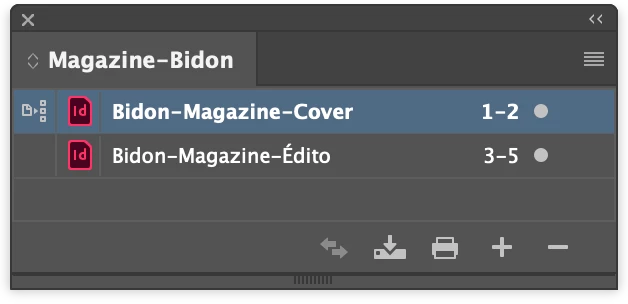
The problem is: if a file ends on an even page (left page), the next file begins on an odd page (right page), but InDesign seems incapable of exporting both pages as a single spread. Instead, ID exports the last page from the first file as a single page, then the first page of the other file as another single page. The last pages are correctly merged in a spread.
The first file has an even number of pages: it ends on an even page (left page).
The exported PDF: the second page (last page from the first INDD file) gets exported as a single page, as well as the third page (wihch is the first page of the second file). Pages 4 & 5, on the other hand, are exported as a spread, as expected.

Now since spreads are considered "single" pages by Adobe Acrobat, it doesn't seem possible – as far as I know – to re-organize the PDF file pages and create a spread out of pages 2 & 3.
Of course, one could avoid ending a chapter on an even page so that each chapter would begin on a left (even) page: InDesign would then export spreads as expected. The problem is, the différents files in the book are created by different designers, and pages count vary within each file (sometimes the page count is odd, sometimes it's even).
So I wish InDesign could just export a Book as a PDF with correct spreads, by merging pages 2 and 3 (that come from two different INDD files) as a spread, like it does for pages 4 and 5 (that come from the same INDD file).
Any ideas?


 AdChoices