
Participating Frequently
November 3, 2016
Answered

InDesign CC 2017 Links Panel no longer show missing links

  • November 3, 2016
  • 2 replies
  • 9523 views

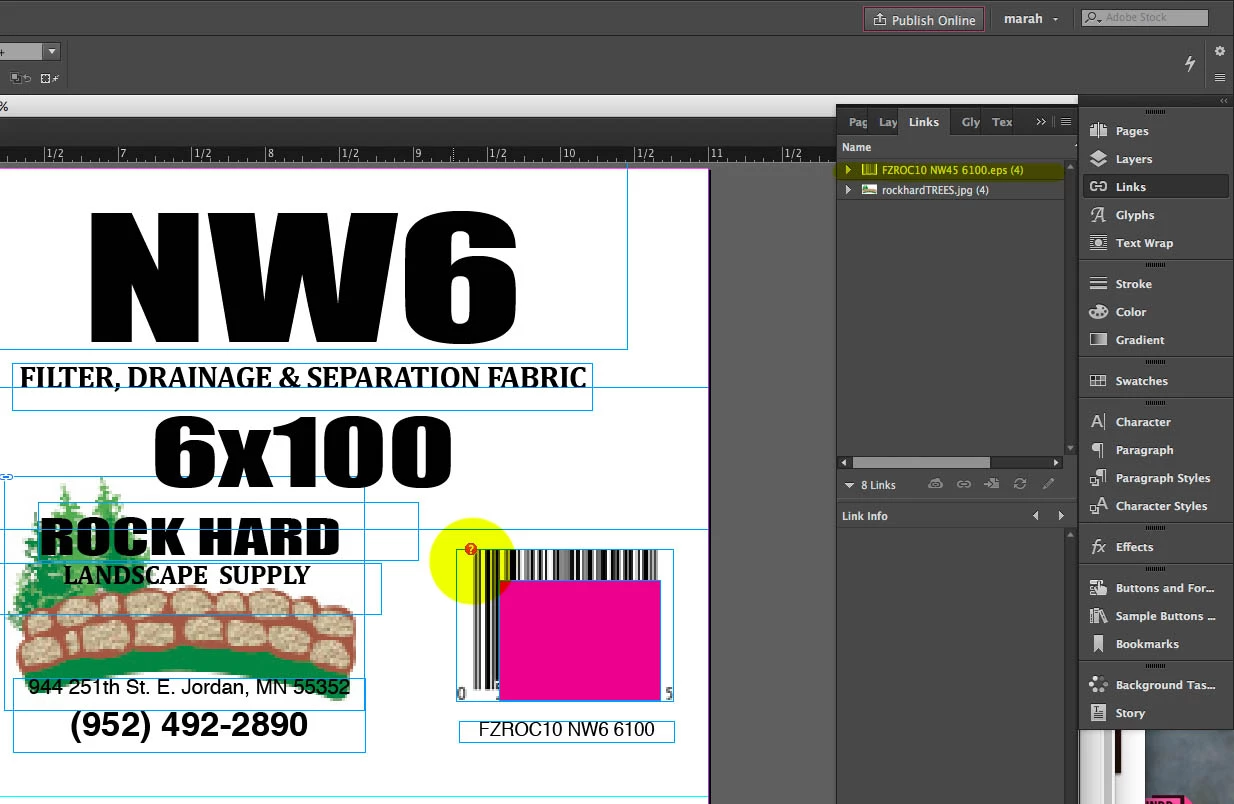
I just updated to CC 2017 and my links panel is no longer showing me which links are missing. How can I bring this back?

There used to be an icon in the link panel designating that it was the missing link so I didn't have to go find it on the page(s).
This topic has been closed for replies.
Correct answer Dan Byer

You sure it's not there? I feel like I can see like one pixel of the corner of the icon hanging right over the edge of that palette. And you've got a whole bunch of horizontal scroll bar there, too. Maybe you just need to open the panel a little wider so you can resize the columns?

2 replies

Dan ByerCorrect answer
Inspiring
November 3, 2016

You sure it's not there? I feel like I can see like one pixel of the corner of the icon hanging right over the edge of that palette. And you've got a whole bunch of horizontal scroll bar there, too. Maybe you just need to open the panel a little wider so you can resize the columns?

Steve Werner
Community Expert
Community Expert
November 3, 2016
Participating Frequently
November 3, 2016

Restoring did nothing, but Dan was correct. It was hiding further off to the side. I was able to resize the columns and move it closer to the names of the files.

Inspiring
November 3, 2016

Excellent. I love easy fixes!