
denjimen
Participant
November 12, 2018
Answered

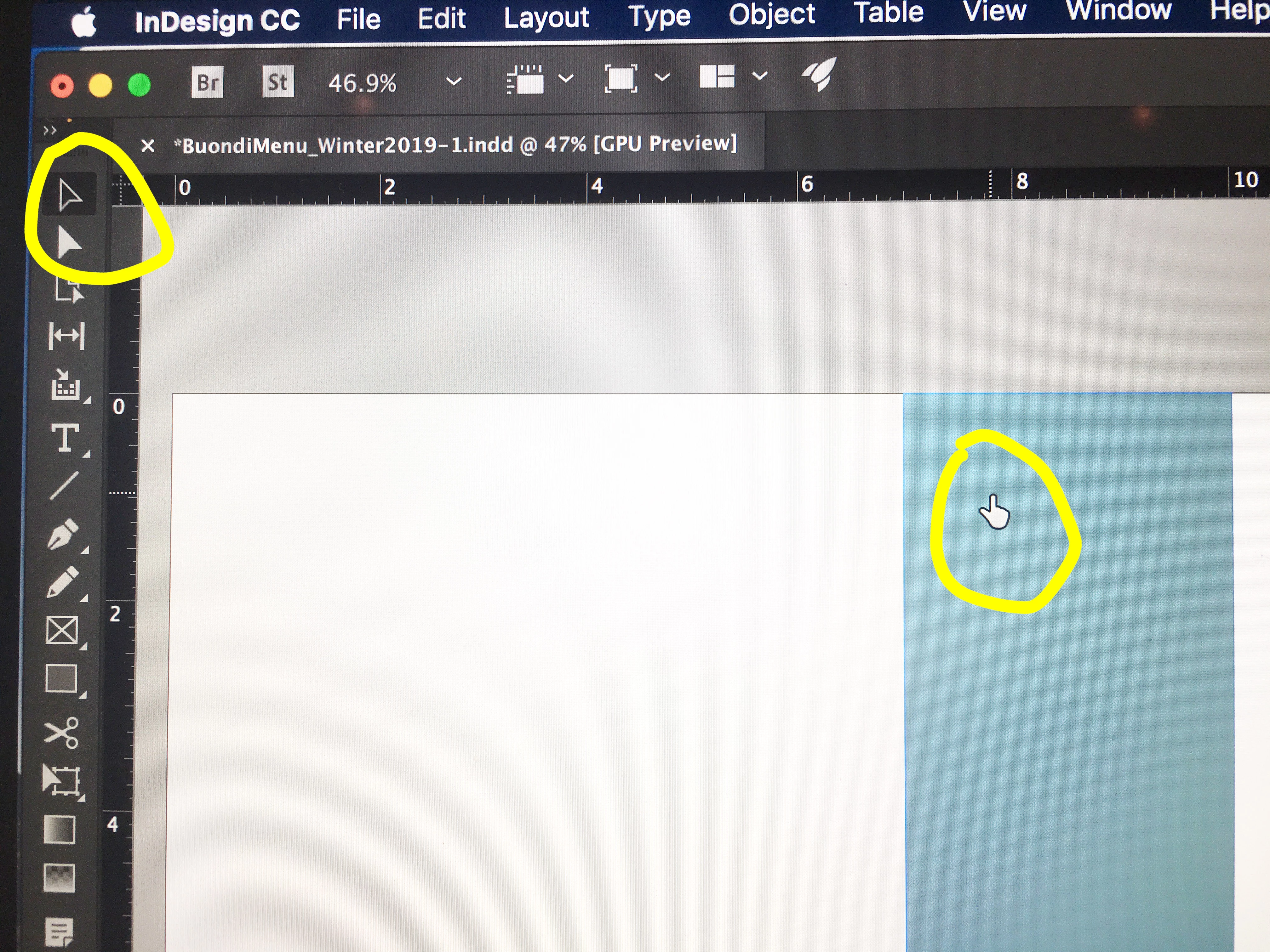
Indesign CC 2019 Pointer stuck in hand icon

  • November 12, 2018
  • 23 replies
  • 83241 views

Hello all,

I recently updated to Indesign CC 2019. I immediately noticed that the pointer (selection tool) is now a hand icon. I've searched and searched forums to no avail. So, is this a new feature? If so, can it be changed? Or is this a bug? I don't like it at all.

I am running Mojave on a MBP Retina.

Thanks.
Correct answer Ellie_Norton

I had this issue today. I just restarted InDesign and it's gone back to normal

If in doubt, restart.

23 replies

Participating Frequently
December 12, 2019

Just waiting for the computer to catch up works for me. It works on the spinning beach ball too. Adobe products are very slow, especially if you have one or more open. 

joshuajamesdesigns
Participating Frequently
November 19, 2019

It's unfortunate that this is being marked as "correct answer" - this suggests that this issue has been resolved. Restarting, reinstalling, and updating is not solving this same issue for me as well. 

C-tin
Participant
October 2, 2019

With Terminal, I went to /Users/<usernam>/Library/Preferences/ and executed:

rm -rf Adobe*

which cleared all preferences for all of their apps.

You can clear it only for the app you have issues with on find other solutions from Adobe if you love/care for your preferences. I don't.

That frustrated I was!

(it seems they kept there preferences for the last 2-3 years and 4-5 versions of each Photoshop, Illustrator, etc...)

C-tin
Participant
October 3, 2019
Seems it is still not working... 🙂 Dropped using Illustrator on Mac, switched to Windows. 😐
Ellie_NortonCorrect answer
Participant
June 27, 2019

I had this issue today. I just restarted InDesign and it's gone back to normal

If in doubt, restart.

Participating Frequently
June 27, 2019

amen

Participating Frequently
June 26, 2019

I think i figured it out. was stuck in the hand mode instead of select. i then made sure i was logged in to the CC.

and voila! was fixed.

I suggest logging in again and seeing if it fixes it.

Participant
May 16, 2019

Same issue, very frustrating to work with. has been working fine for weeks and just started a couple of days ago, thought I might of hit a wrong button or something. Running on a MAC. Hope they can sort this out soon.

Srishti Bali
Community Manager
Community Manager
May 20, 2019

Hi Linda,

Thanks for reaching out. We are already tracking down this issue and it is found that this issue is generally found on the systems where some third party spell check utilities are installed. To help you further on this, I would request if you can share a few more details like:

  • OS ( exact version of MAC)
  • Version of InDesign
  • Screenshot if the issue
  • Is there any spell check utility installed on your system? For example Global auto-correct.

Thanks!

Participant
May 21, 2019

The programme actually shut down unexpectedly two days ago, very frustratingly, It also altered my layout, and when it opened back up the Pointer issue sorted it self out after the unexpected shut down.

Sent from my iPad

Participant
April 2, 2019

Same issue here...just updated to 2019 a few days ago. Cursor just suddenly switched to a hand. Doesn't matter what tool I switch to now, it is still a hand. I'm working on a Dell Precision tower 5810, running Windows 10. Logitech K780 keyboard.

Srishti Bali
Community Manager
Community Manager
April 4, 2019

Hi James,

We are extremely sorry to hear about this issue. I would request if you can share this issue on our Adobe InDesign Feedback page and share the link here. This is the best way of communicating with the Engineering and Product Management teams regarding issues and suggestions so they can be implemented in future releases.

You can also reach us Contact Customer Care for a live troubleshooting session. In case you face any problem while initiating chat please follow the steps shared here: How to initiate chat with Adobe Support?

Regards,

Srishti

Participant
April 16, 2019

So Adobe has zero advice? That's not good.

Participating Frequently
March 28, 2019

Same. The only additional insight I can provide is:

Mac OS X Mojave, which seems to be a bit of a troublemaker.

Also, I might be noticing this when I app-switch. I'm on a dual-monitor setup and it might be occurring when I switch to, like, Slack real quick.

Also, it might be happening when I Place docs. I'm doing a lot of Placing right now, and that might be related.

Restarting the software clears the issue - no system restarts necessary here.

Thais-scarlet
Participant
March 18, 2019

Any fix to this? I'm having the same problem. It happened out of nowhere halfway through working today and no matter what tool i select (selection, type, scissor tool - everything) it's this hand pointer. It's hard to use it as a selection tool because the rotation option at the corners of objects doesn't show up, for example. I took screenshots but for some reason the cursor won't show up in them.

Participant
December 27, 2018

I have the same problem. I think it's a bug. Restarting the application doesn't help either, I usually have to restart my computer. PLEASE FIX!