



michelb_8824
Participant
May 28, 2026
Question

InDesign CC 2026 document won't package document links

  • May 28, 2026
  • 3 replies
  • 24 views

Hi I am running the latest version of Adobe CC InDesign 2026 and am having real issues packaging the document and it’s associated links.

I have no errors on the document and all linked files are located within a links folder i have created within the folder structure. All links are stored on One Drive cloud.

Also the software keeps crashing when attempting to package.

The below alert keeps appearing. No idea what this means or what it relates to?
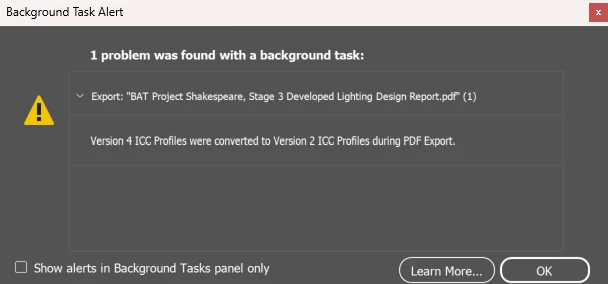
 

Any assistance would be greatly appreciated.

Thanks

    3 replies

    Abhishek Rao
    Community Manager
    Community Manager
    May 28, 2026

    Hi ​@michelb_8824


    Thanks for reaching out. Adding to the suggestions shared by the experts, could you also please try the recommendations discussed in these similar threads and let us know how it goes?

    How to overcome ICC profile warning & export an ID file to PDF | Community

    Version 4 ICC Profiles were converted to version 2 ICC Profiles | Community
    In particular, please try opening the linked images in Photoshop, converting them to another RGB profile such as Adobe RGB, resaving them, and then relinking them in InDesign. Also, while exporting, please check whether changing the Output setting from "No Color Conversion" to "Convert to Destination" makes any difference.


    Please let us know your observations after trying these steps.

    Thanks,
    Abhishek

    michelb_8824
    Participant
    May 29, 2026

    Many thanks for responding and the advice. I no longer have the warning notice and the document exports the PDF.

    However i still have an issue with packaging, although the document seems to package ok, it does not package any of the associated links. The links folder is empty?!

    Any help would be very much appreciated.

    Thanks

    Abhishek Rao
    Community Manager
    Community Manager
    May 29, 2026

    Hi ​@michelb_8824,


    Thanks for the update. I'm glad to hear the ICC profile warning and PDF export issue have been resolved.

    To help narrow down the packaging issue further, could you please confirm your Windows version and the exact InDesign version you're using?

    Additionally, does this happen only with this specific document, or do you see the same behavior when packaging a brand-new test document containing a few locally stored images? Also, are all linked files missing from the packaged Links folder, or only certain file types such as linked INDD files, PNGs, JPEGs, PDFs, etc.?

    If the issue is specific to this document, could you please try saving it as an IDML file, then open the IDML and save it again as a new INDD file. After that, try packaging the newly created INDD and let us know if the linked files are collected correctly.


    Please share your observations, and we'll take it from there.

    Thanks,
    Abhishek

    leo.r
    Community Expert
    Community Expert
    May 28, 2026

    In your OneDrive settings, is the option to have your files available locally enabled? (It should be.) As to the ICC profile conversion warning, it's unlikely to be related to the crash and I think it can be ignored. I'm sure others will provide additional info on this error. 

    Community Expert
    May 28, 2026

    I suppose the problem is with the links present on one drive. Try moving them to another folder and check if it works

    -Manan
    michelb_8824
    Participant
    May 28, 2026

    Hi, thanks for the response. I do already try this. I moved all links to my C Drive and relinked them all, but unfortunately the same issue?