Participating Frequently
February 6, 2019
Answered

Indesign CC Library items show box in Illustrator

  • February 6, 2019
  • 1 reply
  • 335 views

Hi

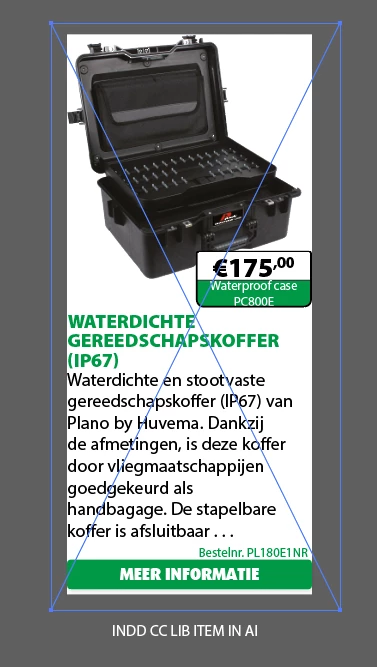
When creating a graphic CC library item with Indesign and then opening the CC item in Illustrator a new bouncing box appears.

Please see attached examples...

Is this normal? 

 

This topic has been closed for replies.
Correct answer Steve Werner

I think that your ambition is too great for what CC Libraries can do.

The item is way more complex than a "simple" InDesign object. You have a text frame including a table. And the table cells include anchored graphics. (Did you try using graphic cells, by the way?). You choose to make it a "graphic" to be stored in a CC Library.

An InDesign graphic is stored in two forms: (1) For InDesign, it's stored as an IDML (like a snippet) which can be reconstituted into the real thing. (2) For other apps, it's converted to PDF to be treated as a picture.

So what happens, because Illustrator doesn't "read" InDesign files, is that the object is turned into a PDF object that can be "ingested" by Illustrator (or Photoshop). There are no controls over how the PDF process works because as far as Illustrator is concerned it's just a (vector) picture.

Why are you bringing it into Illustrator anyway?

1 reply

Steve Werner
Community Expert
Community Expert
February 6, 2019

You'll need to give us a bit more information about how you created the InDesign file and how you interacted with CC Libraries to bring it into Illustrator:

Version of InDesign? Version of Illustrator? Show us the Layers panel in InDesign with the ad selected so we can see the relationship of the objects with a screen shot. When you added the ID ad, how did you  bring it into CC Libraries? When you brought the graphic from CC Libraries into Illustrator, which command did you use—Place Linked or Place Copied?

centervlAuthor
Participating Frequently
February 6, 2019

Hi Steve thanks for you time!

All version are CC2019 as tagged.

I now also see the difference between a Place Linked and Place Copied version of the item.

Before I just dragged the items from the CC Libraries panel onto the canvas in Illustrator, default dragging is Place Linked.

Texts in Place Linked items looks much better.

Place Copied items (or embed the linked items afterwards) can be ungrouped and the clipping masks can be released but I don't want to go that route.

The CC Item is a text frame with a table inside and some anchored frames in the table cells.

Even a simple basic empty table gets a bigger surrounding box in Illustrator.

I think AI don't like indesign tables.

regards,
Center

Steve Werner
Community Expert
Steve WernerCommunity ExpertCorrect answer
Community Expert
February 6, 2019

I think that your ambition is too great for what CC Libraries can do.

The item is way more complex than a "simple" InDesign object. You have a text frame including a table. And the table cells include anchored graphics. (Did you try using graphic cells, by the way?). You choose to make it a "graphic" to be stored in a CC Library.

An InDesign graphic is stored in two forms: (1) For InDesign, it's stored as an IDML (like a snippet) which can be reconstituted into the real thing. (2) For other apps, it's converted to PDF to be treated as a picture.

So what happens, because Illustrator doesn't "read" InDesign files, is that the object is turned into a PDF object that can be "ingested" by Illustrator (or Photoshop). There are no controls over how the PDF process works because as far as Illustrator is concerned it's just a (vector) picture.

Why are you bringing it into Illustrator anyway?