stephanieblebanon
Participating Frequently
February 5, 2018
Question

Indesign CC moving objects on it's own!

  • February 5, 2018
  • 3 replies
  • 2080 views

Indesign is moving objects on its own when I save and close the file, then open it again, all elements belonging to a certain paragraph style are completely shifting places across all of the document.

I manually moved them once, then a week later when I opened the document, they had moved again.

Is there a way I can move them all at once?

This is where they originally were
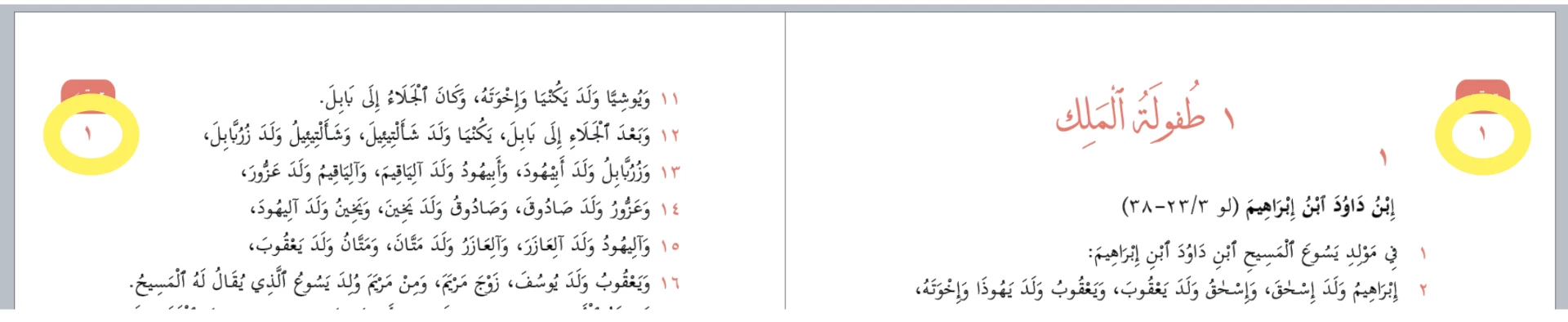
And this is where they shifted

This topic has been closed for replies.

3 replies

Zaid Al Hilali
Community Expert
Community Expert
February 6, 2018

I don't think the file is corrupted as only page number shifted nothing else. It is a Middle Eastern related matter. These circled numbers, are they on the master page? Are they Anchored objects?

stephanieblebanon
Participating Frequently
April 16, 2018

these numbers are not on the master page. they're just text boxes with texts inside.

Community Expert
April 16, 2018

And the text frames are not anchored?
Do the text frames exceed the page bounds or touch the spine?

Regards,
Uwe

Bill Silbert
Community Expert
Community Expert
February 5, 2018

Do you have more than one version of the typeface you are using (an opentype version and also a true type or postscript type 1 for instance)? If you do and other documents are using the other version and another version of the font is still open when you reopen the first document that could provide an explanation. If you are using a font utility like FontExplorer that has auto-activation for InDesign then you should make sure that you don't keep any conflicting fonts open permanently. That way only the correct font should open and be recognized when you open a document. If you have two documents open at the same time which use different versions of the same font then you could still get a conflict.

stephanieblebanon
Participating Frequently
February 6, 2018

Thank you for your input, I am using only 1 version of the font. and all text inside my document are using the same one. however only the numbers i circled in mu preview are moving, and only in 1 file

Community Expert
February 6, 2018

Hi Stephanie,

maybe it's worth a try:

Export the document to IDML.

Open the IDML file in InDesign and save with a new document name.

That should enforce a recomposition of all text frames and other things.

Regards,
Uwe

Steve Werner
Community Expert
Community Expert
February 5, 2018

InDesign version? Operating system version? CC Language version installed? Does this happen with just one file, or with all files?

stephanieblebanon
Participating Frequently
February 6, 2018

I am using the latest OS system, always update. The CC language is Arabic, I installed the ME version. This happens just with 1 file. I have similar files with other chapters, this does not happen there.