
Inspiring
February 16, 2026
Answered

InDesign CC2026 / CC2025 don't start after Update of macOS Tahoe Version 26.3

  • February 16, 2026
  • 2 replies
  • 12 views

After updating to macOS Tahoe 26.3, I can no longer launch InDesign CC2026 and CC2025.



InDesign CC2023 and CC2024, on the other hand, start normally.

Repairing the permissions via the terminal does not help:

sudo chmod -R 755 /Users/dtp/Library/Preferences/Adobe\ InDesign
sudo chmod -R 755 /Users/dtp/Library/Caches/Adobe\ InDesign
sudo chmod -R 755 /Users/dtp/Library/Application\ Support

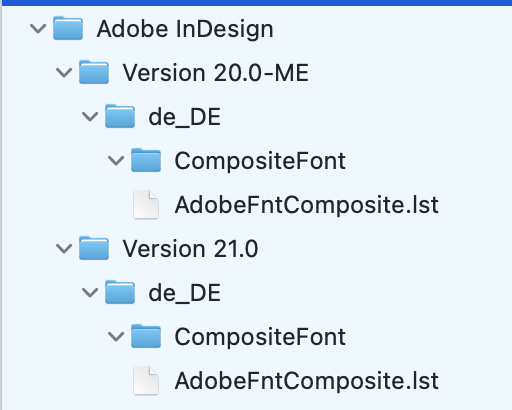
Temporarily renaming the Adobe InDesign Preferences folder creates new folders when starting CC2025 and CC2026, but when creating subfolders, InDesign does not go beyond the CompositeFont folder.


The SF-Symbols.app has also been updated.
Could this be related?


Do others share this problem?
Does anyone have any ideas on how to remedy this?


All best

Martin

    Correct answer Dave Creamer of IDEAS

    I was only on 26.2 but updated just now. InDesign opens without issue. 
    Follow the standard trouble-shooting procedures (some of which you did):

    Start InDesign and immediately hold down Cmd-Cntl-Opt-Shift keys.

    Delete your ~User/Library Cache files. (Hold Opt key and go to Go menu at desktop.)

    Sign out of Adobe CC app and log back in.

    Uninstall InDesign. delete any misc. cache folders, then reinstall.

    Use the Adobe CC Cleaner and clear out InDesign completely.


    Edit: I see you solved the problem.

    2 replies

    Dave Creamer of IDEAS
    Community Expert
    Dave Creamer of IDEASCommunity ExpertCorrect answer
    Community Expert
    February 16, 2026

    I was only on 26.2 but updated just now. InDesign opens without issue. 
    Follow the standard trouble-shooting procedures (some of which you did):

    Start InDesign and immediately hold down Cmd-Cntl-Opt-Shift keys.

    Delete your ~User/Library Cache files. (Hold Opt key and go to Go menu at desktop.)

    Sign out of Adobe CC app and log back in.

    Uninstall InDesign. delete any misc. cache folders, then reinstall.

    Use the Adobe CC Cleaner and clear out InDesign completely.


    Edit: I see you solved the problem.

    David Creamer: Community Expert (ACI and ACE 1995-2023)
    Inspiring
    February 16, 2026

    It works again!

    It was probably due to a defective font cache.
    After deleting
    ~/Library/Caches/Adobe/
    ~/Library/Caches/Adobe InDesign/
    InDesign CC2025 and CC2026 can be restarted.

    Best regards,
    Martin