Participant
Jan 22, 2020 7:24 PM UTC
Answered

InDesign Color Picker Shows "RGB Color Space" and I don't want it to.

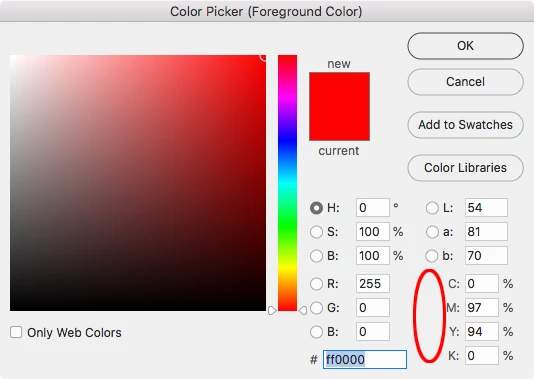
This is driving me crazy. For years, when I work in InDesign and I use the color picker, it shows up in CMYK color space. I did something, I don't know what, and now, the color picker shows RGB color space. Does anyone know how to change this back????


I don't use Bridge and I'm not planning to start, I know how to convert colors from RGB to CMYK... I am not interested in that information. I simply want the program to behave as it has for the past 20 years or more, with CMYK as the default color space, specifically, to show the Color picker in the CMYK color space.


HELP PLEASE!

Thanks!

rob day
rob dayCorrect answer
Community Expert
Jan 31, 2020 7:29 PM UTC

None of the applications let you select a CMYK color field view. PS and AI do have an H view:


23 replies

FLYP
Inspiring
Feb 2, 2022 12:39 PM UTC

Not sure if this is what you're refering to:
In the color picker if you have one of the parameters of the RGB selected, it'll show up like this:

If you select one of the HSB, then you'll have the "default" color picker we all are used to and love so much:

Hope this helps.
Have fun designing!
Flyp

Translate
rob day
Community Expert
Community Expert
Feb 2, 2022 12:50 PM UTC

Hi @FLYP The original post was from Jan 2020, the HSB Space view was added in CC2021 the following year.


In case it isn’t clear when the Add Swatch button is HSB you’ll get an HSB swatch or color, but the color is mode is actually RGB. The color is managed by the document’s RGB profile, and on an export to PDF with color set to No Color Conversion, it will be listed as an ICC based RGB color in AcrobatPro.

Translate
FLYP
Inspiring
Feb 16, 2022 8:54 AM UTC

Hello there @rob day ! Oops, bad timming on my part. My first try with Id was indeed with the CC2021 version, so I thought this was already an overall feature on all adobe programs for quite some time. Thank you for the correction! All the best!

Translate
Participant
Jul 21, 2020 3:29 PM UTC

Hi, did you ever get this solved? I am having the same issue, I think something reset the last time my apps updated and I cannot figure out how to get the color picker back to CMYK view and it is also driving me crazy!

Translate
Legend
Jul 21, 2020 10:43 PM UTC

As stated before, there are no way to show the Color Picker window in CMYK mode or (limited) color gamut.

Depending of your Color Settings for each defined color in HSB, RGB or Lab coordinates or component, there is an equivalent tint in CMYK. Therefore you open the Color Picker in a CMYK file select a color by any means and that becomes the CMYK tint to be used, when saved will be that same tint.

Open the Color Picker. Click inside any of the numerical windows for C, M, Y, or K. the button above shows save as CMYK. Thas's waht you are after?

Translate
Legend
Jan 23, 2020 7:57 AM UTC

I understand you want to use the Color Picker panel to select/create CMYK swatches.

And you are faced with an Add RGB Swatch button.


Well, just click into any of the CMYK % number windows.

Button will show Add to CMYK.

Translate
Participant
Jan 31, 2020 6:14 PM UTC

Thank you for your reply. I would like the Color Picker to be displayed in CMYK so that when I am choosing a color, I am already looking at a CMYK model. I haven't been able to figure it out yet. 

Translate
rob day
Community Expert
rob dayCommunity ExpertCorrect answer
Community Expert
Jan 31, 2020 7:29 PM UTC

None of the applications let you select a CMYK color field view. PS and AI do have an H view:


Translate
Ashutosh_Mishra
Inspiring
Jan 22, 2020 9:08 PM UTC

Hi Mary,


Thanks for reaching out. In addition to Rob's great response, I'd recommend checking out help article https://helpx.adobe.com/in/indesign/using/color-1.html#select_a_color_with_the_color_picker for more information about Color Picker in InDesign.

Hope it helps.


Regards,

Ashutosh

Translate
rob day
Community Expert
Community Expert
Jan 22, 2020 8:16 PM UTC

Could you be confusing Photoshop and InDesign‘s Color Pickers? Photoshop and Illustrator have an HSB color view, and InDesign does not:


The InDesign Space View can be R, G, B, L, a, or b


Photoshop has the added HSB view:


https://community.adobe.com/t5/indesign/how-do-i-achieve-the-same-hsb-colour-photoshop-in-indesign/m-p/10088737

Translate
Participant
Jan 31, 2020 6:13 PM UTC

Hi Rob,

Thanks for your reply.

I am definitely in InDesign and my color picker (when I double click on the foreground color in the toolbar) is displayed in RGB. I don't want it to be displayed in LAB color either. It used to be displayed in CMYK and I am trying to get back to that. I don't want to pick a color in RGB or LAB and then simply add a CMYK swatch... I want to see the color picker in CMYK so that when I am choosing the color I am already seeing it in (a simulated) CMYK version. Ahhh! it's driving me crazy.


As I mentioned. I opened up Bridge for the first time and I think it synched some color profile, but essentially wrecked the color settings that I was used to.  I just want everything in InDesign to function in a default CMYK mode like it used to. 

Translate
rob day
Community Expert
Community Expert
Jan 31, 2020 6:41 PM UTC

InDesign’s Color Picker has not changed, its space view (the field of color you pick from) always been limited to the representations you get by clicking the R, G, B, L, a, or b radio buttons.


The color mode of the picked color depends on where your cursor is. If you insert your cursor in one of the C, M, Y, or K fields, the Add Swatch button will read Add CMYK Swatch, and that will be the color mode of the picked swatch.


The Color Panel also has a color field to pick from and if you set the panel’s mode to CMYK the field will be limited to a CMYK palette:


InDesign doesn’t have a document color mode, you can create RGB, Lab, or CMYK colors and swatches and use them within the same document. The Document Setup lets you choose an intent, but that doesn’t stop you from mixing color modes, it simply sets up the initial color mode of the default swatches to either RGB or CMYK


Translate
David Popham
Participating Frequently
Jan 22, 2020 7:59 PM UTC

If you're referring to the Color panel, with no documents open, hold the cursor over the color ramp at the bottom and Shift + click to cycle through color models until it shows CMYK.

Translate