


Inspiring
May 26, 2026
Question

InDesign complaining about font that obviously isn't missing

  • May 26, 2026
  • 5 replies
  • 78 views

We get this all the time. InDesign will gripe about a few characters in a document. So you can click on the error, see that yes once again Times Roman is applied to some invisible character, and then change the character to match the rest of the document.

But this isn’t enough. Now InDesign will complain about that font for those characters, even though it’s obviously installed and used for tens of thousands of other characters in the document.

Anybody have a workaround for this defect?

Thanks!
 

    5 replies

    Inspiring
    May 27, 2026

    .

    Mike Witherell
    Community Expert
    Community Expert
    May 27, 2026

    Hi Jupa and Thomas,

    In these paragraphs, are they carefully controlled by means of a paragraph style? This, of course, is key to operating an InDesign document with the fewest surprises and irritations.

    Also, no Character Styles interfering?

    Only loosely related: in Preferences > Type > Type Options > have you checked on the one called “Apply Leading to Entire Paragraphs”?

    Mike Witherell
    Inspiring
    May 27, 2026

    Sim, aqui trabalho com os estilos de caractere e parágrafos. O problema tem ocorrido mais porque as fontes da Adobe não estão sincronizando corretamente.

    Abhishek Rao
    Community Manager
    Community Manager
    May 27, 2026

    Hi ​@Thomas_Calvin  and ​@Jupaganelli


    Sorry to hear you’re running into these persistent missing font warnings. Could you please confirm the details asked by the expert and also share the exact InDesign version and OS details you’re currently using?

    Additionally, please let us know whether this happens only with a specific document or across multiple files as well. Is the same font family always involved, or does it vary between documents?

    If the issue seems tied to a particular file, please try exporting the document to IDML, reopen the IDML file, save it again as a fresh INDD, and then test whether the missing font warning still appears. Please also try clearing any stale hidden character formatting around the affected text.

    If you notice the warning is consistently associated with certain text frames, I’d recommend recreating those text frames manually and testing again. Also, please try clearing the font cache and checking for duplicate or conflicting font installations using the steps shared here:
    https://helpx.adobe.com/fonts/kb/troubleshoot-fonts-illustrator-indesign.html

    Please share your observations after trying these steps so we can investigate this further if needed.


    Thanks,
    Abhishek

    Inspiring
    May 27, 2026

    Thanks for the reply. This is in v 21.3, Windows.

    It was happening in multiple documents. Preflight would show font errors, always involving Times New Roman. Double-clicking on an error in the preflight dialog would go to the page in the document, but no character was highlighted and Shift-arrow did not appear to select the complained-about character. I couldn’t determine which side of the insertion point the problem character resided on. I suspected it was a return or end-of-story character.

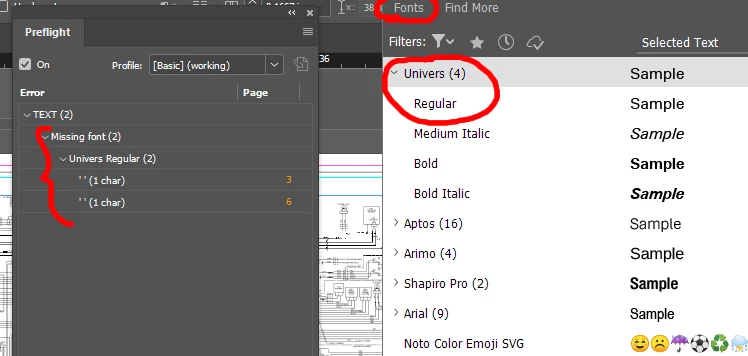
    After double-clicking on the errror, I would go up to the formatting toolbar and change the font from Times New Roman to the font used everywhere else in the document (IUnivers). This would cause the error to go away in the Preflight dialog… only to be replaced by another error nonsensically complaining about Univers (screen shot attached).

    Pulling up the Type / Find/Replace dialog still showed Times New Roman as the problem. Replacing it here did, in the end, eradicate it from the document. I had to systematically do this for every document in our book… about 50-70 files.

    So… three problems here.

    1. The nonsensical feedback in the Preflight dialog.
    2. There are two Find/Replace dialogs. You can search for formatting in Edit / Find/Replace, so I wouldn’t have guessed that there was another Find/Replace in some other menu, designed for formatting.
    3. InDesign’s book functionality desperately needs to be made useful. The fact that we can’t even search across all documents in a book is absurd. Then there are all of the problems with syncing styles, master pages, and so forth.

    Again, thanks for the prompt reply.

    rob day
    Community Expert
    Community Expert
    May 27, 2026

    The nonsensical feedback in the Preflight dialog.


    Any insertion point has an applied font so preflight is simply telling you if any text, which includes insertion points, has a missing font. If I run this script on a text frame with 1 insertion point selected:


    var s = app.selection[0]
    alert("Current Insertion Point’s applied font name:\r" + s.insertionPoints[0].appliedFont.name)

    I get this:


    rob day
    Community Expert
    Community Expert
    May 27, 2026

    Does the font also show as missing in Type>Find/Replace…?


    Inspiring
    May 27, 2026

    Yep, thanks. See my reply above.

    Inspiring
    May 26, 2026

    Infelizmente esse problema é recorrente e o InDesign vem fazendo isso mesmo sem utilizarmos determinada fonte. Também estou tendo problema, mas como não se resolve, estou trocando manualmente e observando se isso não prejudica o espaçamento no documento.

    Inspiring
    May 27, 2026

    It turns out that there’s a second Find/Replace dialog under the Type menu. You can use that to replace the font throughout the whole document. Be sure to select the bad font in the list, select a good replacement at the bottom of the dialog, and be sure to press Change All. Pressing Done does nothing.

    Inspiring
    May 27, 2026

    Sim, sim. Manualmente, que eu digo, é usar a troca pelo menu e substituir todas indesejadas ao mesmo tempo. :)