paigen6813445
Participant
March 27, 2019
Answered

Indesign Crashing

  • March 27, 2019
  • 3 replies
  • 510 views

Hey

I use indesign everyday and over the last 3 days, every 15min it would crash and close down on me. I have sent my laptop away and it started to use the work computer. I had to download indesign on the new Mac and it is doing the exact same thing. Is anyone else experiencing this??
    This topic has been closed for replies.
    Correct answer Michael Bullo

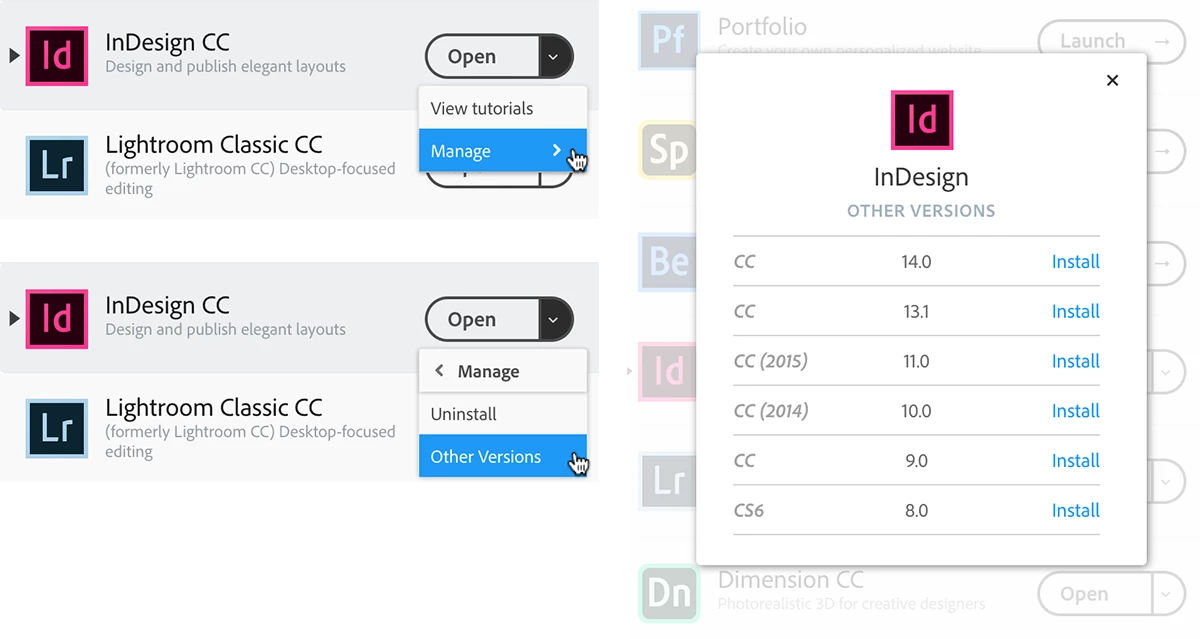
    I agree with Eugenio.NYC that you should try resetting the preferences. If you can't get the latest version of InDesign working you can always try installing an earlier version from the Adobe CC app. It's also possible to have multiple versions of programs like InDesign installed on any one machine at the same time.

    3 replies

    Srishti_Bali
    Legend
    April 5, 2019

    Hi Paige,

    We’re so sorry to hear about this. We have released an update for InDesign CC2019 (v 14.0.2) which contains some stability fixes. If you are not already on 14.0.2, then we recommend you to update to latest version.

    If you still face this issue even after updating, please submit the crash report to us(Guidelines to submit crash are available at https://helpx.adobe.com/indesign/kb/submit-crash-reports.html)

    Also, please share the following information:

    • Reproducible Steps – What were you doing when InDesign crashed?

    • Error snapshot or video recording of the issue.

    • Is the issue related to a specific document(s)/asset(s)? If yes, can you please share the document(s)/asset(s) with us?

    • Does trashing InDesign Preferences and Cache(Set preferences in Adobe InDesign ) help resolve the issue?

    Resetting preferences will remove all the custom settings and InDesign will launch with default settings. You can also take a backup of the folders in case you want to. Location is mentioned in the article.

    Regards,

    Srishti

    Michael Bullo
    Community Expert
    Michael BulloCommunity ExpertCorrect answer
    Community Expert
    March 28, 2019

    I agree with Eugenio.NYC that you should try resetting the preferences. If you can't get the latest version of InDesign working you can always try installing an earlier version from the Adobe CC app. It's also possible to have multiple versions of programs like InDesign installed on any one machine at the same time.

    Participant
    April 8, 2019

    I tried everything listed, then saw your post and installed an earlier version. That did the trick!

    Eugenio.NYC
    Participating Frequently
    March 28, 2019

    Hi, did you reset preferences?

    Preferences in Photoshop