

sarahpeller
Known Participant
May 19, 2018
Answered

Indesign creating huge file sizes when exporting

  • May 19, 2018
  • 6 replies
  • 12193 views

I've been using Indesign for a long time and have never had these problems before. Suddenly when I export a pdf, they are all exporting to very large sizes. I just went into an old file and updated 2 photos (replaced them with slightly different ones). This should have produced a file that was pretty much the same size as the previous version, once I exported to pdf. The older version file size was 972 KB. This latest one that I just saved was 198 MB.

None of my files seem to be embedded... I'm not seeing the embedded file icon next to any of them.

What could be causing this? I'm having weird troubles with all of my Adobe Programs right now and this one seemed to crop up at the same time. People have been suggesting that maybe I need a new graphics card. Could this sort of issue be related?

Thanks for you your help!

- Sarah
Correct answer Scott Citron

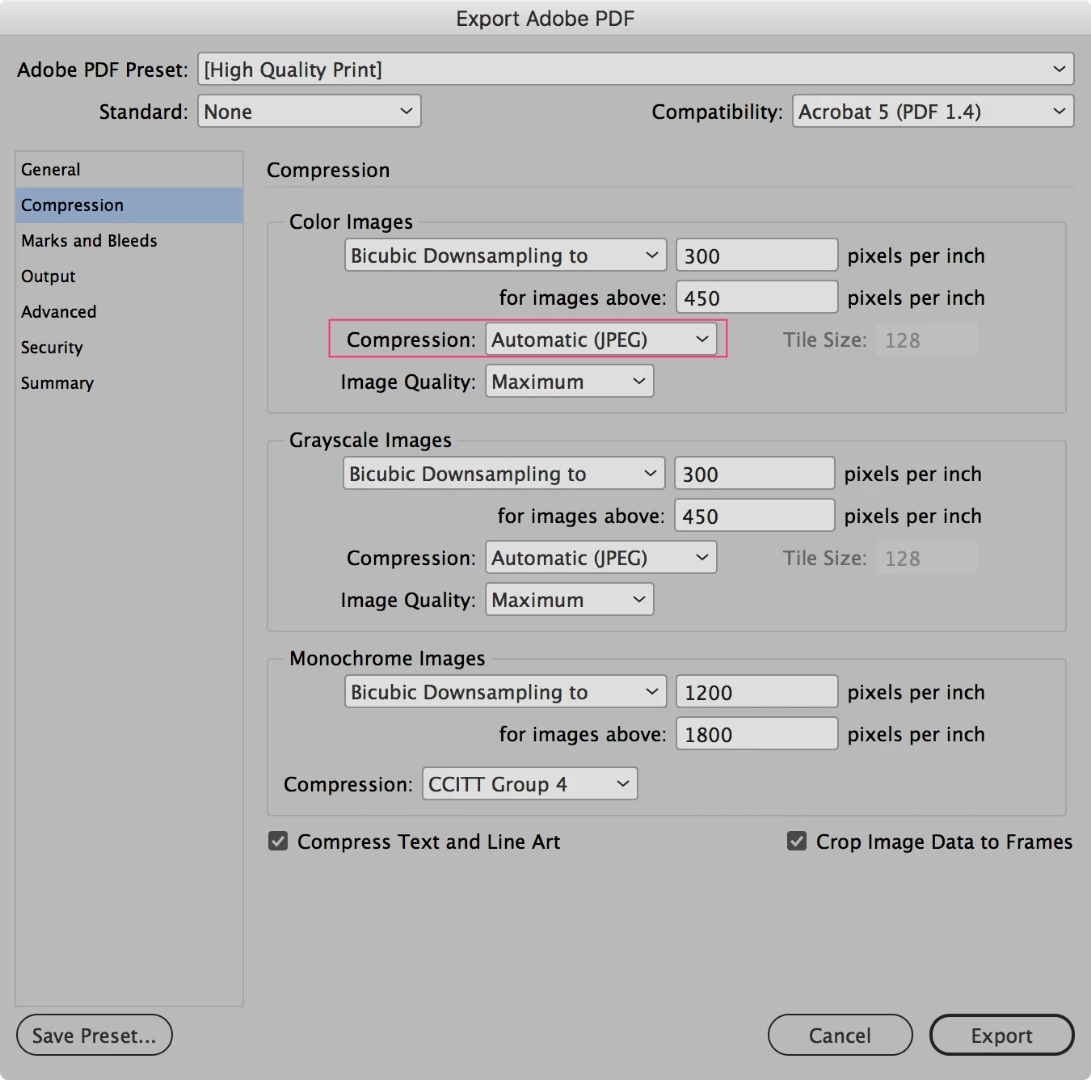
I can't imagine what your graphics card has to do with this. Check your PDF export settings > Compression and use Automatic (JPEG) or JPEG compression. None or ZIP will create a large, uncompressed PDF.

6 replies

Srishti_Bali
Legend
May 22, 2018

Hi Sarah,

I would like to know if the above mentioned suggestions worked for you, or the issue still persists.

Kindly update the discussion if you need further assistance with it.

Thanks,

Srishti

joeadukwu
Participant
October 21, 2021

I have tried all the suggestions above and still haven't gotten a solution to this problem.

BobLevine
Community Expert
Community Expert
October 21, 2021

What problem? There's a limit to how small you can get a file and you've given us no details at all including your definition of large.

rob day
Community Expert
Community Expert
May 20, 2018

I just went into an old file and updated 2 photos (replaced them with slightly different ones). This should have produced a file that was pretty much the same size as the previous version, once I exported to pdf. The older version file size was 972 KB. This latest one that I just saved was 198 MB.

It could be metadata being brought in with the new images. Look at this thread starting with post #57:

Re: File size is too big

ceyhun_akgun
Legend
May 20, 2018

In some cases it may be necessary to try out old remedies.

By saving PS, you can have the solution to convert PDF to Distiller.

In InDesign, INX, IDML saving option is available for such documents.

Cache, color icon front views of pages, etc. resetting may be the solution.

Graphic Designer Educator / PrePress Consultant
BobLevine
Community Expert
Community Expert
May 20, 2018

Those are unnecessary. If the file is bloated it should be checked in Acrobat Pro where any bloat can also be removed without using archaic methods.

Bill Silbert
Community Expert
Community Expert
May 19, 2018

What operating system and what version of InDesign are you using?

Barb Binder
Community Expert
Community Expert
May 19, 2018

HI Sarah:

It would be helpful to see your Adobe Export PDF settings dialog box.

~Barb

~Barb at Rocky Mountain Training
Scott Citron
Scott CitronCorrect answer
Legend
May 19, 2018

I can't imagine what your graphics card has to do with this. Check your PDF export settings > Compression and use Automatic (JPEG) or JPEG compression. None or ZIP will create a large, uncompressed PDF.

Participant
December 11, 2020

Im having this same issue, we have an indesign doc that we use for proof, just replace with the graphic that we are sending out, I have tried multiple image and every time we save as smallest file size pdf it comes out as a 37meg file, the file inside in photoshop arent even that large please help