
Participant
March 28, 2008
Answered

InDesign CS3: Automatically place image file names under images?

  • March 28, 2008
  • 8 replies
  • 9043 views
Here is what I'm trying to do in InDesign CS3. We have a folder full of images (usually tifs, sometimes EPS, rarely jpgs). As it stands now I can just drag all the images onto a 16x20 empty document and arrange them for printing (we just need the images laid out to proof them). What I would really like is a way to easily have the file names for each image displayed on top of/next to/under each corresponding image. Currently I would have to manually type the file name of each image out.

Even better would be an applescript I could run (OS X.4) that would ask me for the folder to use and then script would dump the images and text into a new 16x20 document.

Any help would be greatly appreciated.

Thanks all!

-Sean
This topic has been closed for replies.
Correct answer rob day

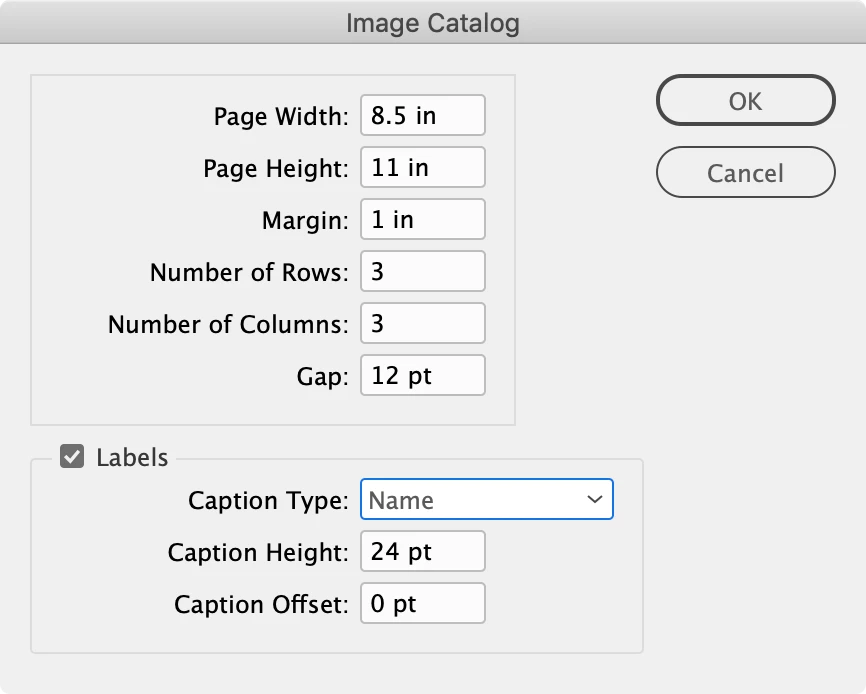
Hi @Danique van Hulst , The original post is from 2008, so it‘s unlikely Sean will see your post. Did you try ImageCatalog.jsx as @_Olav_Kvern_  suggested? I would be in your Scripts panel under Samples. Also, you are welcome to try this catalog script, which is a newer version:


https://shared-assets.adobe.com/link/c3a862d0-ea53-4c7d-6b60-0ac39bf901f5


Dialog:

8 replies

Participant
September 7, 2015

With object(s) selected, Object>Captions>Caption Setup: Allows you to dictate what text proceeds the image file name, or what comes after.


I know this thread is years old, but if anyone finds this wanting to know how, there you go.

Kasyan Servetsky
Legend
April 1, 2008
Sean,

Give me your e-mail and I'll send you a remake of the LabelGraphics script(with Client's name field).

Kasyan

askoldich@yahoo.com
Participant
March 31, 2008
Olav: BINGO! That works really well. The only thing we would love to be able to do is have it add a client name to each one. Is there a way to add that to the script so that we tell it use the file name, then a dialog pops up and asks for the client name to tack next to each filename?

Thanks for your help!
Participant
September 29, 2023

Hello Sean. I know this conversation is from a while ago, but i am also looking to make a proofprint and atuomatically have the name of the image next to it. You seem to have figured it out back then. But from the info here I can not seem to do the same.
Would you mind explaining what you did in the end to making it work?
Thanks in advance!

Danique

rob day
Community Expert
rob dayCommunity ExpertCorrect answer
Community Expert
September 29, 2023

Hi @Danique van Hulst , The original post is from 2008, so it‘s unlikely Sean will see your post. Did you try ImageCatalog.jsx as @_Olav_Kvern_  suggested? I would be in your Scripts panel under Samples. Also, you are welcome to try this catalog script, which is a newer version:


https://shared-assets.adobe.com/link/c3a862d0-ea53-4c7d-6b60-0ac39bf901f5


Dialog:

Known Participant
March 31, 2008
Hi Sean,

You might also take a look at some of the example scripts that are installed with InDesign CS3: ImageCatalog.jsx, LabelGraphics.jsx, and LabelGraphicsMenu.jsx. All of them have options for placing text frames relative to graphics in a document.

Thanks,

Ole
Participant
March 31, 2008
Kasyan, again, thank you! Can you direct me to a how-to on using the script you wrote? I have very little scripting experience and I wouldn't know where to begin with that. I know I save it as a .js, where do I put it from there, and how to I use it?

Again, thank you very much!

-Sean
Kasyan Servetsky
Legend
March 31, 2008
Sean,

I don't have enough time to write the whole script right now, but here is my idea of how it can be done:
//-------------------------------------------------------
// Places all pictures from the selected folder onto the first
// page of the active document, adds captions, groups pics & captions
// and distributes them vertically

var myDocument = app.activeDocument;
var myGroups = new Array;

var myFolder = Folder.selectDialog("Please select path to files");
if (myFolder!=null) {
var myFiles = myFolder.getFiles();
}
else {
alert("No folder selected");
}

for (var j = myFiles.length - 1; j >= 0; j--) {
var myPic = myDocument.pages[0].place(myFiles, [0, 0], undefined, false, false);
var myPicBounds = myPic[0].parent.geometricBounds;
var myName = myPic[0].itemLink.name;
var myCaption = myDocument.pages[0].textFrames.add();
myCaption.geometricBounds = [
myPicBounds[2],
myPicBounds[1],
myPicBounds[2]+10,
myPicBounds[3]
]
myCaption.contents = myName;
myCaption.paragraphs.everyItem().applyParagraphStyle(myDocument.paragraphStyles.item("[Basic Paragraph]"), true);
var myGroup = app.activeWindow.activeSpread.groups.add([myPic[0].parent, myCaption]);
myGroups.push(myGroup);
}

myDocument.distribute(myGroups, DistributeOptions.VERTICAL_SPACE, AlignDistributeBounds.PAGE_BOUNDS, false);
//-------------------------------------------------------
It's far from perfect – I made it in about 5 minutes – but it can be a starting point for your script.

Kasyan
Participant
March 31, 2008
Kasyan: That is so close, but still not perfect (but thank you!). Sadly the "Create Contact sheet" function scales all of the images to fit onto the page. We need each image placed at 100%.

Anyone have any ideas?
Kasyan Servetsky
Legend
March 28, 2008
Hi Sean,

It seems to me that Bridge has such a script.
Have a look at Tools > InDesign > Create InDesign Contact sheet menu.

Kasyan