June 8, 2010
Question

Indesign CS5 - how to align objects

  • June 8, 2010
  • 4 replies
  • 27485 views

Dear All,

I have a problem with Indesign that is present from CS2 trough CS3 & CS4 version. I thought that CS5 version finaly will solve this issue, but it seems to me that nothing changed.

When we have to align two objects lets say in Illustrator,  we may always mark the reference object by second click (then it is locked). In different software the sequence of marking objects for aligment is important (even better solution in my opinion than in Illustartor). But in Indesign things work different. If we align objects to the top - the most top object is reference. When we align to the left the object most to left is the base for aligment.

I think that everyone learned to live with that by right placing the objects before aligment. Sometimes by centering (in past versions) we were forced to lock one of the objects before aligment. But now in CS5 locked object is not selectable. Besides that I never liked this long "work around" method.

My question is how to easy align vertical centres of the objects shown on the picture below when I want object A to stay on place and object B to be centered to A. I don't want to use smart guides.
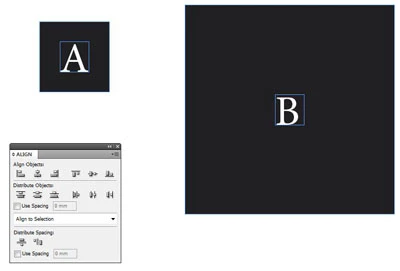
Paul

    This topic has been closed for replies.

    4 replies

    Sergey_Anosov
    Participating Frequently
    April 11, 2011

    Here is the attemp to solve the problem:

    https://sites.google.com/site/dtpscripting/indesign-scripts/selectandalign

    Best wishes,

    Sergey

    Participating Frequently
    September 21, 2010

    I know: now the Adobe community will jump, but anyway I have to say it

    I used Corel Draw for many years, they have this amazing feature since version 2 or 3, which means they had it almost 20 years ago, and still have it today...

    It will save you one click even comparing to illustrator's aligh, which, as you said, works.

    Corel just align the objects to the LAST SELECTED OBJECT.

    Simple, and effective. I won't even talk about the other align features of Corel Draw which are just amazing and by far better that what we get from Adobe, oh I hate to say it but it is truth. Anyway, I think we deserve having a working align, yes?

    So please, please Adobe, do something, aligning an object is a really BASIC feature, a feature that we use DAILY, and we really need it.

    Looking forward to getting it soon, if possible this century

    Regards,

    Dimo

    Harbs.
    Legend
    September 21, 2010

    No. I don't think anyone will jump.

    There are definitely apps which handle aligning better than InDesign.

    But if you want Adobe to hear your voice, you will be better heard here: http://www.adobe.com/cfusion/mmform/index.cfm?name=wishform

    Harbs

    tomaxxi
    Inspiring
    September 21, 2010

    I think that implementing Illustrator "Key Object" method to align would be just fine.

    --

    tomaxxi

    http://indisnip.wordpress.com/

    Community Expert
    August 10, 2010

    Lock the black frame - in CS5 you may have to choose Preferences and "Allow Selection of Locked Objects"

    Then select all your frames and choose the Align to Top, Bottom, or Center (if you don't see the align tools in the control panel then don't worry you can access it through Window>Objects and Layout>Align (CS5) and prior versions I think it's just Window>Align?)

    http://img802.imageshack.us/img802/9651/align1.jpg

    http://img808.imageshack.us/img808/2629/align2.jpg

    Peter Spier
    Community Expert
    Community Expert
    June 8, 2010

    Smart guides is in fact the easy way. What have you got against using them for this?

    As you say, you can't key an object in ID without locking it (and in CS5 you'll also need to change the default preference to allow you to select locked objects), so usinthe align panel is probably more work than is worth doing for this. You could select a proxy point in center row on the transfrom proxy, copy the y-coordinate, then select the other object and paste the y-coordinate is very little time.

    June 8, 2010

    Hello Peter,

    thank you for fast feedback. I appreciate it.

    I don't want to use smartguides because when there are more objects around it will be confusing to guess if you have right center or not.

    Changing preferences for locked objects will not help much I guess. I like the way the locked objects are unselctable now and of course, as you mentioned, it is time consuming way to go.

    The case is, that I would like Adobe to add this issue to the wish list. If this "double click" way is good for Illustrator, why it is not implemented in Indesign, forcing users to use some magical, time consuming, workarounds.

    To be honest, I hopped that I miss the point in this case and someone will tell me some obvious shortcut to use by selecting the objects to get the things right.

    Paul

    Peter Spier
    Community Expert
    Community Expert
    June 8, 2010

    Did you know that smart guides only react to objects that are visible on the screen? That means if you change the zoom or page position you may be able to eliminate the stray objects you don't want to snap on.

    The official feature request form is Adobe - Feature Request/Bug Report Form