Inspiring
September 6, 2023
Answered

InDesign CS6 problem -- will no longer open

  • September 6, 2023
  • 6 replies
  • 1319 views

We have used Adobe InDesign for years, from CS2 to CS6. A few days ago, CS6 would not open. Whenever I try to open it, this error message displays:
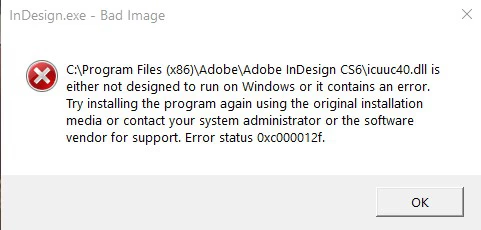
 

Any idea why it has stopped working? What does the Error status Oxc000012f indicate?

I have the Upgrade software and can reinstall it if that's the only solution. We are about to retire and do not plan to upgrade again and don't want to be forced to pay for subscriptions.

Today Adobe Acrobat 9 Pro would not load either 😞   The message that appears instructs me to uninstall and reinstall Acrobat too 😞

I'm using Windows 10.

Thank you for any tips/advice!

This topic has been closed for replies.
Correct answer Peter Spier

Unless you feel you need to have CS5 for some reason you shouldn't need to actually install it to install your CS6 upgrade -- the installer should just ask for you to insert the DVD and/or provide the serial number as proof.

I'm making you a backup of my CS6 program folder (fully patched and working on Win10 Pro) that you can copy over the fresh install. That's what I did last year to install on my new laptop to get all the patches.

Again, send me a message so I can get it to you.

6 replies

lekkerderAuthor
Inspiring
September 7, 2023

Thanks for your replies. I'm posting this as a reply to my message in hopes that you all see it too. We took the computer to a repair shop and they are going to install a new hard drive, hopefully by tomorrow (Friday). This means we'll have to reinstall all software. 


We have the software for Adobe InDesign CS4, CS5 and the upgrade to CS6 (includes original boxes, DVDs, s/n's, etc.). Should we install CS5 and then the upgrade to CS6 (and not bother with CS4)? The CS5 DVD copyright years given are 1999-2010. Sure hope there won't be issues with installing such an old program on a Windows 10 computer.


Peter Spier
Community Expert
Peter SpierCommunity ExpertCorrect answer
Community Expert
September 7, 2023

Unless you feel you need to have CS5 for some reason you shouldn't need to actually install it to install your CS6 upgrade -- the installer should just ask for you to insert the DVD and/or provide the serial number as proof.

I'm making you a backup of my CS6 program folder (fully patched and working on Win10 Pro) that you can copy over the fresh install. That's what I did last year to install on my new laptop to get all the patches.

Again, send me a message so I can get it to you.

lekkerderAuthor
Inspiring
September 8, 2023
quote

Unless you feel you need to have CS5 for some reason you shouldn't need to actually install it to install your CS6 upgrade -- the installer should just ask for you to insert the DVD and/or provide the serial number as proof.

I'm making you a backup of my CS6 program folder (fully patched and working on Win10 Pro) that you can copy over the fresh install. That's what I did last year to install on my new laptop to get all the patches.

Again, send me a message so I can get it to you.


We do not need CS5 if the CS6 upgrade will install. That would be great! Very kind of you. Just drag and drop it onto the CS6 program folder after we install the upgrade, correct?


I tried to reply to your message via email but delivery failed ("recipient's mailbox is full"). I also sent a message via your page here but don't know if it went through so am trying here in case it didn't.


I assume that clicking on "Upvote" is the equivalent of giving messages in the forum a thumbs up/thanks to people who posted replies; is that correct?


Thanks.

Community Expert
September 7, 2023

@Peter Kahrel said: "CS6 is still running fine over here on Windows 10/64 Pro with the latest updates applied."


That's also my experience with CS6 on my Windows 10 Pro laptop.

It's still running fine. No issues at all.


Regards,
Uwe Laubender
( Adobe Community Expert )

Peter Spier
Community Expert
Community Expert
September 7, 2023

I, too, have no issues with Win 10 and CS6.

Peter Spier
Community Expert
Community Expert
September 6, 2023

Rather than installing from the original media I would recommend restoring from a backup, if you have one, as there will be no access to updates and patches for a ne install.

If you don't have a backup, send me a private message (clcik my name) and I can provide the .dll in question.

Peter Kahrel
Community Expert
Community Expert
September 6, 2023

CS6 is still running fine over here on Windows 10/64 Pro with the latest updates applied.

James Gifford—NitroPress
Legend
September 6, 2023

But we know from many posters that very small issues with PCs, drivers, other apps etc. can cause these blocks. It's hit or miss, and more and more it seems to be misses... some of which can be hacked back into operation, and some that can't. For the average user who has no idea what "compatibility modes" are... it's not a good situation.

James Gifford—NitroPress
Legend
September 6, 2023

A Windows update, or some similar change to your system, probably took the OS past its support limits for this very old software.


The only solution is to follow Bob's suggestions to run the software in older compatibility mode, but also lock the system against any further Windows or other updates. There is no third path; CS6 simply will not run properly on newer versions of Windows (or MacOS) and "freezing everything in time" is the only way to keep using it.

BobLevine
Community Expert
Community Expert
September 6, 2023

I'm sorry, but you are in unsupported territory but this seems like something a bit deeper. If you have the installation media then by all means try reinstalling. You might also try running it in Windows 7 compatibility mode.